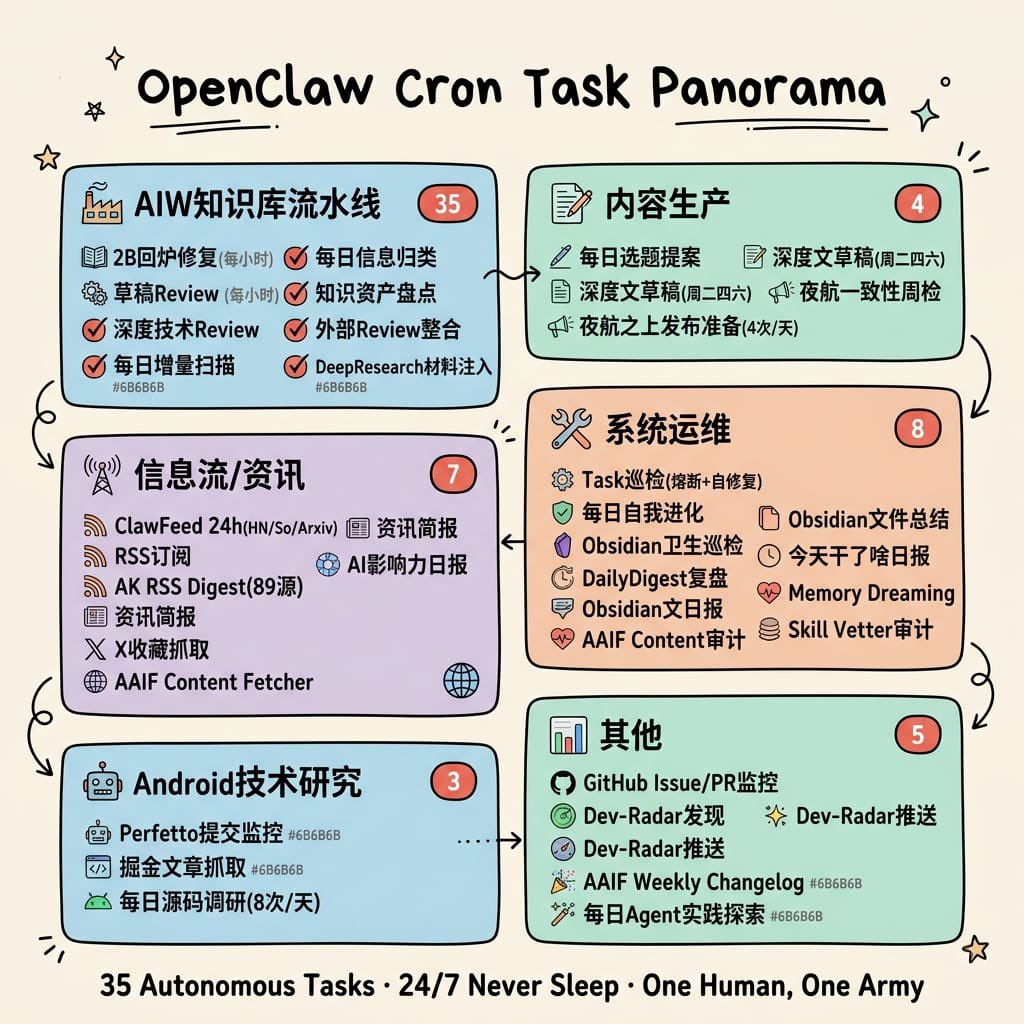
हाथ से बनाया गया क्रोन टास्क पैनोरमा
इससे एक पेस्टल रंग का हाथ से बनाया गया सिंगल-पेज इन्फोग्राफिक पोस्टर तैयार होता है जो उत्पादकता या स्वचालन के अवलोकन के लिए छह लेबल वाले मॉड्यूल, गणना, आइकन और कनेक्टिंग तीरों के साथ क्रॉन-टास्क वर्कफ़्लो को मैप करता है।
यह ग्राफिक और पोस्टर के लिए एक GPT Image 2 प्रॉम्प्ट केस है। इसी तरह के विज़ुअल बनाने के लिए नीचे दिए गए कॉपी-रेडी प्रॉम्प्ट का उपयोग करें, और पुनः उपयोग करने से पहले Awesome GPT Image 2 Prompts एट्रिब्यूशन और व्यावसायिक उपयोग अधिकारों की समीक्षा करें।
Free 1K preview
Generate one preview image instantly, no sign-up required.
Free text preview doesn’t preserve reference-image consistency.
प्रॉम्प्ट
प्रतिलिपि के लिए तैयार संकेत
{
  "type": "hand-drawn educational infographic poster",
  "topic": "cron task ecosystem overview",
  "style": {
    "overall": "clean single-page visual summary in a hand-drawn educational infographic style",
    "background": "warm cream paper texture (#F5F0E8)",
    "linework": "black outlines with slight hand-drawn wobble",
    "rendering": "flat pastel rounded cards, no realism, colors do not completely fill outlines, generous whitespace, small doodle decorations like stars, sparkles, underlines, and tiny arrows",
    "typography": "bold large hand-drawn title at top center, bold keywords inside sections, smaller warm-gray annotations"
  },
  "title": {
    "text": "{argument name=\"headline text\" default=\"OpenClaw Cron Task Panorama\"}",
    "position": "top center",
    "style": "large bold hand-drawn black lettering with short underline accents"
  },
  "layout": {
    "structure": "6 rounded rectangular modules arranged in two columns and three rows, connected by hand-drawn curved arrows showing workflow progression",
    "sections": [
      {
        "title": "AIW Knowledge Base Pipeline",
        "position": "top left",
        "color": "light blue #A8D8EA",
        "count": 6,
        "badge": "35",
        "items": [
          "Fixed within 2 days (per hour)",
          "Draft Review (per hour)",
          "Deep Tech Review",
          "Daily Incremental Scan",
          "Daily Information Categorization",
          "Knowledge Asset Inventory",
          "External Review Integration",
          "DeepResearch Material Injection"
        ]
      },
      {
        "title": "Content Production",
        "position": "top right",
        "color": "mint green #B5E5CF",
        "count": 4,
        "badge": "4",
        "items": [
          "Daily Topic Proposals",
          "In-depth Article Drafts [Tuesday-Saturday]",
          "In-depth Article Summaries [Tuesday-Thursday]",
          "Night Flight Consistency Weekly Check",
          "Night Flight Daily Release (4 times/day)"
        ]
      },
      {
        "title": "Information Flow/News",
        "position": "middle left",
        "color": "lavender #D5C6E0",
        "count": 7,
        "badge": "7",
        "items": [
          "ClawFeed 24h(HN/So/Arxiv)",
          "RSS Subscription",
          "AK RSS Digest (89 Sources)",
          "Information Briefing",
          "AI Impact Daily",
          "X Collection Scraper",
          "AAIF Content Fetcher"
        ]
      },
      {
        "title": "System Operations",
        "position": "middle right",
        "color": "light peach #F4C7AB",
        "count": 8,
        "badge": "8",
        "items": [
          "Task Inspection (Broadcast + Self-healing)",
          "Daily Self-Improvement",
          "Obsidian Hygiene Check",
          "DailyDigest Review",
          "Obsidian Daily Notes",
          "AAIF Content Audit",
          "Obsidian File Summary",
          "Today's Daily Report",
          "Memory Dreaming",
          "Skill Vetter Audit"
        ]
      },
      {
        "title": "Android Technology Research",
        "position": "bottom left",
        "color": "light blue #A8D8EA",
        "count": 3,
        "badge": "3",
        "items": [
          "Perfetto Submission Monitoring",
          "Digging for Articles",
          "Daily Source Code Research (8 times/day)"
        ]
      },
      {
        "title": "Other",
        "position": "bottom right",
        "color": "mint green #B5E5CF",
        "count": 5,
        "badge": "5",
        "items": [
          "GitHub Issue/PR Monitoring",
          "Dev-Radar Discovery",
          "Dev-Radar Push",
          "AAIF Weekly Changelog",
          "Daily Agent Practice Exploration"
        ]
      }
    ],
    "connectors": [
      "top left to top right",
      "top right down to middle right",
      "middle right to middle left",
      "middle left down to bottom left",
      "bottom left to bottom right",
      "middle right down toward bottom right"
    ],
    "decorations": {
      "corner_doodles_count": 6,
      "types": [
        "star",
        "sparkle",
        "short hatch marks",
        "tiny curved lines"
      ]
    }
  },
  "icons": {
    "section_icons": 6,
    "examples": [
      "factory for knowledge pipeline",
      "document and pencil for content production",
      "antenna/wifi for information flow",
      "wrench and screwdriver for system operations",
      "robot for Android research",
      "bar chart for others"
    ],
    "item_icons": "each bullet has a small simple icon such as checkmark, book, magnifier, shield, clock, heart, globe, RSS, GitHub mark, or pencil"
  },
  "footer": {
    "text": "{argument name=\"footer quote\" default=\"35 Autonomous Tasks · 24/7 Never Sleep · One Human, One Army\"}",
    "position": "bottom center",
    "style": "bold centered black summary line"
  },
  "color_customization": {
    "primary_card_palette": "{argument name=\"card palette\" default=\"pastel blue, mint green, lavender, and peach\"}",
    "accent": "{argument name=\"accent color\" default=\"coral red\"}",
    "paper": "{argument name=\"paper background\" default=\"warm cream paper texture\"}"
  }
}
प्रॉम्प्ट वैरिएबल
प्रॉम्प्ट में पाए जाने वाले संपादन योग्य तर्क प्लेसहोल्डर, उनके डिफ़ॉल्ट मानों के साथ।
Best for
- - ग्राफिक और पोस्टर visual exploration
- - Image generation and reference-image edits
- - Reusable briefs that keep source attribution visible
Change these parts
- - Subject, product, character, or scene
- - Aspect ratio, camera, lighting, and background
- - Brand, text, color, and output constraints
Recommended model and settings
- - Model: gpt-image-2
- - Input mode: छवि से छवि
- - Aspect ratio: source
- - Commercial status: review original source
How to use this prompt
- 1. Copy the prompt and preserve its structure for the first test.
- 2. Replace the subject, context, and publishing channel.
- 3. Change one camera, lighting, or style variable per iteration.
- 4. Inspect the output, source, text, and rights before reuse.
Limitations, source, and reuse cautions
- - Generated output is an editable draft, not factual, legal, or rights evidence.
- - Review the linked source, people, brands, logos, text, and third-party media before commercial use.
इस श्रेणी में और भी मामले
श्रेणी, इनपुट मोड अनुकूलता, गुणवत्ता और कम जोखिम को प्राथमिकता दी गई है।






पुनः उपयोग और स्रोत नोट्स
केस का पूर्वावलोकन करने के बाद इस प्रॉम्प्ट का सुरक्षित रूप से उपयोग करें।
- 1.प्रॉम्प्ट को कॉपी करें या जनरेशन बटन का उपयोग करके इसे सीधे डोवू में खोलें।
- 2.अपने उपयोग के अनुसार वैरिएबल, आस्पेक्ट रेशियो और संदर्भ छवियों को समायोजित करें।
- 3.प्रकाशन या सशुल्क उपयोग से पहले, स्रोत अधिकारों, श्रेय देने की आवश्यकताओं और ब्रांड या छवि से जुड़े जोखिमों की पुष्टि करें।