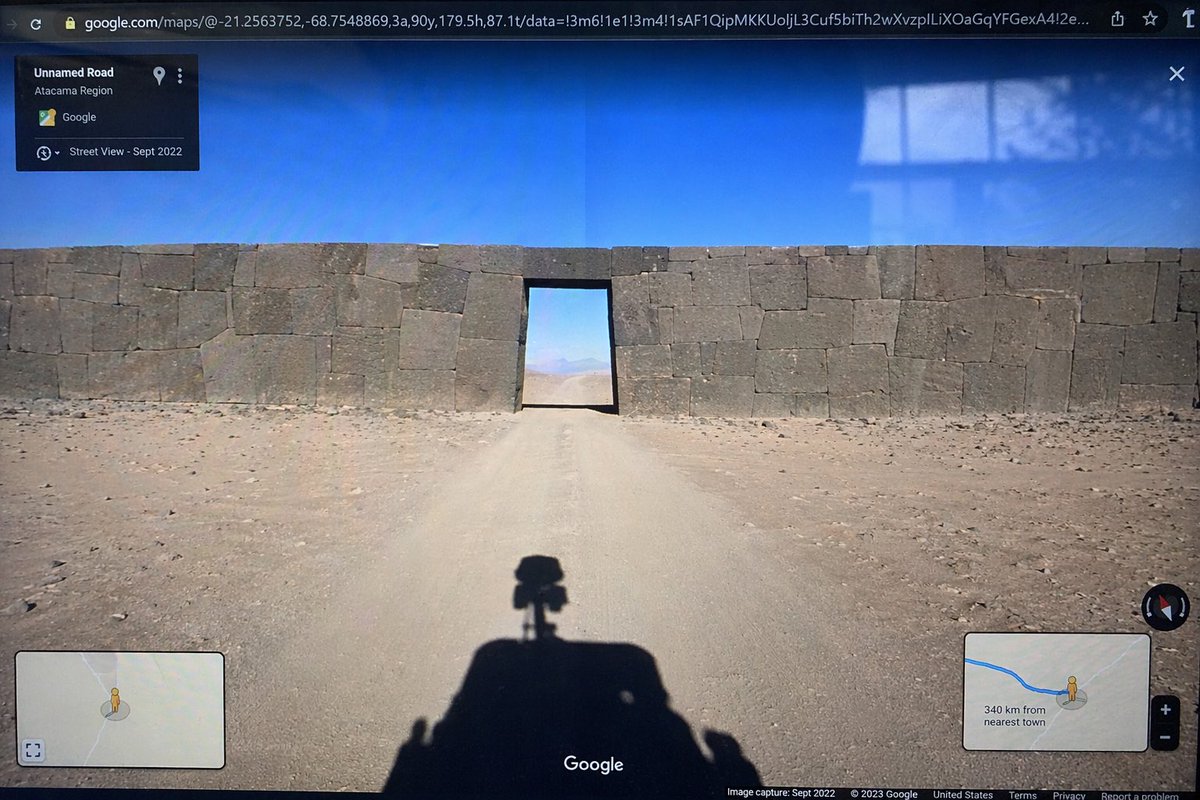
गूगल स्ट्रीट व्यू विसंगति स्क्रीन फोटो
यह एक कंप्यूटर स्क्रीन की यथार्थवादी तस्वीर तैयार करता है जिसमें गूगल स्ट्रीट व्यू इंटरफेस प्रदर्शित होता है और जिसमें एक अवास्तविक या बेमेल वास्तुशिल्प विसंगति दिखाई देती है।
यह अन्य प्रेरणा के लिए एक GPT Image 2 प्रॉम्प्ट केस है। इसी तरह के विज़ुअल बनाने के लिए नीचे दिए गए कॉपी-रेडी प्रॉम्प्ट का उपयोग करें, और पुनः उपयोग करने से पहले Awesome GPT Image 2 Prompts एट्रिब्यूशन और व्यावसायिक उपयोग अधिकारों की समीक्षा करें।
क्या आपको प्रॉम्प्ट्स का पूरा सेट चाहिए? इसका उपयोग करें अन्य प्रेरणा अधिक संबंधित उदाहरणों के लिए विषय हब देखें, या खोलें GPT Image 2 त्वरित सूची संपूर्ण उदाहरण अनुक्रमणिका, पुन: प्रयोज्य संरचनाओं और स्रोत श्रेय के लिए।
Free 1K preview
Generate one preview image instantly, no sign-up required.
1362/4000
प्रॉम्प्ट
प्रतिलिपि के लिए तैयार संकेत
{
  "type": "photograph of a computer monitor displaying a Google Maps Street View interface",
  "scene": {
    "environment": "{argument name=\"environment\" default=\"barren desert landscape under a clear blue sky\"}",
    "subject": "{argument name=\"subject\" default=\"massive ancient stone wall with perfectly fitted cyclopean masonry blocking a dirt road, with a rectangular doorway cut through the center\"}",
    "foreground": "shadow of a Google Street View car with a 360-degree camera mounted on top cast onto the dirt road"
  },
  "ui_elements": {
    "browser_bar": "URL bar at the top showing google.com/maps with latitude and longitude coordinates",
    "top_left_panel": "black semi-transparent info box with text 'Unnamed Road', '{argument name=\"region\" default=\"Atacama Region\"}', and 'Street View - Sept 2022'",
    "bottom_left_panel": "minimap inset with a yellow Pegman icon",
    "bottom_right_panel": "minimap inset showing a blue route line, Pegman, zoom controls, and text '{argument name=\"distance text\" default=\"340 km from nearest town\"}'",
    "bottom_bar": "Google logo in the bottom center, compass icon on the right, and copyright/capture date text along the bottom edge"
  },
  "style_details": "visible screen glare and slight monitor distortion to simulate a photograph taken of a physical screen with a smartphone"
}
प्रॉम्प्ट वैरिएबल
प्रॉम्प्ट में पाए जाने वाले संपादन योग्य तर्क प्लेसहोल्डर, उनके डिफ़ॉल्ट मानों के साथ।
चर
environment
गलती करना
barren desert landscape under a clear blue sky
चर
subject
गलती करना
massive ancient stone wall with perfectly fitted cyclopean masonry blocking a dirt road, with a rectangular doorway cut through the center
चर
region
गलती करना
Atacama Region
चर
distance text
गलती करना
340 km from nearest town
Best for
- - अन्य प्रेरणा visual exploration
- - Image generation and reference-image edits
- - Reusable briefs that keep source attribution visible
Change these parts
- - Subject, product, character, or scene
- - Aspect ratio, camera, lighting, and background
- - Brand, text, color, and output constraints
Recommended model and settings
- - Model: gpt-image-2
- - Input mode: टेक्स्ट से छवि
- - Aspect ratio: source
- - Commercial status: review original source
How to use this prompt
- 1. Copy the prompt and preserve its structure for the first test.
- 2. Replace the subject, context, and publishing channel.
- 3. Change one camera, lighting, or style variable per iteration.
- 4. Inspect the output, source, text, and rights before reuse.
Limitations, source, and reuse cautions
- - Generated output is an editable draft, not factual, legal, or rights evidence.
- - Review the linked source, people, brands, logos, text, and third-party media before commercial use.
Awesome GPT Image 2 Prompts से आयातित। श्रेय देना आवश्यक है। वाणिज्यिक उपयोग की allowed ; सशुल्क उपयोग से पहले स्रोत अधिकारों की समीक्षा करें।
इस श्रेणी में और भी मामले
श्रेणी, इनपुट मोड अनुकूलता, गुणवत्ता और कम जोखिम को प्राथमिकता दी गई है।

MotoGP POV Cornering Shot
टेक्स्ट से छवि

GPT Image 2 Real-Life Character Street Snap
टेक्स्ट से छवि

Orange Rooftop Fashion Photo Prompt
टेक्स्ट से छवि

Luxury Travel Fashion Portrait Prompt
टेक्स्ट से छवि

Cute Focus Desk Flat Lay and Kawaii Illustration
टेक्स्ट से छवि

Street Selfie with Cat in Matching Cap
टेक्स्ट से छवि
पुनः उपयोग और स्रोत नोट्स
केस का पूर्वावलोकन करने के बाद इस प्रॉम्प्ट का सुरक्षित रूप से उपयोग करें।
- 1.प्रॉम्प्ट को कॉपी करें या जनरेशन बटन का उपयोग करके इसे सीधे डोवू में खोलें।
- 2.अपने उपयोग के अनुसार वैरिएबल, आस्पेक्ट रेशियो और संदर्भ छवियों को समायोजित करें।
- 3.प्रकाशन या सशुल्क उपयोग से पहले, स्रोत अधिकारों, श्रेय देने की आवश्यकताओं और ब्रांड या छवि से जुड़े जोखिमों की पुष्टि करें।