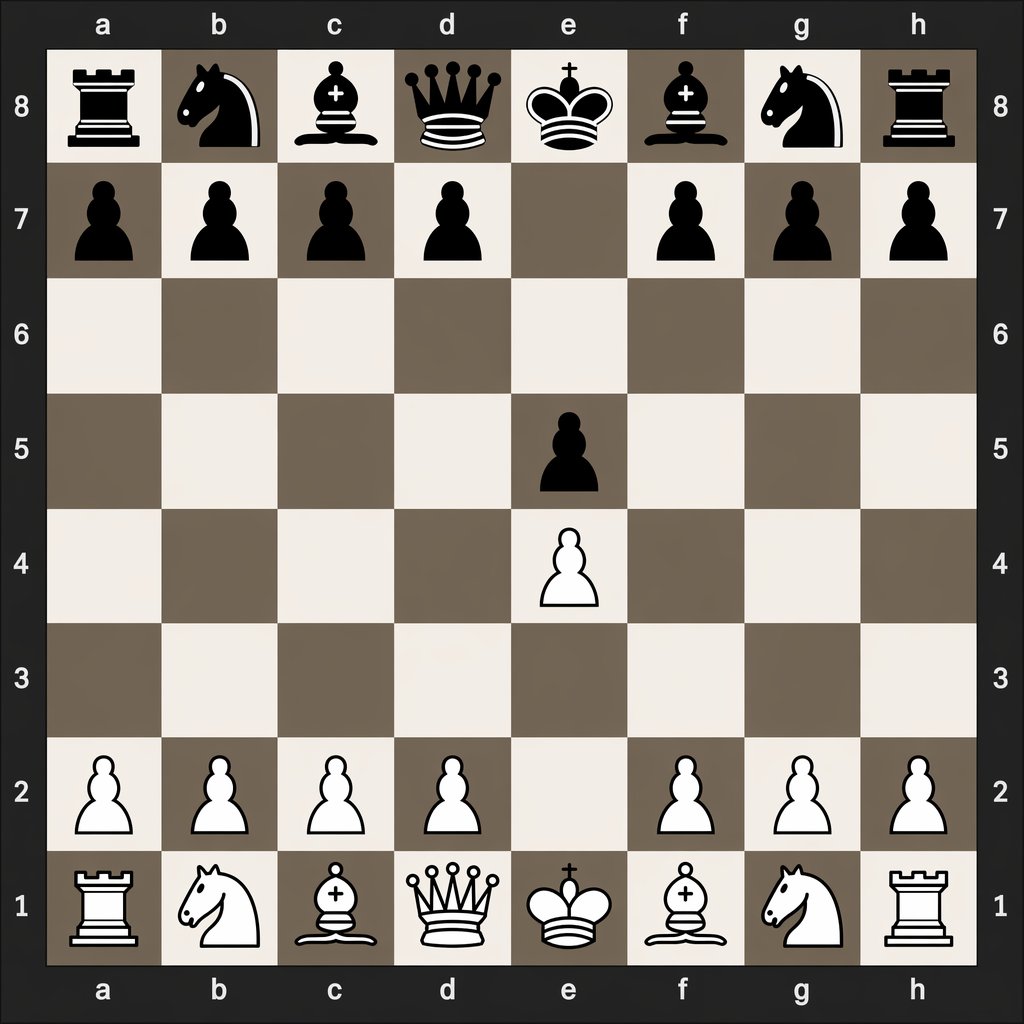
1.e4 e5 के बाद डिजिटल शतरंज बोर्ड
यह प्रॉम्प्ट एक साफ डिजिटल शतरंज आरेख तैयार करता है जो शुरुआती चाल 1.e4 e5 के बाद बोर्ड की सटीक स्थिति को दर्शाता है, जो शतरंज ट्यूटोरियल और चाल-संकेत तुलना के लिए उपयोगी है।
यह ग्राफिक और पोस्टर के लिए एक GPT Image 2 प्रॉम्प्ट केस है। इसी तरह के विज़ुअल बनाने के लिए नीचे दिए गए कॉपी-रेडी प्रॉम्प्ट का उपयोग करें, और पुनः उपयोग करने से पहले Awesome GPT Image 2 Prompts एट्रिब्यूशन और व्यावसायिक उपयोग अधिकारों की समीक्षा करें।
क्या आपको प्रॉम्प्ट्स का पूरा सेट चाहिए? इसका उपयोग करें ग्राफिक और पोस्टर अधिक संबंधित उदाहरणों के लिए विषय हब देखें, या खोलें GPT Image 2 त्वरित सूची संपूर्ण उदाहरण अनुक्रमणिका, पुन: प्रयोज्य संरचनाओं और स्रोत श्रेय के लिए।
Free 1K preview
Generate one preview image instantly, no sign-up required.
1088/4000
प्रॉम्प्ट
प्रतिलिपि के लिए तैयार संकेत
A clean, flat digital top-down chessboard centered in the frame, shown as a square 8x8 board with algebraic coordinates visible on all four sides: letters a through h along the top and bottom, and numbers 8 through 1 along the left and right. Use a dark charcoal outer background and border, with alternating light beige and muted taupe-gray squares. Render simple high-contrast 2D chess icons, black pieces at the top and white pieces at the bottom, in a crisp vector-like style with no wood texture, no realistic lighting, and no extra interface elements. Show the exact position after the opening moves 1. e4 e5: black major pieces on a8 rook, b8 knight, c8 bishop, d8 queen, e8 king, f8 bishop, g8 knight, h8 rook; black pawns on a7, b7, c7, d7, f7, g7, h7, and e5; white pawns on a2, b2, c2, d2, f2, g2, h2, and e4; white major pieces on a1 rook, b1 knight, c1 bishop, d1 queen, e1 king, f1 bishop, g1 knight, h1 rook. Leave all other squares empty. Keep the composition perfectly symmetrical, instructional, and legible, like a digital chess diagram illustrating opening move order.
Best for
- - ग्राफिक और पोस्टर visual exploration
- - Image generation and reference-image edits
- - Reusable briefs that keep source attribution visible
Change these parts
- - Subject, product, character, or scene
- - Aspect ratio, camera, lighting, and background
- - Brand, text, color, and output constraints
Recommended model and settings
- - Model: gpt-image-2
- - Input mode: टेक्स्ट से छवि
- - Aspect ratio: source
- - Commercial status: review original source
How to use this prompt
- 1. Copy the prompt and preserve its structure for the first test.
- 2. Replace the subject, context, and publishing channel.
- 3. Change one camera, lighting, or style variable per iteration.
- 4. Inspect the output, source, text, and rights before reuse.
Limitations, source, and reuse cautions
- - Generated output is an editable draft, not factual, legal, or rights evidence.
- - Review the linked source, people, brands, logos, text, and third-party media before commercial use.
Awesome GPT Image 2 Prompts से आयातित। श्रेय देना आवश्यक है। वाणिज्यिक उपयोग की allowed ; सशुल्क उपयोग से पहले स्रोत अधिकारों की समीक्षा करें।
इस श्रेणी में और भी मामले
श्रेणी, इनपुट मोड अनुकूलता, गुणवत्ता और कम जोखिम को प्राथमिकता दी गई है।

Manga Desert Radio Telescope Road Trip
टेक्स्ट से छवि

Female Clown Cyborg Portrait
टेक्स्ट से छवि

Transparent Earbuds on Stone Pedestal
टेक्स्ट से छवि

Imperial Research Bunker on Volcanic Planet
टेक्स्ट से छवि

Pink Hijab Mirror Selfie Portrait
टेक्स्ट से छवि

Greyscale Puzzle Portrait with Color Accent
टेक्स्ट से छवि
पुनः उपयोग और स्रोत नोट्स
केस का पूर्वावलोकन करने के बाद इस प्रॉम्प्ट का सुरक्षित रूप से उपयोग करें।
- 1.प्रॉम्प्ट को कॉपी करें या जनरेशन बटन का उपयोग करके इसे सीधे डोवू में खोलें।
- 2.अपने उपयोग के अनुसार वैरिएबल, आस्पेक्ट रेशियो और संदर्भ छवियों को समायोजित करें।
- 3.प्रकाशन या सशुल्क उपयोग से पहले, स्रोत अधिकारों, श्रेय देने की आवश्यकताओं और ब्रांड या छवि से जुड़े जोखिमों की पुष्टि करें।