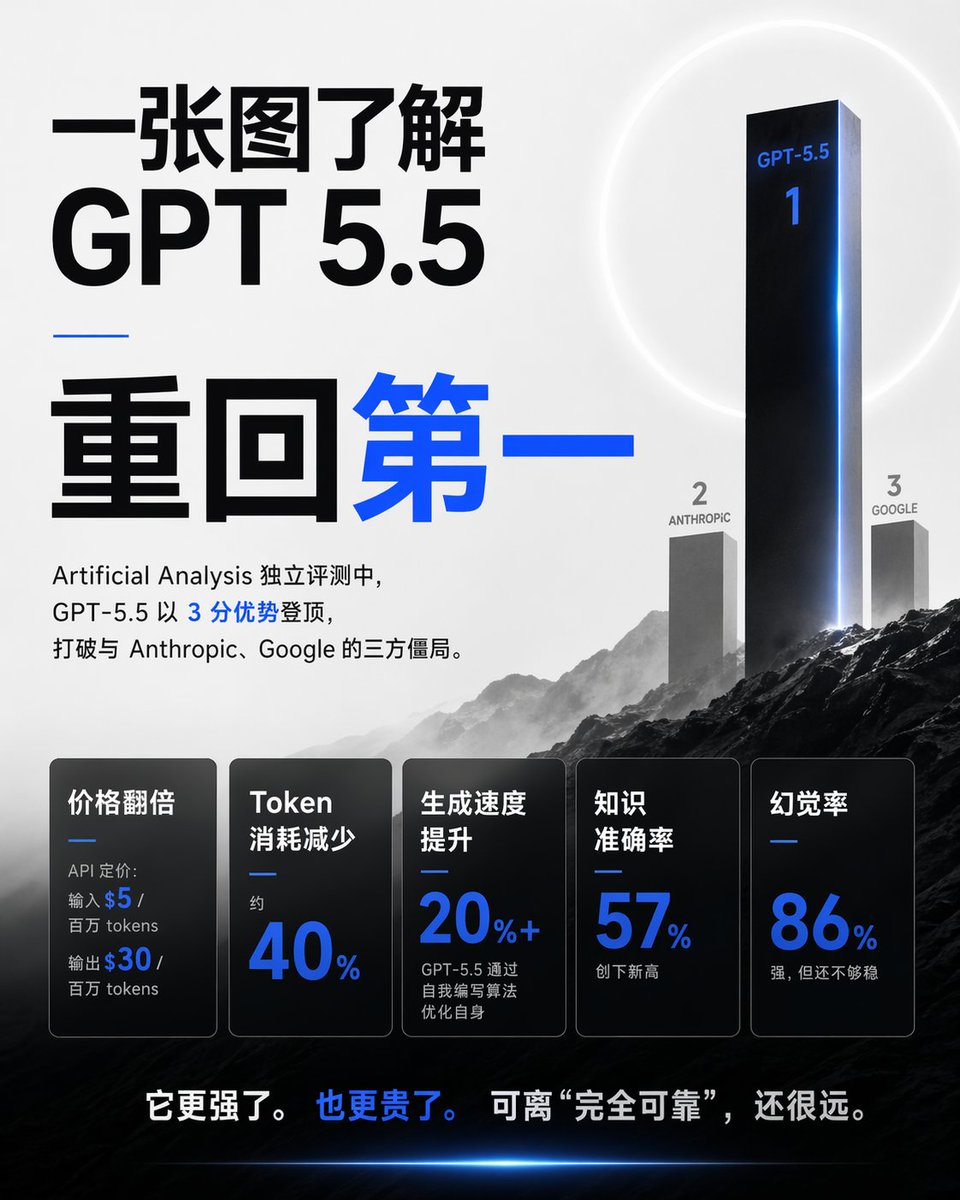
Chinese GPT 5.5 Benchmark Infographic
A square Chinese editorial infographic visualizing GPT-5.5 as the first-place AI benchmark winner with rankings, metrics, and dramatic tech-poster styling.
यह ग्राफिक और पोस्टर के लिए एक GPT Image 2 प्रॉम्प्ट केस है। इसी तरह के विज़ुअल बनाने के लिए नीचे दिए गए कॉपी-रेडी प्रॉम्प्ट का उपयोग करें, और पुनः उपयोग करने से पहले Awesome GPT Image 2 Prompts एट्रिब्यूशन और व्यावसायिक उपयोग अधिकारों की समीक्षा करें।
क्या आपको प्रॉम्प्ट्स का पूरा सेट चाहिए? इसका उपयोग करें ग्राफिक और पोस्टर अधिक संबंधित उदाहरणों के लिए विषय हब देखें, या खोलें GPT Image 2 त्वरित सूची संपूर्ण उदाहरण अनुक्रमणिका, पुन: प्रयोज्य संरचनाओं और स्रोत श्रेय के लिए।
Free 1K preview
Generate one preview image instantly, no sign-up required.
3529/4000
प्रॉम्प्ट
प्रतिलिपि के लिए तैयार संकेत
Objective: Create a 1:1 square Chinese tech news infographic poster that explains {argument name="topic" default="GPT 5.5"} within 30 seconds, and adopts a highly dramatic AI benchmark ranking theme.

Canvas: 768x768 square poster, with a light gray to white background in the upper half and a dark, cinematic mountain landscape in the lower half. Use high-contrast black fonts and accents of electric blue.

Layout: The left side is dominated by a large Chinese title layout. The right side features a 3D benchmark podium/ranking scene rising from the mountains. The bottom third contains 5 horizontally arranged dark, semi-transparent metric cards. A striking Chinese summary sentence is at the very bottom.

Main Title Text: Use huge black Chinese characters in the upper left corner: “Understand it in a single image.” Directly below, use huge black Latin characters: “GPT 5.5.” Below a thin, short blue horizontal line, use extra-large Chinese characters: “Back to the Top,” with “Back” in black and “Top” in bright blue.

Introductory Paragraph Below the Title: “In independent evaluations by Artificial Analysis, GPT-5.5 topped the charts with a 3-point advantage, breaking the three-way stalemate with Anthropic and Google.” Keep the number 3 in blue, with the rest of the text primarily in black.

Ranking Scene: Create 3 vertical ranking pillars on the right side, integrated into a misty mountain landscape. 1st place is a very tall, glossy black monolith with blue edge lighting, labeled “GPT-5.5” near the top and a large blue “1” below. 2nd place is a shorter gray monolith on the left, labeled “2” and “ANTHROPIC.” 3rd place is a shorter gray monolith on the right, labeled “3” and “GOOGLE.” Add a faint white halo behind the 1st place monolith and a blue glow along its right edge.

Metric Cards: Add 5 rounded-corner rectangular black/charcoal gray glass-textured cards in the bottom third, each with a thin border, subtle gradient, and a small blue divider line. These 5 cards are: 1) “Price Doubled,” with small text “API pricing: Input $5 / million tokens Output $30 / million tokens,” where $5 and $30 are in blue; 2) “Token Consumption Reduced,” with small text “approx.” and a large blue “40%”; 3) “Generation Speed Increased,” with a large blue “20% +” and small text “GPT-5.5 optimizes itself through self-written algorithms”; 4) “Knowledge Accuracy,” with a large blue “57%” and small text “New High”; 5) “Hallucination Rate,” with a large blue “86%” and small text “Strong, but not yet stable.”

Bottom Summary: Centered above the dark landscape at the bottom, write: “It’s stronger. It’s also more expensive. But still far from “completely reliable.”” with “It’s also more expensive.” in blue and the rest of the text in white.

Visual Style: High-end editorial AI benchmark poster, sharp modern sans-serif fonts, monochromatic color scheme with electric blue highlights, cinematic mist, dark rocky mountains, subtle lens flares, clean spacing, realistic 3D monoliths, no people, no logos, no watermarks.

Parameters: The main customizable theme is {argument name="model name" default="GPT-5.5"}; the leading score can be {argument name="advantage text" default="3-point advantage"}; the 2nd place competitor is {argument name="second competitor" default="Anthropic"}; the 3rd place competitor is {argument name="third competitor" default="Google"}; the bottom information can be {argument name="conclusion text" default="It's stronger. And more expensive. But still far from “completely reliable.”"}.
प्रॉम्प्ट वैरिएबल
प्रॉम्प्ट में पाए जाने वाले संपादन योग्य तर्क प्लेसहोल्डर, उनके डिफ़ॉल्ट मानों के साथ।
चर
topic
गलती करना
GPT 5.5
चर
model name
गलती करना
GPT-5.5
चर
advantage text
गलती करना
3-point advantage
चर
second competitor
गलती करना
Anthropic
चर
third competitor
गलती करना
Google
चर
conclusion text
गलती करना
It's stronger. And more expensive. But still far from “completely reliable.”
Best for
- - ग्राफिक और पोस्टर visual exploration
- - Image generation and reference-image edits
- - Reusable briefs that keep source attribution visible
Change these parts
- - Subject, product, character, or scene
- - Aspect ratio, camera, lighting, and background
- - Brand, text, color, and output constraints
Recommended model and settings
- - Model: gpt-image-2
- - Input mode: टेक्स्ट से छवि
- - Aspect ratio: source
- - Commercial status: review original source
How to use this prompt
- 1. Copy the prompt and preserve its structure for the first test.
- 2. Replace the subject, context, and publishing channel.
- 3. Change one camera, lighting, or style variable per iteration.
- 4. Inspect the output, source, text, and rights before reuse.
Limitations, source, and reuse cautions
- - Generated output is an editable draft, not factual, legal, or rights evidence.
- - Review the linked source, people, brands, logos, text, and third-party media before commercial use.
Awesome GPT Image 2 Prompts से आयातित। श्रेय देना आवश्यक है। वाणिज्यिक उपयोग की allowed ; सशुल्क उपयोग से पहले स्रोत अधिकारों की समीक्षा करें।
इस श्रेणी में और भी मामले
श्रेणी, इनपुट मोड अनुकूलता, गुणवत्ता और कम जोखिम को प्राथमिकता दी गई है।






पुनः उपयोग और स्रोत नोट्स
केस का पूर्वावलोकन करने के बाद इस प्रॉम्प्ट का सुरक्षित रूप से उपयोग करें।
- 1.प्रॉम्प्ट को कॉपी करें या जनरेशन बटन का उपयोग करके इसे सीधे डोवू में खोलें।
- 2.अपने उपयोग के अनुसार वैरिएबल, आस्पेक्ट रेशियो और संदर्भ छवियों को समायोजित करें।
- 3.प्रकाशन या सशुल्क उपयोग से पहले, स्रोत अधिकारों, श्रेय देने की आवश्यकताओं और ब्रांड या छवि से जुड़े जोखिमों की पुष्टि करें।