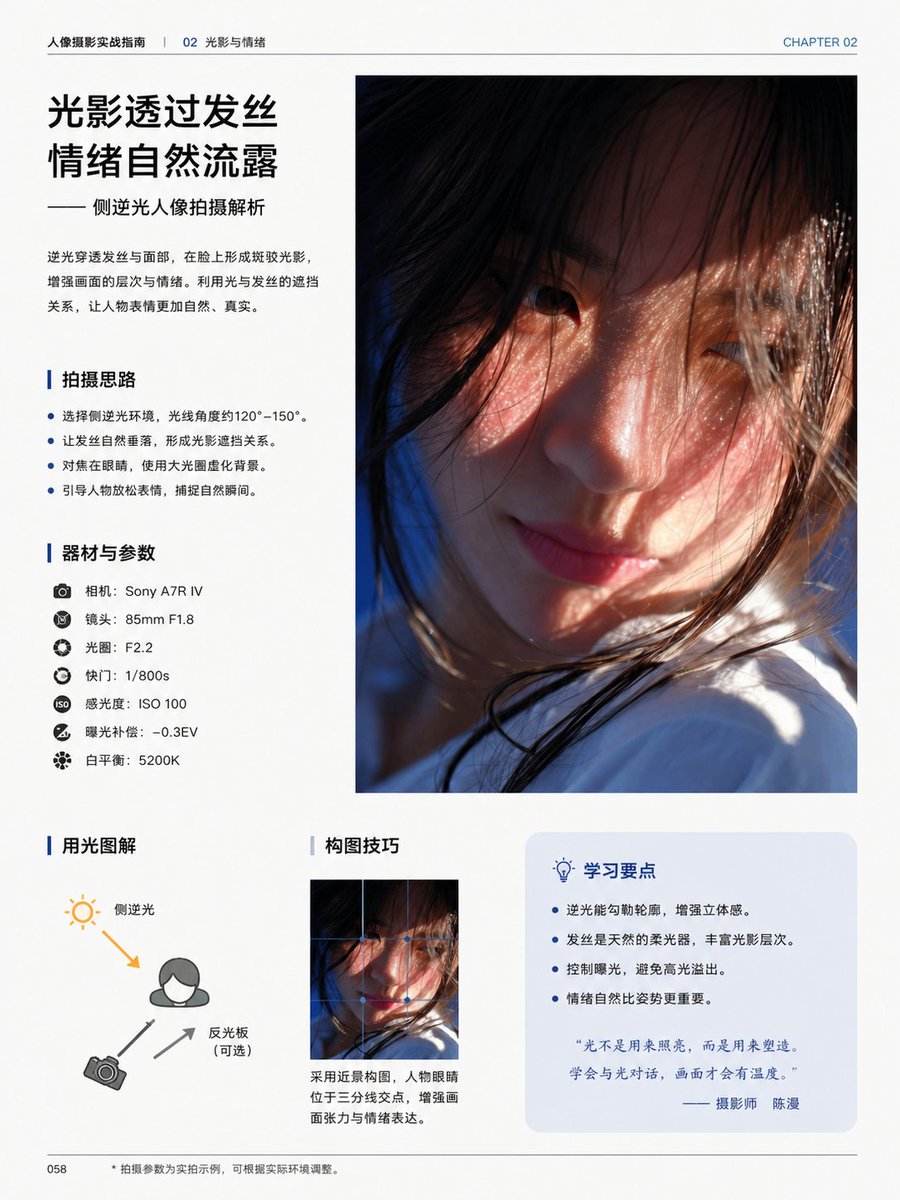
चीनी फोटोग्राफी ट्यूटोरियल पुस्तक पृष्ठ
इससे बैकलाइट पोर्ट्रेट फोटोग्राफी सिखाने वाला एक परिष्कृत चीनी संपादकीय पुस्तक पृष्ठ तैयार होता है, जो पत्रिका के पृष्ठों, फोटोग्राफी गाइड और प्रीमियम लेआउट मॉकअप के लिए उपयुक्त है।
यह ग्राफिक और पोस्टर के लिए एक GPT Image 2 प्रॉम्प्ट केस है। इसी तरह के विज़ुअल बनाने के लिए नीचे दिए गए कॉपी-रेडी प्रॉम्प्ट का उपयोग करें, और पुनः उपयोग करने से पहले Awesome GPT Image 2 Prompts एट्रिब्यूशन और व्यावसायिक उपयोग अधिकारों की समीक्षा करें।
क्या आपको प्रॉम्प्ट्स का पूरा सेट चाहिए? इसका उपयोग करें ग्राफिक और पोस्टर अधिक संबंधित उदाहरणों के लिए विषय हब देखें, या खोलें GPT Image 2 त्वरित सूची संपूर्ण उदाहरण अनुक्रमणिका, पुन: प्रयोज्य संरचनाओं और स्रोत श्रेय के लिए।
Free 1K preview
Generate one preview image instantly, no sign-up required.
4000/4000
प्रॉम्प्ट
प्रतिलिपि के लिए तैयार संकेत
{
  "content_blocks": [
    {
      "body": "Backlight penetrates the hair and face, creating mottled light and shadow on the face, enhancing the layers and emotions of the picture. Utilizing the relationship between light and hair occlusion, the subject's expression becomes more natural and authentic.",
      "kind": "headline_block",
      "position": "top-left",
      "subtitle": "—— Analysis of Sideways Backlit Portrait Photography",
      "title": "{argument name=\"headline text\" default=\"Light and shadow pass through the hair\nEmotions are naturally revealed\"}"
    },
    {
      "count": 1,
      "description": "large vertical portrait photo occupying the upper-right half of the page, cinematic close-up of a young woman in side backlight, warm sunlight passing through loose hair strands, soft skin tones, shallow depth of field, Show every face clearly with natural, detailed facial features, white clothing visible near the bottom, emotional and intimate atmosphere",
      "kind": "main_photo",
      "position": "top-right"
    },
    {
      "count": 4,
      "items": [
        "Choose a sideways backlit environment, with a light angle of approximately 120°–150°.",
        "Let the strands of hair fall naturally, creating a relationship of light and shadow obstruction.",
        "Focus on the eyes, using a large aperture to blur the background.",
        "Guide the subject to relax their expression and capture natural moments."
      ],
      "kind": "bullet_section",
      "position": "mid-left",
      "title": "Shooting Ideas"
    },
    {
      "count": 7,
      "items": [
        "Camera: {argument name=\"camera model\" default=\"Sony A7R IV\"}",
        "Lens: 85mm F1.8",
        "Aperture: F2.2",
        "Shutter Speed: 1/800s",
        "ISO: ISO 100",
        "Exposure Compensation: -0.3EV",
        "White balance: 5200K"
      ],
      "kind": "gear_section",
      "position": "left-center",
      "title": "Equipment and Parameters"
    },
    {
      "count": 3,
      "description": "simple lighting diagram with a person icon, sun icon at upper left, camera icon at lower left, one orange arrow showing back-side light direction toward the subject, two gray arrows indicating camera and reflector relationship",
      "kind": "diagram_section",
      "labels": [
        "Side backlight",
        "Reflector (optional)",
        "Camera"
      ],
      "position": "bottom-left",
      "title": "Lighting explained with diagrams"
    },
    {
      "caption": "Use a close-up composition with the subject's eyes positioned at the intersection of the rule of thirds to enhance visual tension and emotional expression.",
      "count": 1,
      "image": "small vertical crop of the same portrait image",
      "kind": "composition_section",
      "position": "bottom-center",
      "title": "Composition Techniques"
    },
    {
      "count": 4,
      "items": [
        "Backlighting can outline the subject and enhance three-dimensionality.",
        "Hair acts as a natural softbox, enriching the layers of light and shadow.",
        "Control exposure to avoid blown highlights.",
        "Natural emotion is more important than posing."
      ],
      "kind": "tips_box",
      "position": "bottom-right",
      "quote": "“Light isn't used to illuminate, but to shape. Learn to communicate with light, and your images will have warmth.” — Photographer {argument name=\"photographer name\" default=\"Chen Man\"}",
      "title": "Key Learning Points"
    }
  ],
  "footer": {
    "center": "• Shooting parameters are examples from actual shooting, and can be adjusted according to the actual environment.",
    "left": "058"
  },
  "page": {
    "chapter_label": "CHAPTER 02",
    "header_left": "Portrait Photography Practical Guide | 02 Light and Emotion",
    "page_number": "058",
    "size": "single portrait-oriented book page"
  },
  "style": "clean modern Chinese magazine layout, minimalist white background, professional typography, generous margins, thin divider lines, blue accent color, premium print design",
  "type": "editorial photography tutorial book page",
  "visual_notes": "all body text in simplified Chinese, headings in bold black Chinese type, blue vertical accent bars before section titles, pale blue rounded rectangle behind the tips box, realistic print-ready editorial composition, high-end educational photography book aesthetic"
}
प्रॉम्प्ट वैरिएबल
प्रॉम्प्ट में पाए जाने वाले संपादन योग्य तर्क प्लेसहोल्डर, उनके डिफ़ॉल्ट मानों के साथ।
चर
headline text
गलती करना
Light filters through hair\nEmotions flow naturally
चर
camera model
गलती करना
Sony A7R IV
चर
photographer name
गलती करना
Chen Man
Best for
- - ग्राफिक और पोस्टर visual exploration
- - Image generation and reference-image edits
- - Reusable briefs that keep source attribution visible
Change these parts
- - Subject, product, character, or scene
- - Aspect ratio, camera, lighting, and background
- - Brand, text, color, and output constraints
Recommended model and settings
- - Model: gpt-image-2
- - Input mode: टेक्स्ट से छवि
- - Aspect ratio: source
- - Commercial status: review original source
How to use this prompt
- 1. Copy the prompt and preserve its structure for the first test.
- 2. Replace the subject, context, and publishing channel.
- 3. Change one camera, lighting, or style variable per iteration.
- 4. Inspect the output, source, text, and rights before reuse.
Limitations, source, and reuse cautions
- - Generated output is an editable draft, not factual, legal, or rights evidence.
- - Review the linked source, people, brands, logos, text, and third-party media before commercial use.
Awesome GPT Image 2 Prompts से आयातित। श्रेय देना आवश्यक है। वाणिज्यिक उपयोग की allowed ; सशुल्क उपयोग से पहले स्रोत अधिकारों की समीक्षा करें।
इस श्रेणी में और भी मामले
श्रेणी, इनपुट मोड अनुकूलता, गुणवत्ता और कम जोखिम को प्राथमिकता दी गई है।

Manga Desert Radio Telescope Road Trip
टेक्स्ट से छवि

Female Clown Cyborg Portrait
टेक्स्ट से छवि

Transparent Earbuds on Stone Pedestal
टेक्स्ट से छवि

Imperial Research Bunker on Volcanic Planet
टेक्स्ट से छवि

Pink Hijab Mirror Selfie Portrait
टेक्स्ट से छवि

Greyscale Puzzle Portrait with Color Accent
टेक्स्ट से छवि
पुनः उपयोग और स्रोत नोट्स
केस का पूर्वावलोकन करने के बाद इस प्रॉम्प्ट का सुरक्षित रूप से उपयोग करें।
- 1.प्रॉम्प्ट को कॉपी करें या जनरेशन बटन का उपयोग करके इसे सीधे डोवू में खोलें।
- 2.अपने उपयोग के अनुसार वैरिएबल, आस्पेक्ट रेशियो और संदर्भ छवियों को समायोजित करें।
- 3.प्रकाशन या सशुल्क उपयोग से पहले, स्रोत अधिकारों, श्रेय देने की आवश्यकताओं और ब्रांड या छवि से जुड़े जोखिमों की पुष्टि करें।