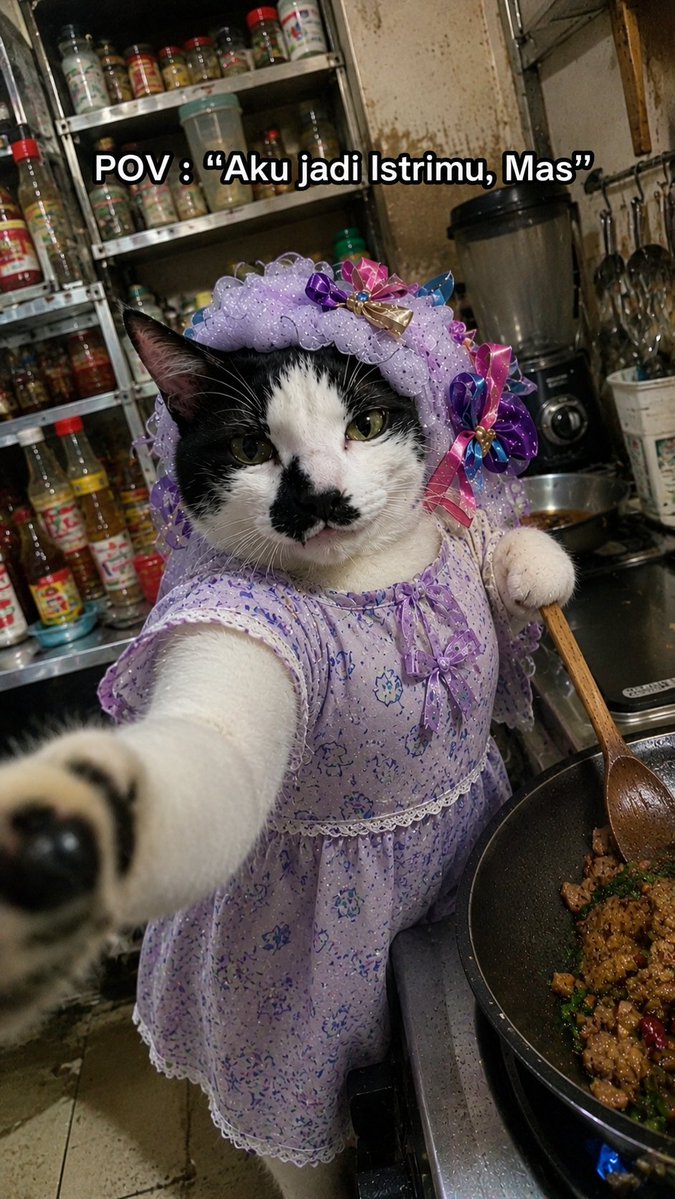
बिल्ली पत्नी खाना पकाने मीम फोटो
यह ऐप एक सजी-धजी बिल्ली की यथार्थवादी, अजीबोगरीब स्मार्टफोन-शैली की मीम तस्वीर तैयार करता है, जो एक अव्यवस्थित रसोई में खाना बना रही है, और इसमें अनुकूलित कैप्शन टेक्स्ट भी शामिल है।
यह चित्र और चरित्र के लिए एक GPT Image 2 प्रॉम्प्ट केस है। इसी तरह के विज़ुअल बनाने के लिए नीचे दिए गए कॉपी-रेडी प्रॉम्प्ट का उपयोग करें, और पुनः उपयोग करने से पहले Awesome GPT Image 2 Prompts एट्रिब्यूशन और व्यावसायिक उपयोग अधिकारों की समीक्षा करें।
क्या आपको प्रॉम्प्ट्स का पूरा सेट चाहिए? इसका उपयोग करें चित्र और चरित्र अधिक संबंधित उदाहरणों के लिए विषय हब देखें, या खोलें GPT Image 2 त्वरित सूची संपूर्ण उदाहरण अनुक्रमणिका, पुन: प्रयोज्य संरचनाओं और स्रोत श्रेय के लिए।
Free 1K preview
Generate one preview image instantly, no sign-up required.
1493/4000
प्रॉम्प्ट
प्रतिलिपि के लिए तैयार संकेत
Create a hyper-realistic vertical smartphone meme photo with an intentionally imperfect low-end Android camera look: harsh mixed kitchen lighting, slight motion blur, noisy shadows, compression artifacts, awkward tilted framing, and close selfie perspective. The subject is one black-and-white domestic cat standing upright beside a stovetop, reaching one front paw toward the camera so the paw is large and blurred in the foreground, while the cat’s face stays mostly in focus with a serious, unimpressed expression and a small black patch around the nose and mouth. Dress the cat in exactly 2 visible outfit pieces: a lavender floral house dress with lace trim and tiny bow details, and a matching ruffled lavender bonnet decorated with colorful satin ribbon bows. The cat holds one wooden cooking spoon in its other paw, stirring one black frying pan on the right side of the frame containing browned chopped food, green herbs, and red chili pieces over a visible blue gas flame. Set the scene in a cramped, messy home kitchen with stained walls, a metal rack crowded with spice and sauce bottles behind the cat, a blender on the counter, hanging utensils, and a worn tiled floor. Add exactly 1 meme caption at the top center in bold white text with a thick black outline, reading {argument name="caption text" default="POV : “Aku jadi Istrimu, Mas”"}. Make the image feel like a real accidental candid cooking selfie, funny and surreal but photorealistic, with no polished studio lighting.प्रॉम्प्ट वैरिएबल
प्रॉम्प्ट में पाए जाने वाले संपादन योग्य तर्क प्लेसहोल्डर, उनके डिफ़ॉल्ट मानों के साथ।
चर
caption text
गलती करना
POV : “Aku jadi Istrimu, Mas”
Best for
- - चित्र और चरित्र visual exploration
- - Image generation and reference-image edits
- - Reusable briefs that keep source attribution visible
Change these parts
- - Subject, product, character, or scene
- - Aspect ratio, camera, lighting, and background
- - Brand, text, color, and output constraints
Recommended model and settings
- - Model: gpt-image-2
- - Input mode: टेक्स्ट से छवि
- - Aspect ratio: source
- - Commercial status: review original source
How to use this prompt
- 1. Copy the prompt and preserve its structure for the first test.
- 2. Replace the subject, context, and publishing channel.
- 3. Change one camera, lighting, or style variable per iteration.
- 4. Inspect the output, source, text, and rights before reuse.
Limitations, source, and reuse cautions
- - Generated output is an editable draft, not factual, legal, or rights evidence.
- - Review the linked source, people, brands, logos, text, and third-party media before commercial use.
Awesome GPT Image 2 Prompts से आयातित। श्रेय देना आवश्यक है। वाणिज्यिक उपयोग की allowed ; सशुल्क उपयोग से पहले स्रोत अधिकारों की समीक्षा करें।
इस श्रेणी में और भी मामले
श्रेणी, इनपुट मोड अनुकूलता, गुणवत्ता और कम जोखिम को प्राथमिकता दी गई है।

Female Clown Cyborg Portrait
टेक्स्ट से छवि

Pink Hijab Mirror Selfie Portrait
टेक्स्ट से छवि

Manga Desert Radio Telescope Road Trip
टेक्स्ट से छवि

Greyscale Puzzle Portrait with Color Accent
टेक्स्ट से छवि

Transparent Earbuds on Stone Pedestal
टेक्स्ट से छवि

Imperial Research Bunker on Volcanic Planet
टेक्स्ट से छवि
पुनः उपयोग और स्रोत नोट्स
केस का पूर्वावलोकन करने के बाद इस प्रॉम्प्ट का सुरक्षित रूप से उपयोग करें।
- 1.प्रॉम्प्ट को कॉपी करें या जनरेशन बटन का उपयोग करके इसे सीधे डोवू में खोलें।
- 2.अपने उपयोग के अनुसार वैरिएबल, आस्पेक्ट रेशियो और संदर्भ छवियों को समायोजित करें।
- 3.प्रकाशन या सशुल्क उपयोग से पहले, स्रोत अधिकारों, श्रेय देने की आवश्यकताओं और ब्रांड या छवि से जुड़े जोखिमों की पुष्टि करें।