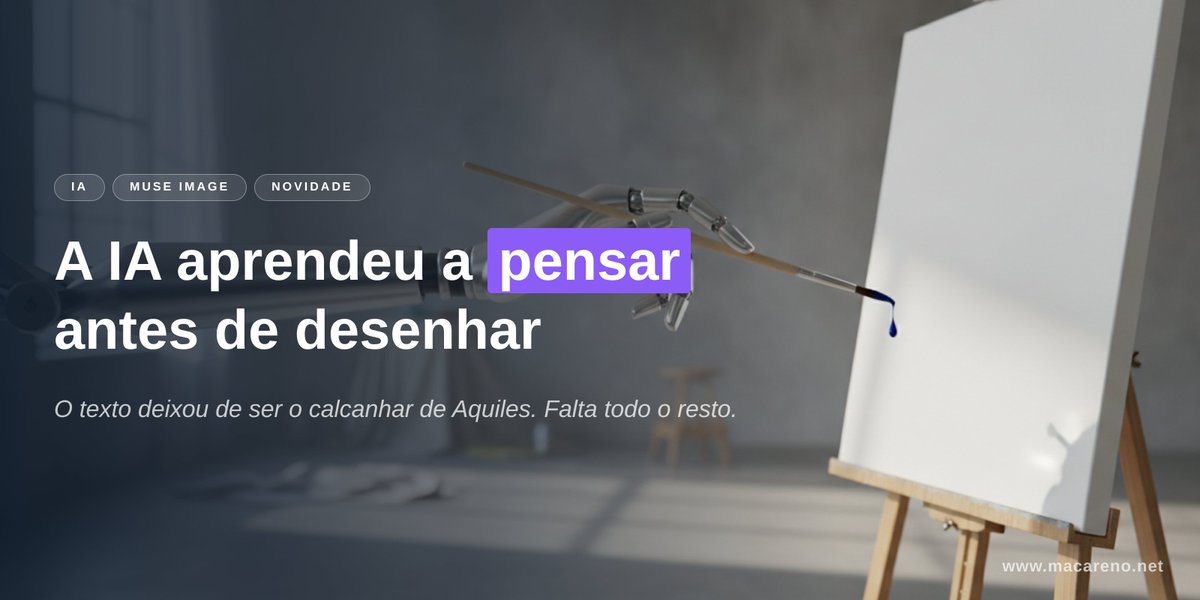
AI Thinking Before Drawing Banner
A cinematic tech-news banner showing a robotic brush facing a blank canvas with bold Portuguese headline text about AI learning to think before drawing.
यह ग्राफिक और पोस्टर के लिए एक GPT Image 2 प्रॉम्प्ट केस है। इसी तरह के विज़ुअल बनाने के लिए नीचे दिए गए कॉपी-रेडी प्रॉम्प्ट का उपयोग करें, और पुनः उपयोग करने से पहले Awesome GPT Image 2 Prompts एट्रिब्यूशन और व्यावसायिक उपयोग अधिकारों की समीक्षा करें।
क्या आपको प्रॉम्प्ट्स का पूरा सेट चाहिए? इसका उपयोग करें ग्राफिक और पोस्टर अधिक संबंधित उदाहरणों के लिए विषय हब देखें, या खोलें GPT Image 2 त्वरित सूची संपूर्ण उदाहरण अनुक्रमणिका, पुन: प्रयोज्य संरचनाओं और स्रोत श्रेय के लिए।
Free 1K preview
Generate one preview image instantly, no sign-up required.
2645/4000
प्रॉम्प्ट
प्रतिलिपि के लिए तैयार संकेत
Goal: Create a cinematic horizontal website/social banner about AI image generation and accurate text rendering, with a moody studio atmosphere and clear Portuguese typography.

Canvas: Wide 2:1 banner, approximately 1200×600 px. Dark, soft-focus photographic background with strong depth of field. Leave the left half for text and the right half for the visual metaphor.

Background and subject: A dim artist studio with cool gray-blue lighting, a blurred window on the far left, concrete wall, soft shadows on the floor, and an easel on the right holding a blank white canvas. In the upper center-right, show a delicate mechanical drawing arm or robotic brush holder reaching toward the canvas, holding a thin brush that has a single dark blue paint droplet at its tip. The canvas should be bright white and mostly empty, slightly angled, with a subtle shadow. Use realistic lighting, shallow depth of field, and a premium editorial tech aesthetic.

Layout: Place all main text on the left side over a dark translucent gradient overlay for legibility. Use exactly 3 small rounded pill tags above the headline, aligned horizontally: “IA”, “MUSE IMAGE”, and “NOVIDADE”. Below them, place a large bold headline in two lines: “A IA aprendeu a pensar” on the first line and “antes de desenhar” on the second line. Highlight only the word “pensar” with a vivid purple rectangular label behind the word, white text on purple. Under the headline, add one smaller italic subtitle: “O texto deixou de ser o calcanhar de Aquiles. Falta todo o resto.” Add a small website URL in the bottom-right corner: “www.macareno.net”.

Text content: Use {argument name="headline text" default="A IA aprendeu a pensar antes de desenhar"}, with the word {argument name="highlighted word" default="pensar"} highlighted in purple. Use {argument name="subtitle text" default="O texto deixou de ser o calcanhar de Aquiles. Falta todo o resto."}. Use {argument name="tag labels" default="IA, MUSE IMAGE, NOVIDADE"}. Use {argument name="website URL" default="www.macareno.net"}.

Visual style: Minimal, polished, cinematic, realistic, high contrast between white typography and dark background, with a modern tech-news landing-page feel. Typography should be clean sans serif; headline extra bold, subtitle light italic, tags uppercase with letter spacing. Keep text sharp and perfectly spelled.

Constraints: Include exactly 3 pill tags, exactly 1 highlighted word, exactly 1 subtitle line, exactly 1 URL, exactly 1 easel canvas, exactly 1 robotic drawing arm, exactly 1 brush, and exactly 1 visible paint droplet. Do not add extra logos, people, icons, or additional text.
प्रॉम्प्ट वैरिएबल
प्रॉम्प्ट में पाए जाने वाले संपादन योग्य तर्क प्लेसहोल्डर, उनके डिफ़ॉल्ट मानों के साथ।
चर
headline text
गलती करना
A IA aprendeu a pensar antes de desenhar
चर
highlighted word
गलती करना
pensar
चर
subtitle text
गलती करना
O texto deixou de ser o calcanhar de Aquiles. Falta todo o resto.
चर
tag labels
गलती करना
IA, MUSE IMAGE, NOVIDADE
चर
website URL
गलती करना
www.macareno.net
Best for
- - ग्राफिक और पोस्टर visual exploration
- - Image generation and reference-image edits
- - Reusable briefs that keep source attribution visible
Change these parts
- - Subject, product, character, or scene
- - Aspect ratio, camera, lighting, and background
- - Brand, text, color, and output constraints
Recommended model and settings
- - Model: gpt-image-2
- - Input mode: टेक्स्ट से छवि
- - Aspect ratio: source
- - Commercial status: review original source
How to use this prompt
- 1. Copy the prompt and preserve its structure for the first test.
- 2. Replace the subject, context, and publishing channel.
- 3. Change one camera, lighting, or style variable per iteration.
- 4. Inspect the output, source, text, and rights before reuse.
Limitations, source, and reuse cautions
- - Generated output is an editable draft, not factual, legal, or rights evidence.
- - Review the linked source, people, brands, logos, text, and third-party media before commercial use.
Awesome GPT Image 2 Prompts से आयातित। श्रेय देना आवश्यक है। वाणिज्यिक उपयोग की allowed ; सशुल्क उपयोग से पहले स्रोत अधिकारों की समीक्षा करें।
इस श्रेणी में और भी मामले
श्रेणी, इनपुट मोड अनुकूलता, गुणवत्ता और कम जोखिम को प्राथमिकता दी गई है।

GPT Image 2 Real-Life Character Street Snap
टेक्स्ट से छवि

Matte Black B.AI Keyboard Keycap
टेक्स्ट से छवि

MotoGP POV Cornering Shot
टेक्स्ट से छवि

Orange Rooftop Fashion Photo Prompt
टेक्स्ट से छवि

Luxury Travel Fashion Portrait Prompt
टेक्स्ट से छवि

Cute Focus Desk Flat Lay and Kawaii Illustration
टेक्स्ट से छवि
पुनः उपयोग और स्रोत नोट्स
केस का पूर्वावलोकन करने के बाद इस प्रॉम्प्ट का सुरक्षित रूप से उपयोग करें।
- 1.प्रॉम्प्ट को कॉपी करें या जनरेशन बटन का उपयोग करके इसे सीधे डोवू में खोलें।
- 2.अपने उपयोग के अनुसार वैरिएबल, आस्पेक्ट रेशियो और संदर्भ छवियों को समायोजित करें।
- 3.प्रकाशन या सशुल्क उपयोग से पहले, स्रोत अधिकारों, श्रेय देने की आवश्यकताओं और ब्रांड या छवि से जुड़े जोखिमों की पुष्टि करें।