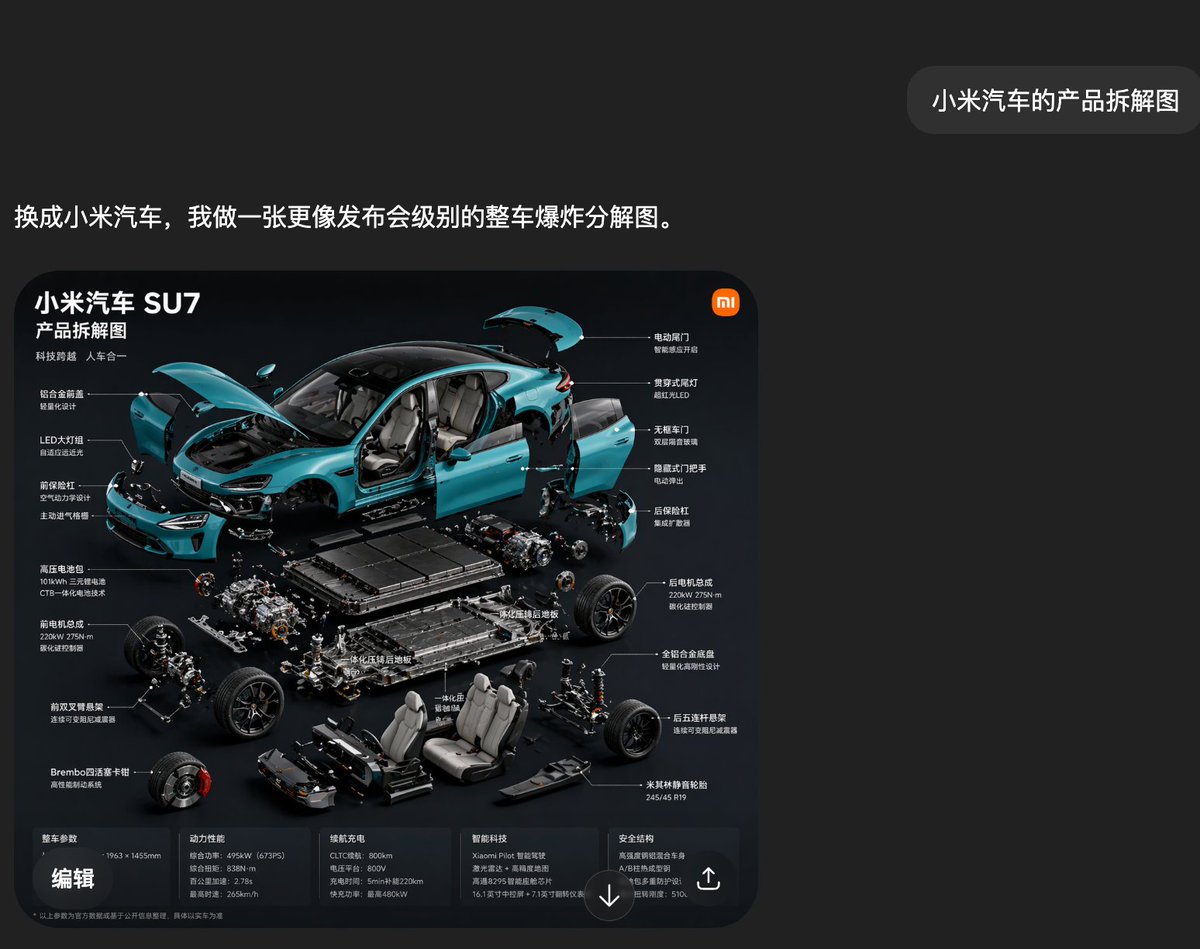
Capture d'écran de la vue éclatée du Xiaomi SU7
Cela génère une capture d'écran sombre de style application chinoise présentant une infographie en vue éclatée de qualité premium d'une voiture électrique Xiaomi SU7, utile pour les visuels de démonstration d'IA et les maquettes de présentation de produits technologiques.
Il s'agit d'un exemple de visuel pour la catégorie { GPT Image 2 Produit et commercial . Utilisez le visuel ci-dessous pour générer des éléments visuels similaires et vérifiez les conditions d'utilisation (attribution Awesome GPT Image 2 Prompts et droits d'utilisation commerciale) avant toute réutilisation.
Free 1K preview
Generate one preview image instantly, no sign-up required.
Prompt
invite prête à être copiée
A stylish Chinese social media-style screenshot with a deep carbon black interface, featuring a minimalist and high-end design. A large, rounded rectangular image card is positioned in the lower-left center, and a small, rounded chat bubble is in the upper-right corner. The overall canvas has ample whitespace, creating a clean and technological presentation. In the upper-left area, a line of bold white Chinese characters reads: “Switch to Xiaomi car, and I’ll create a full-vehicle exploded view diagram more akin to a launch event.” In the upper-right corner, a gray rounded bubble contains the white Chinese characters: “Xiaomi car component breakdown diagram.” Below, a poster-style rounded infographic card is displayed with a bright black background. Inside the card, a beautiful exploded view product presentation is created for a turquoise {argument name="car model" default="Xiaomi SU7"} electric sedan, using a highly dynamic 45-degree front-side perspective. The car body is broken down into multiple components, suspended around the chassis. The hood is open, the trunk lid is raised, the four side doors are detached and suspended outwards, the front bumper and front fascia are separated, the headlights are displayed independently, and the interior is visible. The main mechanical and structural modules are neatly layered below and around the car body. The visual style should resemble high-end launch event Slides: cinematic studio lighting, realistic reflections, sharp details, a dark background, subtle blue highlights, and precise technical composition. At the top-left of the infographic card, place three large white Chinese titles: “Xiaomi Car SU7,” “Product Breakdown Diagram,” “Technological Leap, Harmony Between Man and Machine.” Add a small orange Xiaomi-style logo in the upper-right corner of the card. Surround the car with 14 Chinese labels, connected by thin white lines, indicating visible parts and systems. The left side contains 6 functional labels, such as integrated closed front face, LED headlights, front trunk design, high-voltage battery, front motor assembly, front double-wishbone suspension, and Brembo four-piston brake calipers. The right side contains 8 functional labels, such as electric tailgate, through-type taillights, frameless doors, hidden door handles, rear motor assembly, rear motor parameters, all-aluminum alloy chassis, five-link rear suspension, and Michelin high-performance tires. Below the exploded car body, clearly display the battery pack, front and rear drive units, suspension subframes, wheel hub components, braking parts, front and rear seats, center console parts, underbody protection, and structural floor elements, all meticulously organized in an exploded suspended arrangement. At the bottom of the infographic card, add a horizontal information strip divided into 5 columns of small Chinese specification text, with titles for vehicle dimensions, power performance, range, intelligent driving, and safety structure. Place a bold white Chinese label “Edit” in the lower-left corner of the card. Include a circular downward arrow icon in the bottom center and a share/export icon in the lower-right corner. The overall composition should look like a genuine screenshot from a Chinese AI chat app, showcasing an automatically generated car breakdown infographic, with modern UI spacing, clear typography, and a luxurious dark teal color scheme.Variables d'invite
Espaces réservés aux arguments modifiables présents dans l'invite, avec leurs valeurs par défaut.
Best for
- - Produit et commercial visual exploration
- - Image generation and reference-image edits
- - Reusable briefs that keep source attribution visible
Change these parts
- - Subject, product, character, or scene
- - Aspect ratio, camera, lighting, and background
- - Brand, text, color, and output constraints
Recommended model and settings
- - Model: gpt-image-2
- - Input mode: Texte vers image
- - Aspect ratio: source
- - Commercial status: review original source
How to use this prompt
- 1. Copy the prompt and preserve its structure for the first test.
- 2. Replace the subject, context, and publishing channel.
- 3. Change one camera, lighting, or style variable per iteration.
- 4. Inspect the output, source, text, and rights before reuse.
Limitations, source, and reuse cautions
- - Generated output is an editable draft, not factual, legal, or rights evidence.
- - Review the linked source, people, brands, logos, text, and third-party media before commercial use.
Plus de cas dans cette catégorie
Priorisé par catégorie, compatibilité du mode d'entrée, qualité et risque moindre.






Réutilisation et notes de source
Utilisez cette invite en toute sécurité après avoir prévisualisé le dossier.
- 1.Copiez l'invite ou ouvrez-la directement dans Dovoo avec le bouton de génération.
- 2.Ajustez les variables, le format d'image et les images de référence en fonction de votre cas d'utilisation.
- 3.Avant toute publication ou utilisation payante, vérifiez les droits d'auteur, les exigences d'attribution et les risques liés à la marque ou à l'image.