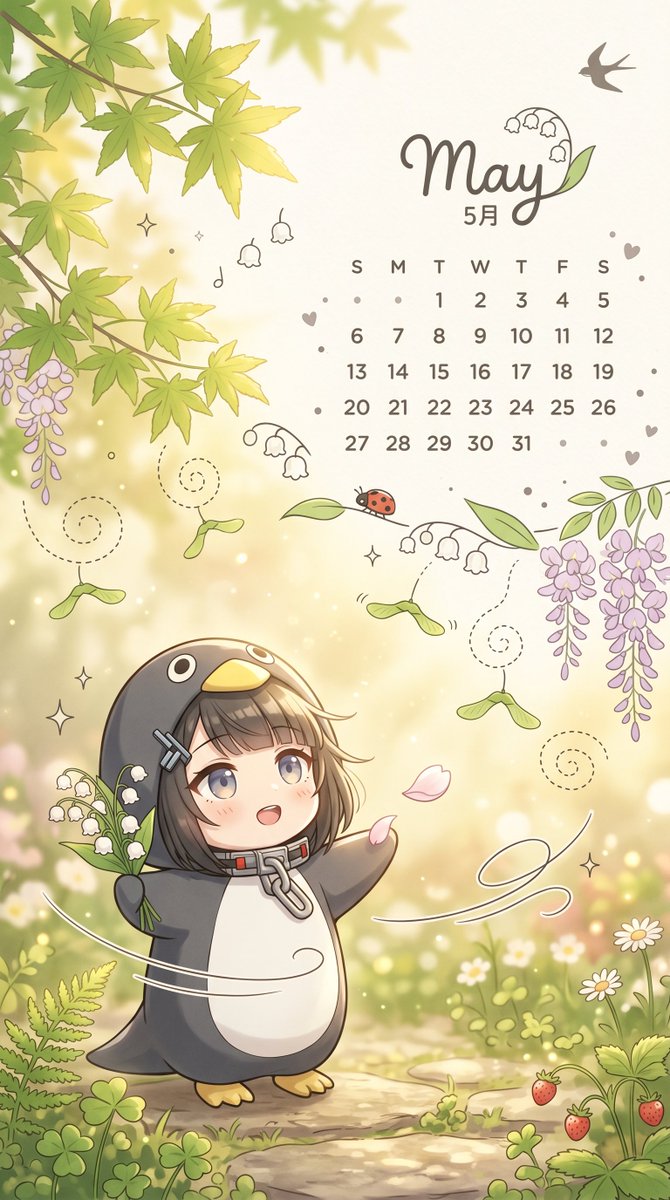
Papier peint calendrier de jardin fantaisiste de mai
Une adorable illustration verticale pour fond d'écran sur le thème du printemps, présentant un calendrier de mai, un enfant chibi déguisé en pingouin et un jardin fleuri de rêve, idéale pour les fonds d'écran de téléphone saisonniers.
Il s'agit d'un exemple de visuel pour la catégorie { GPT Image 2 Illustration et art . Utilisez le visuel ci-dessous pour générer des éléments visuels similaires et vérifiez les conditions d'utilisation (attribution Awesome GPT Image 2 Prompts et droits d'utilisation commerciale) avant toute réutilisation.
Free 1K preview
Generate one preview image instantly, no sign-up required.
Prompt
invite prête à être copiée
A portrait fantasy spring calendar illustration, adopting a soft pastel anime picture book style, a cute mobile wallpaper designed for {argument name="month" default="May"}. The scene is a warm garden with dappled sunlight, featuring creamy golden light spots, a narrow pebble path, clover patches, tiny white daisies, ferns, and a few ripe strawberries in the lower right corner. A large, vibrant green maple leaf hangs in the upper left, and the left and right edges are framed by cascading clusters of pale purple wisteria. Near the upper right corner, place elegant handwritten text {argument name="headline text" default="May"}, incorporating small lily of the valley doodles within the letters, with a silhouette of a small swallow above and smaller text below reading “May”. Add a simple mini May calendar at the bottom, including a day row of “S M T W T F S” and dates from 1 to 31 arranged in a simple grid, using soft taupe text. Scatter tiny decorative hearts, dots, sparkles, and simple floral doodles around the calendar area. In the lower half, depict a Q-version child character standing on the path, wearing a penguin onesie with a dark charcoal body, white belly, yellow beak-shaped hood, and yellow little feet. The character has a short {argument name="hair color" default="ash brown"} bob hairstyle peeking out from the hood, with two silver hair clips on one side and a large metal zipper ring around the neck. Replace the face with a smooth, centered rectangular blur block for privacy, while keeping the rest of the head and hair visible. The character holds a bunch of white lily of the valley flowers in one hand and extends the other arm as if enjoying the breeze. Add nearby falling pink petals, a red ladybug perched on a leaf above the character, several maple seeds with dashed spiral trails, delicate white swirling lines suggesting a breeze around the character, and a few extra sprigs of lily of the valley around the composition. Use soft cream, sage green, lavender purple, and warm beige tones, combined with delicate lines and subtle shading, to create a dreamy and adorable seasonal atmosphere.Variables d'invite
Espaces réservés aux arguments modifiables présents dans l'invite, avec leurs valeurs par défaut.
Best for
- - Illustration et art visual exploration
- - Image generation and reference-image edits
- - Reusable briefs that keep source attribution visible
Change these parts
- - Subject, product, character, or scene
- - Aspect ratio, camera, lighting, and background
- - Brand, text, color, and output constraints
Recommended model and settings
- - Model: gpt-image-2
- - Input mode: Texte vers image
- - Aspect ratio: source
- - Commercial status: review original source
How to use this prompt
- 1. Copy the prompt and preserve its structure for the first test.
- 2. Replace the subject, context, and publishing channel.
- 3. Change one camera, lighting, or style variable per iteration.
- 4. Inspect the output, source, text, and rights before reuse.
Limitations, source, and reuse cautions
- - Generated output is an editable draft, not factual, legal, or rights evidence.
- - Review the linked source, people, brands, logos, text, and third-party media before commercial use.
Plus de cas dans cette catégorie
Priorisé par catégorie, compatibilité du mode d'entrée, qualité et risque moindre.






Réutilisation et notes de source
Utilisez cette invite en toute sécurité après avoir prévisualisé le dossier.
- 1.Copiez l'invite ou ouvrez-la directement dans Dovoo avec le bouton de génération.
- 2.Ajustez les variables, le format d'image et les images de référence en fonction de votre cas d'utilisation.
- 3.Avant toute publication ou utilisation payante, vérifiez les droits d'auteur, les exigences d'attribution et les risques liés à la marque ou à l'image.