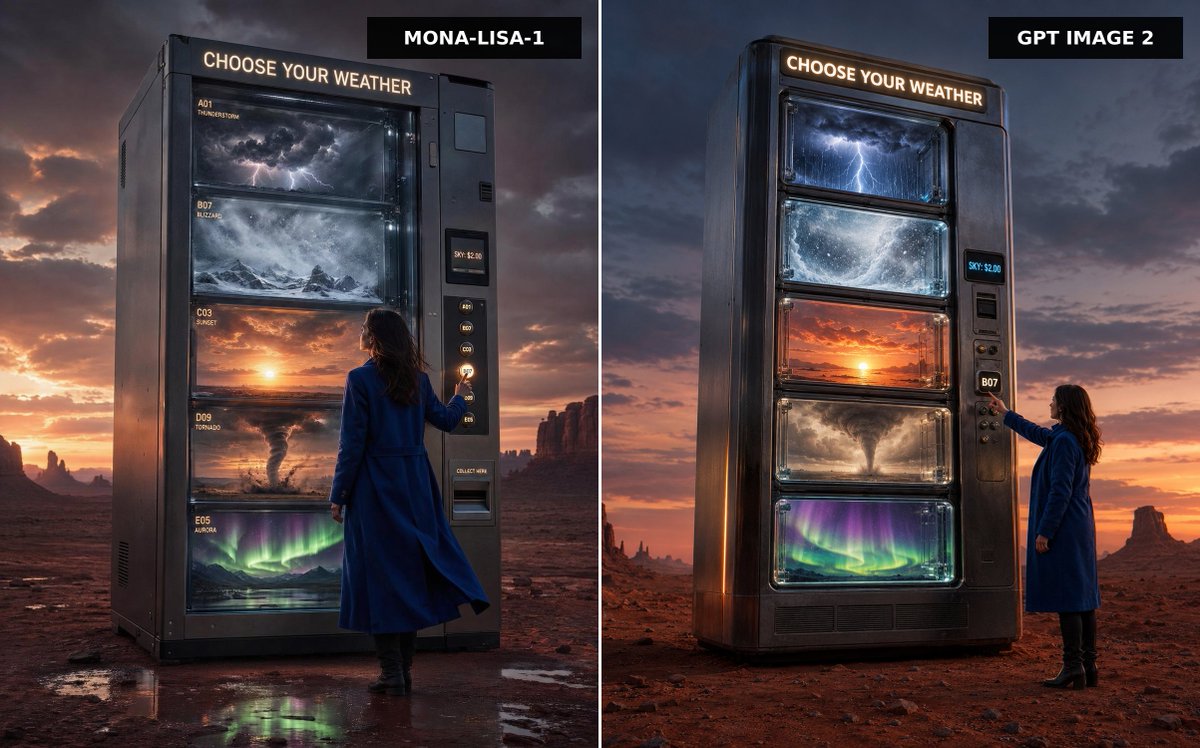
Weather Vending Machine Comparison
A cinematic split-screen desert advertisement comparing two versions of a colossal vending machine that dispenses different kinds of weather.
Il s'agit d'un exemple de visuel pour la catégorie { GPT Image 2 Produit et commercial . Utilisez le visuel ci-dessous pour générer des éléments visuels similaires et vérifiez les conditions d'utilisation (attribution Awesome GPT Image 2 Prompts et droits d'utilisation commerciale) avant toute réutilisation.
Besoin de l'ensemble complet des invites ? Utilisez le Produit et commercial Consultez le centre thématique pour plus d'exemples connexes, ou ouvrez le GPT Image 2 catalogue rapide pour l'index complet des exemples, les structures réutilisables et l'attribution des sources.
Free 1K preview
Generate one preview image instantly, no sign-up required.
1876/4000
Prompt
invite prête à être copiée
Create a split-screen comparison image showing two premium cinematic advertising photographs side by side, separated by a thin vertical white divider. The scene is a vast red desert at dusk with dramatic storm clouds, orange sunset glow on the horizon, distant mesas and rock spires, and wet reflective patches on the desert floor. In both panels, place a colossal dark metallic vending machine standing alone, labeled at the top with glowing warm-white text: “CHOOSE YOUR WEATHER”. The machine sells weather instead of snacks, with exactly five large glass display shelves containing: 1) a miniature thunderstorm with dark clouds and lightning, 2) a swirling blizzard over snowy mountains, 3) a glowing sunset sky, 4) a tornado over dusty plains, and 5) green-purple aurora lights over a night landscape. Include a woman in a long cobalt-blue coat and black boots standing beside the vending machine, seen from behind or side-back, reaching toward the selection buttons. The vending machine has a side payment/control panel with small glowing code buttons, a digital price display reading “SKY: $2.00”, and a collection slot. Add black rectangular title tags at the top of each panel: left tag reads {argument name="left model label" default="MONA-LISA-1"}, right tag reads {argument name="right model label" default="GPT IMAGE 2"}. Make the left panel slightly closer and more imposing, with readable small shelf labels such as A01 THUNDERSTORM, B07 BLIZZARD, C03 SUNSET, D09 TORNADO, and E05 AURORA; make the right panel a cleaner vertical machine design with the same five weather windows. Use ultra-realistic photography, cinematic lighting, high contrast, glossy glass reflections, moody atmosphere, premium sci-fi advertising style, sharp detail, 16:9 landscape composition, no extra text beyond the vending machine signage, shelf labels, price display, and model tags.Variables d'invite
Espaces réservés aux arguments modifiables présents dans l'invite, avec leurs valeurs par défaut.
Variable
left model label
Défaut
MONA-LISA-1
Variable
right model label
Défaut
GPT IMAGE 2
Best for
- - Produit et commercial visual exploration
- - Image generation and reference-image edits
- - Reusable briefs that keep source attribution visible
Change these parts
- - Subject, product, character, or scene
- - Aspect ratio, camera, lighting, and background
- - Brand, text, color, and output constraints
Recommended model and settings
- - Model: gpt-image-2
- - Input mode: Texte vers image
- - Aspect ratio: source
- - Commercial status: review original source
How to use this prompt
- 1. Copy the prompt and preserve its structure for the first test.
- 2. Replace the subject, context, and publishing channel.
- 3. Change one camera, lighting, or style variable per iteration.
- 4. Inspect the output, source, text, and rights before reuse.
Limitations, source, and reuse cautions
- - Generated output is an editable draft, not factual, legal, or rights evidence.
- - Review the linked source, people, brands, logos, text, and third-party media before commercial use.
Importé de Awesome GPT Image 2 Prompts . L'attribution est requise. Le statut d'utilisation commerciale est allowed ; veuillez vérifier les droits d'auteur avant toute utilisation payante.
Plus de cas dans cette catégorie
Priorisé par catégorie, compatibilité du mode d'entrée, qualité et risque moindre.






Réutilisation et notes de source
Utilisez cette invite en toute sécurité après avoir prévisualisé le dossier.
- 1.Copiez l'invite ou ouvrez-la directement dans Dovoo avec le bouton de génération.
- 2.Ajustez les variables, le format d'image et les images de référence en fonction de votre cas d'utilisation.
- 3.Avant toute publication ou utilisation payante, vérifiez les droits d'auteur, les exigences d'attribution et les risques liés à la marque ou à l'image.