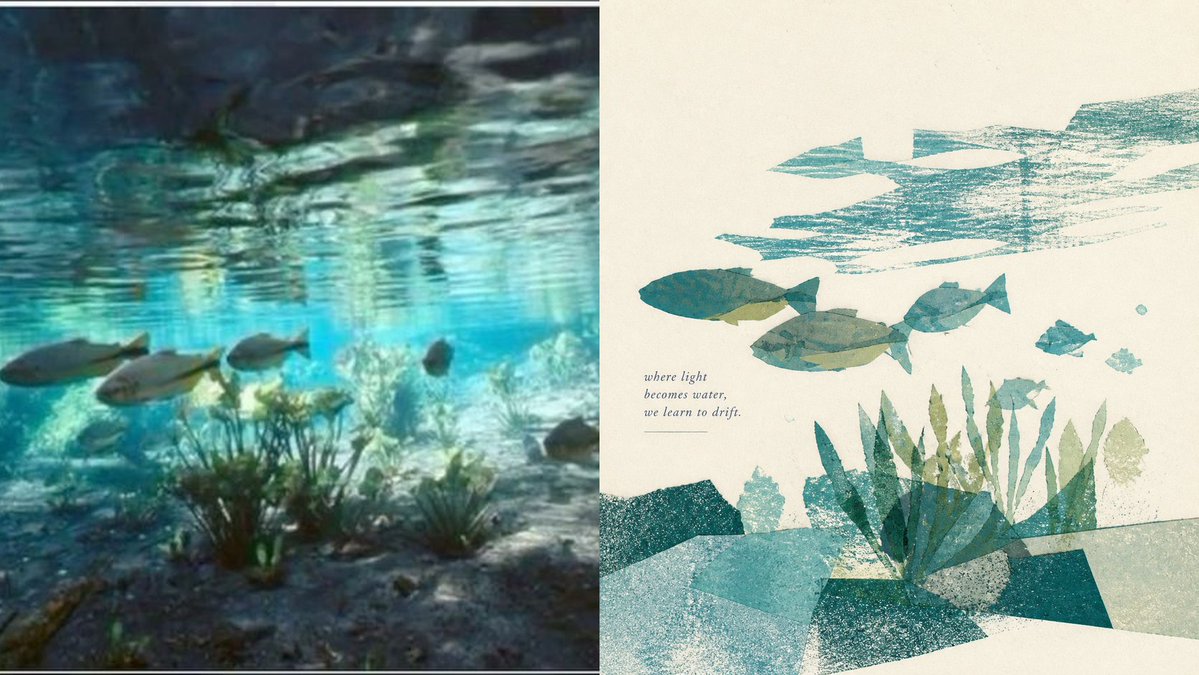
Underwater Risograph Diptych
A serene split-panel underwater composition pairing a dreamy aquatic photo scene with a poetic textured risograph collage poster.
Il s'agit d'un exemple de visuel pour la catégorie { GPT Image 2 Graphique et affiche . Utilisez le visuel ci-dessous pour générer des éléments visuels similaires et vérifiez les conditions d'utilisation (attribution Awesome GPT Image 2 Prompts et droits d'utilisation commerciale) avant toute réutilisation.
Besoin de l'ensemble complet des invites ? Utilisez le Graphique et affiche Consultez le centre thématique pour plus d'exemples connexes, ou ouvrez le GPT Image 2 catalogue rapide pour l'index complet des exemples, les structures réutilisables et l'attribution des sources.
Free 1K preview
Generate one preview image instantly, no sign-up required.
3018/4000
Prompt
invite prête à être copiée
Goal: Create a calm two-panel visual study contrasting an underwater scene with a poetic abstract print interpretation, in a quiet healing aesthetic using color blocks, generous white space, and visible printmaking texture.

Canvas: Wide horizontal 16:9 composition, split exactly into 2 vertical panels by a thin white divider. Add a very thin pale border around the full image.

Left panel: A soft, slightly blurred underwater photograph-style scene filling the entire left half. Show shallow turquoise water with rippled reflections on the surface, sandy seabed, sea grass and coral-like plants near the bottom, and 6 visible fish: 3 larger fish swimming from left to right across the middle-left, 1 small pale fish near the center-right, 1 dark small fish near the right middle, and 1 partial dark fish near the lower-right edge. Use teal, cyan, sea green, gray, and shadowy blue-black tones, with dreamy motion blur and dappled sunlight.

Right panel: A minimalist editorial poster illustration on warm off-white paper. Use hand-cut collage shapes, risograph/screen-print grain, transparent overlapping color blocks, and rough ink texture. Depict an abstract underwater world with 6 visible fish: 1 large teal fish left of center, 1 large olive-gray fish in the center, 1 medium teal fish upper-right of center, 1 small teal fish at far right, 1 small pale teal fish below-right, and 1 tiny pale fish or mark near the lower center. Add 3 broad turquoise brush-stroke water-current shapes across the upper-right, leaving irregular white gaps. At the bottom, create layered geometric seabed blocks in teal, aqua, dark green, and pale gray, plus a cluster of vertical sea plants rising from the lower center-right; include about 15 individual plant blades in mixed teal and muted green.

Text content: Place a small italic serif poem on the right panel, left of the main fish group, reading exactly: "where light\nbecomes water,\nwe learn to drift." Add a thin horizontal line beneath the poem.

Style: Poetic, quiet, contemplative, modern art-book layout; strong negative space on the right panel; muted aquatic palette of {argument name="main color palette" default="turquoise, teal, sea green, muted olive, pale gray, warm ivory"}; textured paper grain and imperfect printed edges; gentle, balanced composition inspired by natural light underwater.

Customizable details: Use the poem text {argument name="poem text" default="where light\nbecomes water,\nwe learn to drift."}, keep the theme as {argument name="visual theme" default="underwater drifting fish and sea grass"}, set the left panel style to {argument name="left panel style" default="dreamy underwater photograph"}, and set the right panel style to {argument name="right panel style" default="abstract risograph collage poster"}.

Constraints: Preserve the exact two-panel split, keep the right panel airy with large blank space, avoid extra labels or logos, avoid hyperrealism on the right, and do not add more fish than the 6 counted in each panel.
Variables d'invite
Espaces réservés aux arguments modifiables présents dans l'invite, avec leurs valeurs par défaut.
Variable
main color palette
Défaut
turquoise, teal, sea green, muted olive, pale gray, warm ivory
Variable
poem text
Défaut
where light\nbecomes water,\nwe learn to drift.
Variable
visual theme
Défaut
underwater drifting fish and sea grass
Variable
left panel style
Défaut
dreamy underwater photograph
Variable
right panel style
Défaut
abstract risograph collage poster
Best for
- - Graphique et affiche visual exploration
- - Image generation and reference-image edits
- - Reusable briefs that keep source attribution visible
Change these parts
- - Subject, product, character, or scene
- - Aspect ratio, camera, lighting, and background
- - Brand, text, color, and output constraints
Recommended model and settings
- - Model: gpt-image-2
- - Input mode: Texte vers image
- - Aspect ratio: source
- - Commercial status: review original source
How to use this prompt
- 1. Copy the prompt and preserve its structure for the first test.
- 2. Replace the subject, context, and publishing channel.
- 3. Change one camera, lighting, or style variable per iteration.
- 4. Inspect the output, source, text, and rights before reuse.
Limitations, source, and reuse cautions
- - Generated output is an editable draft, not factual, legal, or rights evidence.
- - Review the linked source, people, brands, logos, text, and third-party media before commercial use.
Importé de Awesome GPT Image 2 Prompts . L'attribution est requise. Le statut d'utilisation commerciale est allowed ; veuillez vérifier les droits d'auteur avant toute utilisation payante.
Plus de cas dans cette catégorie
Priorisé par catégorie, compatibilité du mode d'entrée, qualité et risque moindre.

Tuxedo Cat Photo and Line Art Diptych
Texte vers image

Luxury Travel Fashion Portrait Prompt
Texte vers image

Autumn Cozy Casual Outfit Prompt
Texte vers image

Cute Focus Desk Flat Lay and Kawaii Illustration
Texte vers image

Studio Portrait of Woman with Sunglasses
Texte vers image

Boisterous Shrimpers Entering Pub
Texte vers image
Réutilisation et notes de source
Utilisez cette invite en toute sécurité après avoir prévisualisé le dossier.
- 1.Copiez l'invite ou ouvrez-la directement dans Dovoo avec le bouton de génération.
- 2.Ajustez les variables, le format d'image et les images de référence en fonction de votre cas d'utilisation.
- 3.Avant toute publication ou utilisation payante, vérifiez les droits d'auteur, les exigences d'attribution et les risques liés à la marque ou à l'image.