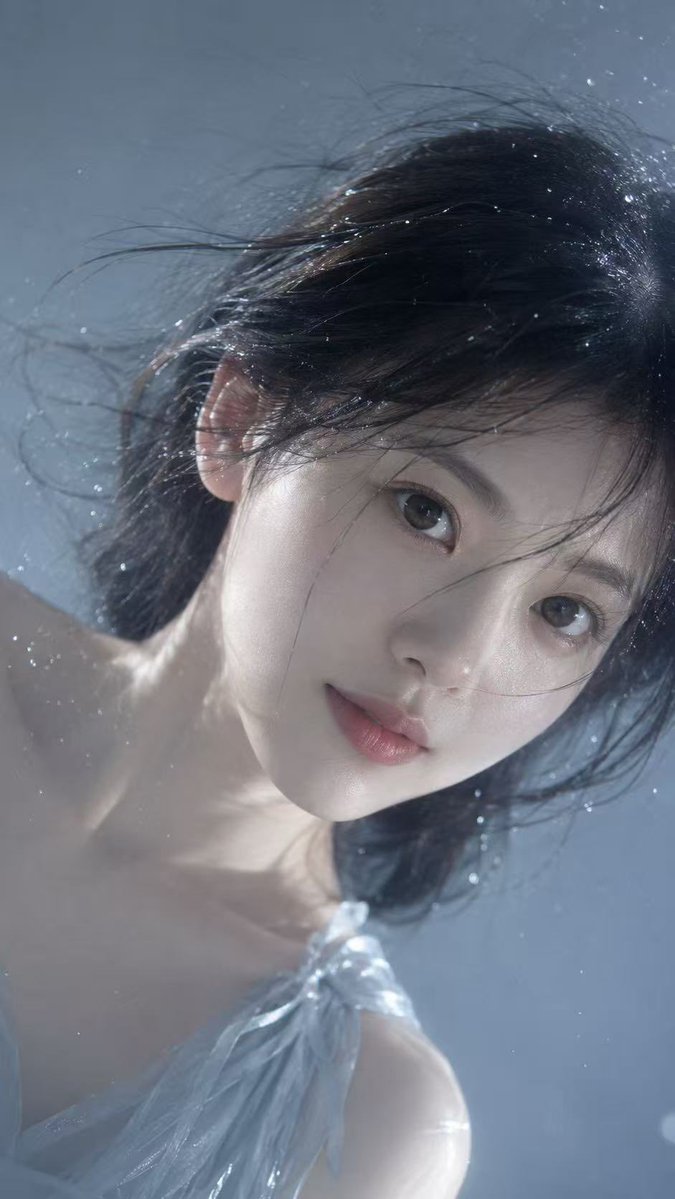
Underwater Dreamy Close-up Portrait
A detailed style-transfer prompt that uses an uploaded photo for identity while creating an underwater-style, cool-toned cinematic portrait.
Il s'agit d'un exemple de visuel pour la catégorie { GPT Image 2 Portrait et personnage . Utilisez le visuel ci-dessous pour générer des éléments visuels similaires et vérifiez les conditions d'utilisation (attribution Awesome GPT Image 2 Prompts et droits d'utilisation commerciale) avant toute réutilisation.
Free 1K preview
Generate one preview image instantly, no sign-up required.
Free text preview doesn’t preserve reference-image consistency.
Prompt
invite prête à être copiée
Use the uploaded portrait only as the identity reference. Preserve the person’s real facial features, face shape, skin tone, eye shape, lips, nose structure, and recognizable hairstyle. Do not copy the original clothing, background, lighting, pose, or image quality from the uploaded portrait.

Create a realistic vertical close-up portrait photo of the person’s face captured at a tilted sideways angle, as if the camera is very close to the face through clear water or wet glass. The face fills most of the frame, with one eye closer to the camera, soft calm expression, slightly parted lips, natural gaze looking toward the lens. The head is gently rotated, creating an intimate cinematic composition without unnatural neck twisting.

Style the hair as {argument name="hair style" default="wet, dark, and slightly messy"}, with fine strands floating across the forehead and around the eyes. Add tiny water droplets, soft moisture on the skin, subtle floating particles, and a dreamy underwater-like atmosphere. The skin should look pale, dewy, and realistic, with visible natural texture, soft highlights, and no plastic smoothing.

Use {argument name="lighting" default="cool blue-gray lighting"}, soft diffused highlights, shallow depth of field, cinematic blur, gentle film grain, realistic lens softness, high-detail facial realism, emotional quiet mood, delicate beauty editorial photography. Choose a {argument name="outfit style" default="simple elegant outfit"} that best suits the person’s appearance, such as a minimal light-toned sleeveless top or soft neutral fabric, barely visible at the edge of the frame. No text, no logo, no watermark.

Negative Prompt:

watermark, logo, text, signature, AI-generated text, Show every face clearly with natural, detailed facial features, distorted face, changed identity, wrong facial features, unnatural neck twist, broken anatomy, plastic skin, over-smoothed skin, doll-like face, anime style, cartoon style, heavy makeup, harsh beauty filter, extra eyes, deformed eyes, asymmetrical eyes, bad pupils, messy teeth, overexposed face, low resolution, noisy artifacts, duplicate face, cropped facial features, unnatural hair, dry hair, stiff pose, unrealistic water, random clothing, reference image watermark.
Variables d'invite
Espaces réservés aux arguments modifiables présents dans l'invite, avec leurs valeurs par défaut.
Best for
- - Portrait et personnage visual exploration
- - Image generation and reference-image edits
- - Reusable briefs that keep source attribution visible
Change these parts
- - Subject, product, character, or scene
- - Aspect ratio, camera, lighting, and background
- - Brand, text, color, and output constraints
Recommended model and settings
- - Model: gpt-image-2
- - Input mode: Image vers image
- - Aspect ratio: source
- - Commercial status: review original source
How to use this prompt
- 1. Copy the prompt and preserve its structure for the first test.
- 2. Replace the subject, context, and publishing channel.
- 3. Change one camera, lighting, or style variable per iteration.
- 4. Inspect the output, source, text, and rights before reuse.
Limitations, source, and reuse cautions
- - Generated output is an editable draft, not factual, legal, or rights evidence.
- - Review the linked source, people, brands, logos, text, and third-party media before commercial use.
Plus de cas dans cette catégorie
Priorisé par catégorie, compatibilité du mode d'entrée, qualité et risque moindre.






Réutilisation et notes de source
Utilisez cette invite en toute sécurité après avoir prévisualisé le dossier.
- 1.Copiez l'invite ou ouvrez-la directement dans Dovoo avec le bouton de génération.
- 2.Ajustez les variables, le format d'image et les images de référence en fonction de votre cas d'utilisation.
- 3.Avant toute publication ou utilisation payante, vérifiez les droits d'auteur, les exigences d'attribution et les risques liés à la marque ou à l'image.