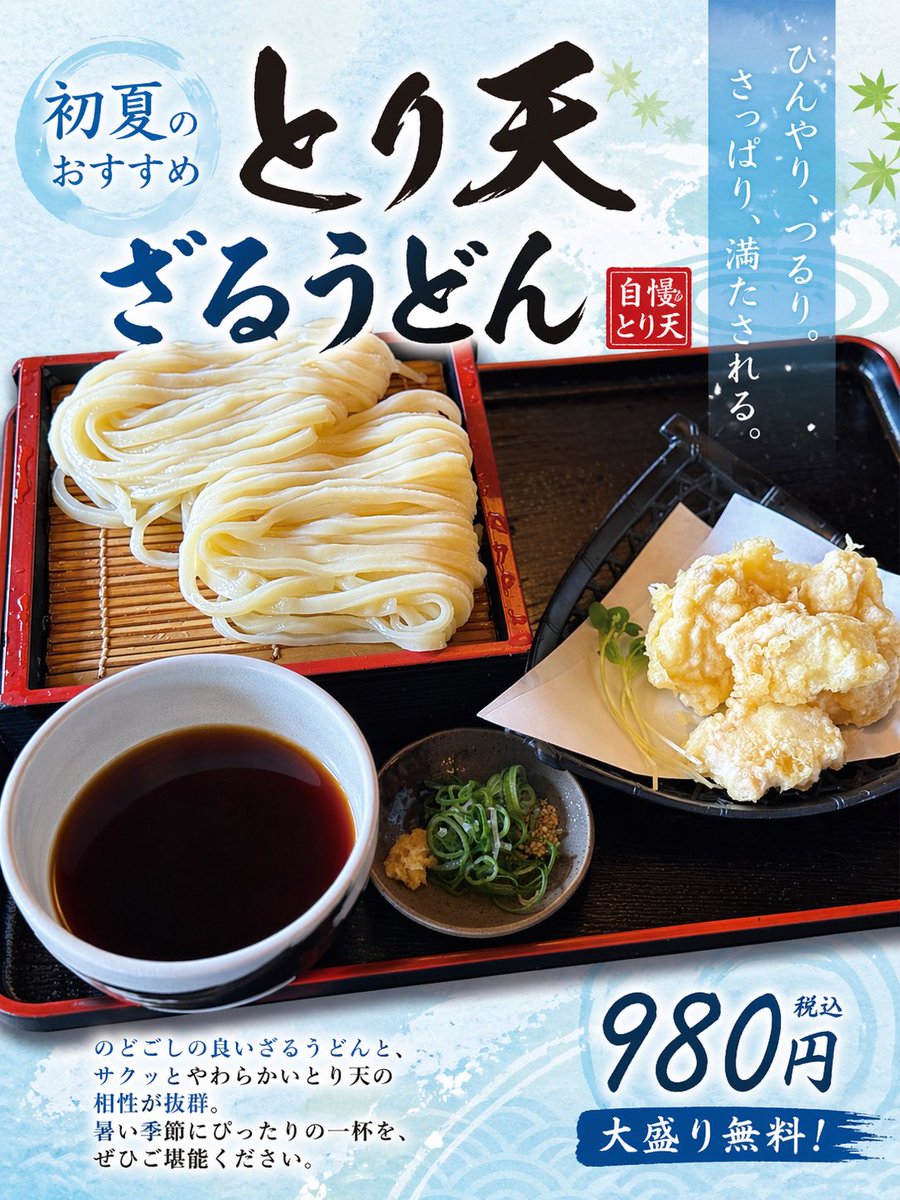
Transformez une photo de nourriture en affiche japonaise
Cet outil transforme une photo de plat de référence en une affiche publicitaire soignée pour un restaurant japonais, utile pour la promotion des menus et le marketing culinaire sur les réseaux sociaux.
Il s'agit d'un exemple de visuel pour la catégorie { GPT Image 2 Graphique et affiche . Utilisez le visuel ci-dessous pour générer des éléments visuels similaires et vérifiez les conditions d'utilisation (attribution Awesome GPT Image 2 Prompts et droits d'utilisation commerciale) avant toute réutilisation.
Free 1K preview
Generate one preview image instantly, no sign-up required.
Free text preview doesn’t preserve reference-image consistency.
Prompt
invite prête à être copiée
Using the provided reference image of the udon meal, turn it into a clean, print-ready Japanese restaurant promotional poster while keeping the food photo itself as the main hero image. Expand the composition vertically into a portrait flyer layout, add a light icy-blue seasonal background with subtle watercolor texture and faint wave motifs, and overlay decorative green maple leaves for an early-summer feel. Add 5 text elements in Japanese: a blue circular badge at the upper left reading "初夏のおすすめ", a large bold brush-calligraphy headline across the top in 2 lines reading "とり天" and "ざるうどん", a small red vertical seal near the headline reading "自慢のとり天", a tall translucent blue vertical copy block at the upper right reading "ひんやり、つるり。さっぱり、満たされる。", and a price block at the lower right reading "980円 税込" with a blue brushstroke banner below that says "大盛り無料!". Add a short 4-line Japanese body copy paragraph at the lower left describing the dish in a menu-poster style. Preserve the original meal arrangement and realistic photography, but enhance it slightly for advertising: brighter, more appetizing, crisp, and high contrast. Make the overall design look like a polished restaurant poster created from a casual food photo.
Best for
- - Graphique et affiche visual exploration
- - Image generation and reference-image edits
- - Reusable briefs that keep source attribution visible
Change these parts
- - Subject, product, character, or scene
- - Aspect ratio, camera, lighting, and background
- - Brand, text, color, and output constraints
Recommended model and settings
- - Model: gpt-image-2
- - Input mode: Image vers image
- - Aspect ratio: source
- - Commercial status: review original source
How to use this prompt
- 1. Copy the prompt and preserve its structure for the first test.
- 2. Replace the subject, context, and publishing channel.
- 3. Change one camera, lighting, or style variable per iteration.
- 4. Inspect the output, source, text, and rights before reuse.
Limitations, source, and reuse cautions
- - Generated output is an editable draft, not factual, legal, or rights evidence.
- - Review the linked source, people, brands, logos, text, and third-party media before commercial use.
Plus de cas dans cette catégorie
Priorisé par catégorie, compatibilité du mode d'entrée, qualité et risque moindre.






Réutilisation et notes de source
Utilisez cette invite en toute sécurité après avoir prévisualisé le dossier.
- 1.Copiez l'invite ou ouvrez-la directement dans Dovoo avec le bouton de génération.
- 2.Ajustez les variables, le format d'image et les images de référence en fonction de votre cas d'utilisation.
- 3.Avant toute publication ou utilisation payante, vérifiez les droits d'auteur, les exigences d'attribution et les risques liés à la marque ou à l'image.