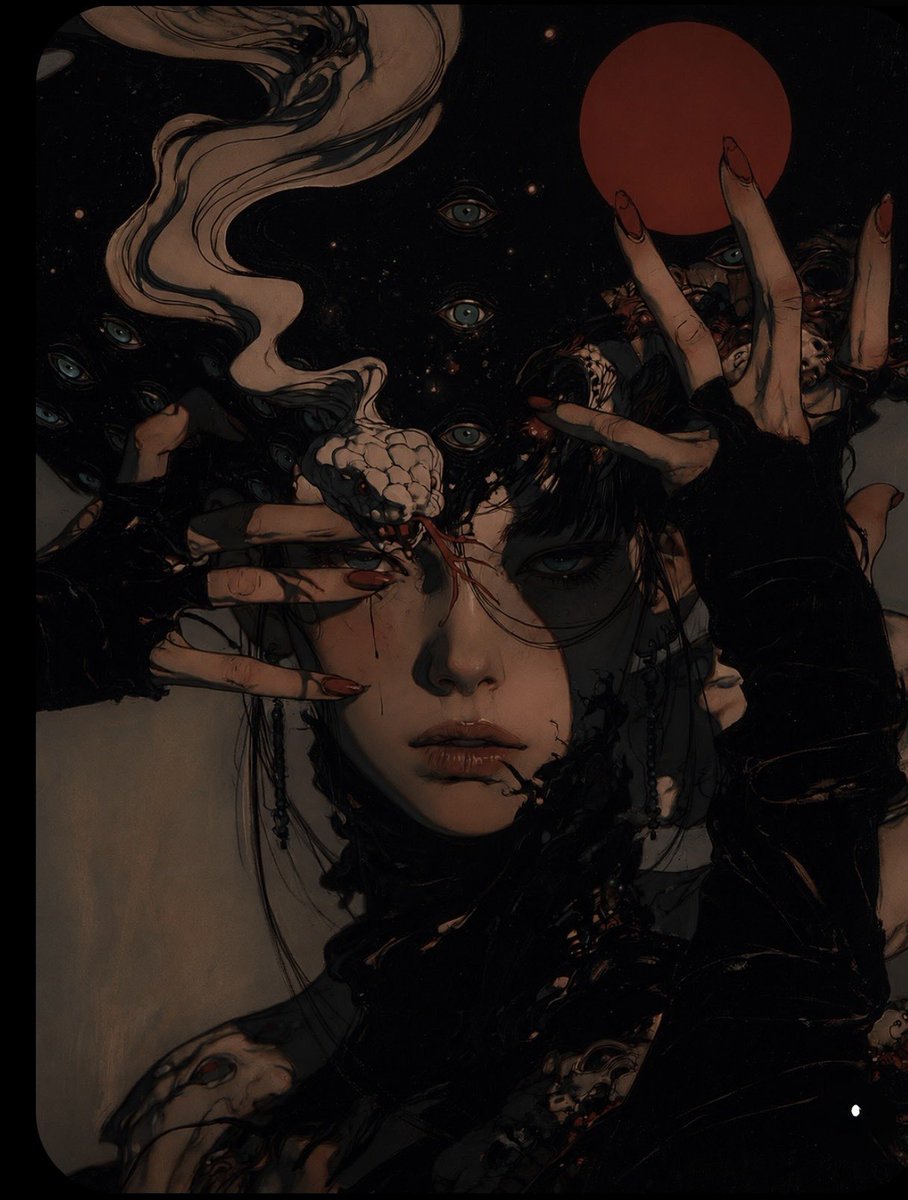
Surreal Gothic Horror Portrait
A highly detailed surreal gothic horror portrait prompt featuring a pale young woman surrounded by hands and a snake creature.
Il s'agit d'un exemple de visuel pour la catégorie { GPT Image 2 Portrait et personnage . Utilisez le visuel ci-dessous pour générer des éléments visuels similaires et vérifiez les conditions d'utilisation (attribution Awesome GPT Image 2 Prompts et droits d'utilisation commerciale) avant toute réutilisation.
Besoin de l'ensemble complet des invites ? Utilisez le Portrait et personnage Consultez le centre thématique pour plus d'exemples connexes, ou ouvrez le GPT Image 2 catalogue rapide pour l'index complet des exemples, les structures réutilisables et l'attribution des sources.
Free 1K preview
Generate one preview image instantly, no sign-up required.
Free text preview doesn’t preserve reference-image consistency.
1818/4000
Prompt
invite prête à être copiée
A highly detailed surreal gothic horror portrait of a pale young woman with short black hair, centered in a tight vertical composition. Her expression is calm, melancholic, haunting, and emotionally distant, with heavy dark eye makeup, tired eyes, delicate facial features, and subtle imperfections.
Multiple pale hands with long sharp red-painted nails emerge around her face, partially covering her eyes and framing her head in an unsettling ritualistic composition. A pale snake-like creature rests across her forehead and nose, with intricate scales and subtle organic details.
Behind her is a deep black cosmic void filled with tiny stars, floating particles, and numerous eerie turquoise eyes staring from the darkness. A large muted crimson-red circular moon/orb hangs in the upper background. Long flowing pale hair-like tendrils sweep dramatically across the upper-left portion of the composition and blend into the surrounding darkness.
She wears dark black clothing with layered fabric, organic textures, subtle metallic details, chains, jewelry, and distressed elements. The entire scene should feel mysterious, occult, surreal, gothic, dreamlike, and psychologically unsettling.
Keep the original muted color palette: black, charcoal, dusty beige, muted teal, faded blue, deep crimson, and subtle warm skin tones. Make the image significantly moodier with low-key cinematic lighting, deep shadows, soft highlights, subdued saturation, atmospheric darkness, subtle film grain, textured brushwork, and dramatic chiaroscuro.
Highly detailed dark fantasy illustration, surreal editorial artwork, hand-painted texture, intricate linework, painterly shading, cinematic composition, haunting atmosphere, sophisticated gothic aesthetic, sharp facial details, layered visual storytelling, vertical 4:5 composition.
Best for
- - Portrait et personnage visual exploration
- - Image generation and reference-image edits
- - Reusable briefs that keep source attribution visible
Change these parts
- - Subject, product, character, or scene
- - Aspect ratio, camera, lighting, and background
- - Brand, text, color, and output constraints
Recommended model and settings
- - Model: gpt-image-2
- - Input mode: Image vers image
- - Aspect ratio: source
- - Commercial status: review original source
How to use this prompt
- 1. Copy the prompt and preserve its structure for the first test.
- 2. Replace the subject, context, and publishing channel.
- 3. Change one camera, lighting, or style variable per iteration.
- 4. Inspect the output, source, text, and rights before reuse.
Limitations, source, and reuse cautions
- - Generated output is an editable draft, not factual, legal, or rights evidence.
- - Review the linked source, people, brands, logos, text, and third-party media before commercial use.
Importé de Awesome GPT Image 2 Prompts . L'attribution est requise. Le statut d'utilisation commerciale est allowed ; veuillez vérifier les droits d'auteur avant toute utilisation payante.
Plus de cas dans cette catégorie
Priorisé par catégorie, compatibilité du mode d'entrée, qualité et risque moindre.




Réutilisation et notes de source
Utilisez cette invite en toute sécurité après avoir prévisualisé le dossier.
- 1.Copiez l'invite ou ouvrez-la directement dans Dovoo avec le bouton de génération.
- 2.Ajustez les variables, le format d'image et les images de référence en fonction de votre cas d'utilisation.
- 3.Avant toute publication ou utilisation payante, vérifiez les droits d'auteur, les exigences d'attribution et les risques liés à la marque ou à l'image.