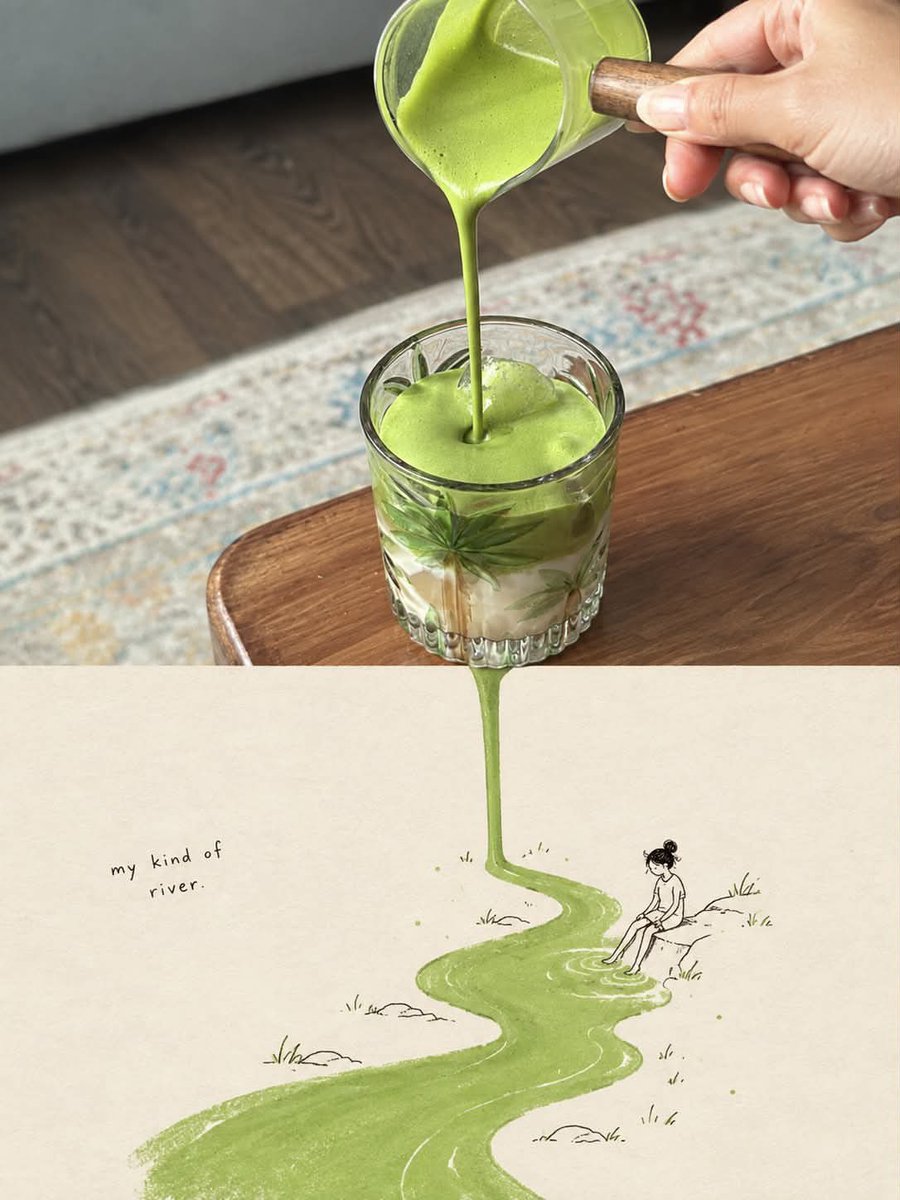
Surreal Food Storybook Illustration
A complex prompt for gpt-image-2 that transforms an uploaded food/object photo into a surreal editorial artwork where the photographed element flows seamlessly into a whimsical hand-drawn storybook illustration below.
Il s'agit d'un exemple de visuel pour la catégorie { GPT Image 2 Illustration et art . Utilisez le visuel ci-dessous pour générer des éléments visuels similaires et vérifiez les conditions d'utilisation (attribution Awesome GPT Image 2 Prompts et droits d'utilisation commerciale) avant toute réutilisation.
Free 1K preview
Generate one preview image instantly, no sign-up required.
Free text preview doesn’t preserve reference-image consistency.
Prompt
invite prête à être copiée
Use the uploaded image as the primary reference and transform it into a vertical 3:4 surreal editorial artwork that seamlessly combines photorealistic food/object photography with a whimsical hand-drawn storybook illustration.

Preserve the main subject, composition, colors, textures, and recognizable details of the original photograph. Keep the upper portion highly photorealistic and naturally lit, with realistic materials, shadows, reflections, depth of field, and authentic photographic detail.

Create a seamless visual transition from the photographed subject into an imaginative illustrated world below. Identify the most visually meaningful element in the photograph—such as a liquid, food ingredient, object, pattern, trail, shadow, or texture—and organically extend it downward into the illustration, transforming it into a river, pathway, landscape, trail, or other creative scene.

The illustrated section should appear on a warm off-white textured paper background, using delicate black ink/pencil linework, subtle watercolor and gouache textures, imperfect handmade details, soft muted colors, and a charming vintage storybook aesthetic. Add small environmental details appropriate to the subject, such as tiny people, plants, rocks, objects, or landscape elements.

Include a short handwritten phrase that naturally relates to the concept and the transformation, positioned subtly within the illustrated area. The typography should look genuinely handwritten, imperfect, minimal, and artistic.

The photograph and illustration must feel like one continuous visual story, not two separate images. Avoid a hard horizontal split, borders, frames, arrows, labels, or obvious digital compositing. The photographed element should physically appear to flow, fall, extend, or transform into the illustrated world.

Aesthetic: poetic, whimsical, clever, minimalist, premium editorial magazine art, surreal but believable, tactile paper texture, natural imperfections, sophisticated visual storytelling.

Composition: vertical 3:4, balanced negative space, strong focal point, seamless transition, high detail, realistic photography + delicate hand-drawn illustration, no unnecessary elements.
Best for
- - Illustration et art visual exploration
- - Image generation and reference-image edits
- - Reusable briefs that keep source attribution visible
Change these parts
- - Subject, product, character, or scene
- - Aspect ratio, camera, lighting, and background
- - Brand, text, color, and output constraints
Recommended model and settings
- - Model: gpt-image-2
- - Input mode: Image vers image
- - Aspect ratio: source
- - Commercial status: review original source
How to use this prompt
- 1. Copy the prompt and preserve its structure for the first test.
- 2. Replace the subject, context, and publishing channel.
- 3. Change one camera, lighting, or style variable per iteration.
- 4. Inspect the output, source, text, and rights before reuse.
Limitations, source, and reuse cautions
- - Generated output is an editable draft, not factual, legal, or rights evidence.
- - Review the linked source, people, brands, logos, text, and third-party media before commercial use.
Plus de cas dans cette catégorie
Priorisé par catégorie, compatibilité du mode d'entrée, qualité et risque moindre.






Réutilisation et notes de source
Utilisez cette invite en toute sécurité après avoir prévisualisé le dossier.
- 1.Copiez l'invite ou ouvrez-la directement dans Dovoo avec le bouton de génération.
- 2.Ajustez les variables, le format d'image et les images de référence en fonction de votre cas d'utilisation.
- 3.Avant toute publication ou utilisation payante, vérifiez les droits d'auteur, les exigences d'attribution et les risques liés à la marque ou à l'image.