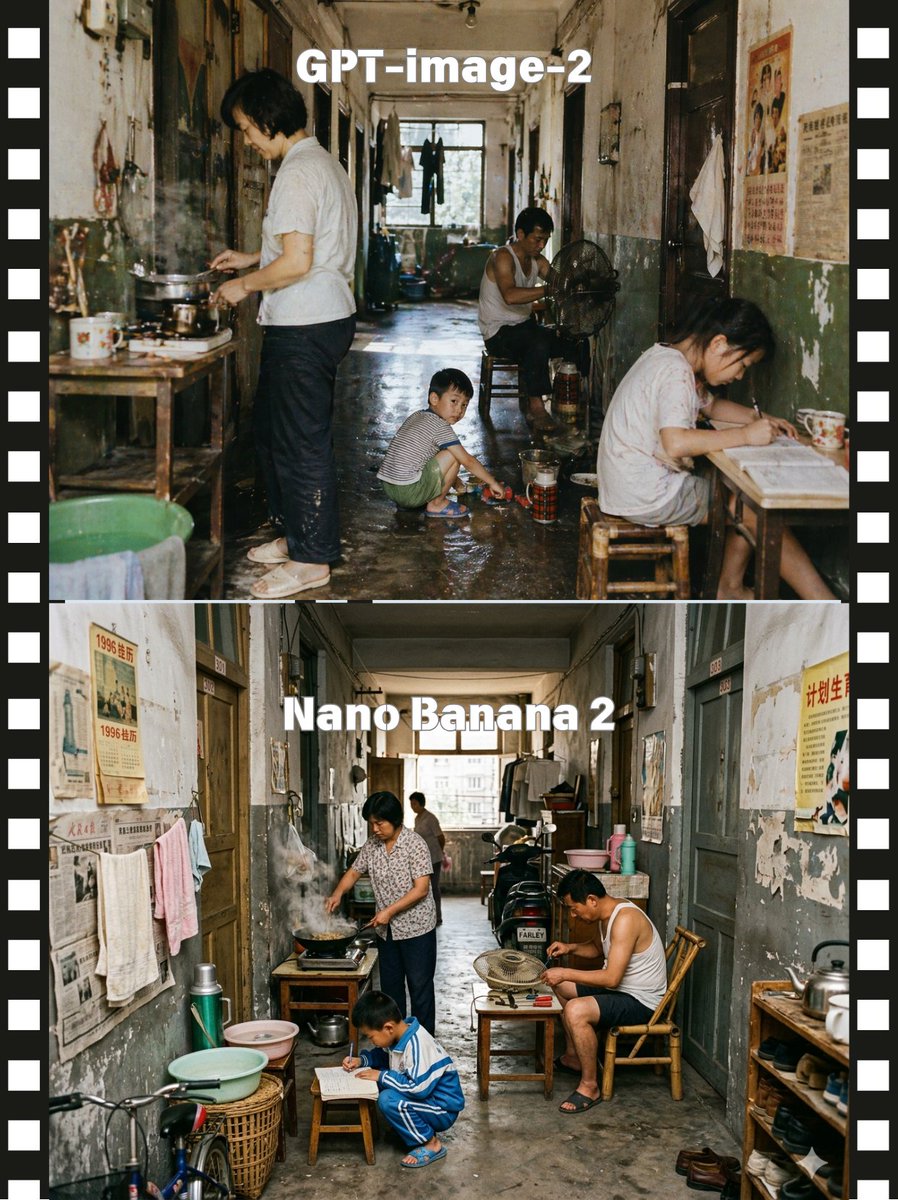
Comparaison de modèles de couloirs empilés
Cette invite génère une image comparative de style pellicule à deux panneaux montrant deux rendus réalistes d'une scène de couloir d'appartement ancien et encombré, utile pour les publications de comparaison de modèles visuels.
Il s'agit d'un exemple de visuel pour la catégorie { GPT Image 2 Intérieur et architecture . Utilisez le visuel ci-dessous pour générer des éléments visuels similaires et vérifiez les conditions d'utilisation (attribution Awesome GPT Image 2 Prompts et droits d'utilisation commerciale) avant toute réutilisation.
Free 1K preview
Generate one preview image instantly, no sign-up required.
Prompt
invite prête à être copiée
A side-by-side comparison image presented as two stacked documentary-style photographs of the same cramped old Chinese apartment corridor, framed by a black filmstrip border with white sprocket holes on both left and right edges. The top half is labeled {argument name="top label" default="GPT-image-2"} in large bold white sans-serif text centered near the top, and the bottom half is labeled {argument name="bottom label" default="Nano Banana 2"} in the same style. Create a gritty, nostalgic, cinematic scene in a long, narrow shared hallway of a worn residential building from the late 20th century, with peeling paint, stained walls, faded propaganda posters and old newspapers on the walls, dark wooden doorways, hanging towels and laundry, a damp concrete floor, and daylight coming from a window at the far end. In the upper scene, show exactly 4 people: 1 adult standing at the left cooking over a small stove on a wooden table with visible steam, 1 adult man sitting deeper in the corridor beside an electric fan, 1 child crouching in the center playing near a basin on the wet floor, and 1 adult woman seated at a small table on the right writing or reading; include enamel mugs, metal pots, stools, buckets, thermos containers, and cluttered household items. In the lower scene, show exactly 4 people again: 1 adult woman at the left cooking at a stove with smoke rising, 1 adult man seated on the right in a bamboo chair leaning over a tabletop fan, 1 child crouching in front writing on paper on a low stool, and 1 distant adult figure near the back window; add more visible corridor clutter including a bicycle front wheel at lower left, wash basins, baskets, thermoses, shelves, shoes, and hanging clothes. Keep the camera straight-on and centered to emphasize the corridor depth, with realistic human proportions, candid slice-of-life behavior, muted aged colors, soft natural light, high detail, photojournalistic realism, and a subtle difference in arrangement between the top and bottom scenes while preserving the same overall environment and mood.Variables d'invite
Espaces réservés aux arguments modifiables présents dans l'invite, avec leurs valeurs par défaut.
Best for
- - Intérieur et architecture visual exploration
- - Image generation and reference-image edits
- - Reusable briefs that keep source attribution visible
Change these parts
- - Subject, product, character, or scene
- - Aspect ratio, camera, lighting, and background
- - Brand, text, color, and output constraints
Recommended model and settings
- - Model: gpt-image-2
- - Input mode: Texte vers image
- - Aspect ratio: source
- - Commercial status: review original source
How to use this prompt
- 1. Copy the prompt and preserve its structure for the first test.
- 2. Replace the subject, context, and publishing channel.
- 3. Change one camera, lighting, or style variable per iteration.
- 4. Inspect the output, source, text, and rights before reuse.
Limitations, source, and reuse cautions
- - Generated output is an editable draft, not factual, legal, or rights evidence.
- - Review the linked source, people, brands, logos, text, and third-party media before commercial use.
Plus de cas dans cette catégorie
Priorisé par catégorie, compatibilité du mode d'entrée, qualité et risque moindre.






Réutilisation et notes de source
Utilisez cette invite en toute sécurité après avoir prévisualisé le dossier.
- 1.Copiez l'invite ou ouvrez-la directement dans Dovoo avec le bouton de génération.
- 2.Ajustez les variables, le format d'image et les images de référence en fonction de votre cas d'utilisation.
- 3.Avant toute publication ou utilisation payante, vérifiez les droits d'auteur, les exigences d'attribution et les risques liés à la marque ou à l'image.