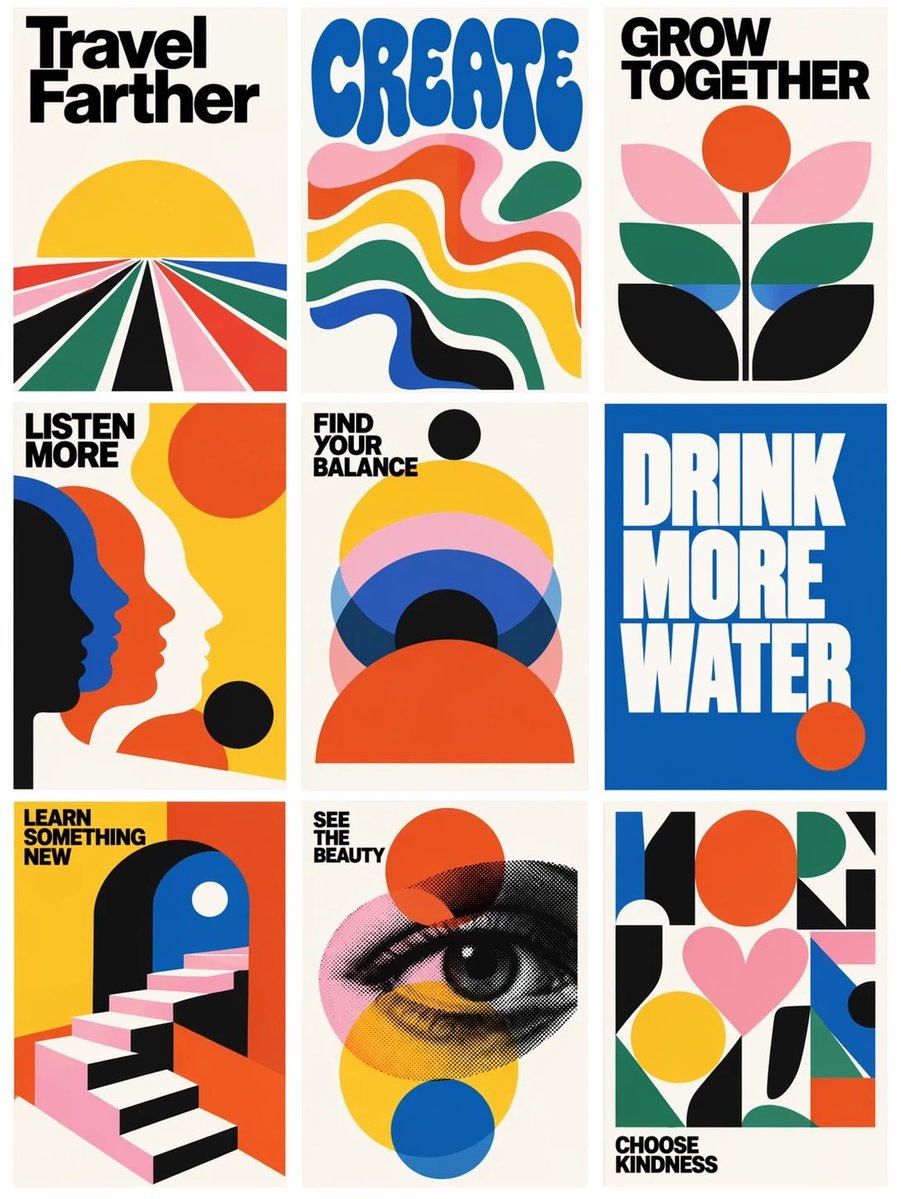
Retro Motivational Poster Grid
Generates a 3x3 gallery of bold vintage-style motivational posters from a reference grid layout.
Il s'agit d'un exemple de visuel pour la catégorie { GPT Image 2 Graphique et affiche . Utilisez le visuel ci-dessous pour générer des éléments visuels similaires et vérifiez les conditions d'utilisation (attribution Awesome GPT Image 2 Prompts et droits d'utilisation commerciale) avant toute réutilisation.
Besoin de l'ensemble complet des invites ? Utilisez le Graphique et affiche Consultez le centre thématique pour plus d'exemples connexes, ou ouvrez le GPT Image 2 catalogue rapide pour l'index complet des exemples, les structures réutilisables et l'attribution des sources.
Free 1K preview
Generate one preview image instantly, no sign-up required.
Free text preview doesn’t preserve reference-image consistency.
2106/4000
Prompt
invite prête à être copiée
Using the provided reference image as a loose layout reference, replace the prompt-library interface with a clean 3-column by 3-row gallery of exactly 9 vertical retro graphic posters. Remove all website UI elements, author names, buttons, borders, Korean interface text, and card metadata. Keep only the idea of a tiled poster grid with narrow gutters on an off-white background.

Style: Bold 1960s–1970s modernist poster design, flat vector shapes, cream paper backgrounds, high-contrast black typography, saturated primary colors, simple geometric compositions, minimal texture, crisp print-poster look.

Create exactly 9 posters, arranged left to right, top to bottom:
1. Poster text: “Travel Farther” — radiating perspective road/fields leading to a yellow sun.
2. Poster text: “CREATE” — large rounded blue psychedelic type above flowing wavy color bands.
3. Poster text: “GROW TOGETHER” — abstract flower with orange sun/circle and layered leaves.
4. Poster text: “LISTEN MORE” — overlapping side-profile silhouettes in black, blue, orange, and cream.
5. Poster text: “FIND YOUR BALANCE” — stacked semicircles and circles in yellow, pink, blue, black, and orange.
6. Poster text: “DRINK MORE WATER” — oversized white block type on a solid blue field with a small orange circle.
7. Poster text: “LEARN SOMETHING NEW” — geometric staircase entering an archway.
8. Poster text: “SEE THE BEAUTY” — halftone illustrated eye over transparent colored circles.
9. Poster text: “CHOOSE KINDNESS” — abstract geometric collage with a pink heart and colorful blocks.

Typography: Use bold condensed sans-serif headline lettering; make the text large, readable, and integrated into each poster. Use the headline set {argument name="poster message theme" default="uplifting lifestyle reminders"} while preserving the exact 9-poster count and grid structure. Use a palette based on {argument name="color palette" default="cream, black, yellow, orange-red, cobalt blue, forest green, and pink"}. Overall composition should feel like {argument name="poster era" default="1970s modernist motivational print posters"}.
Variables d'invite
Espaces réservés aux arguments modifiables présents dans l'invite, avec leurs valeurs par défaut.
Variable
poster message theme
Défaut
uplifting lifestyle reminders
Variable
color palette
Défaut
cream, black, yellow, orange-red, cobalt blue, forest green, and pink
Variable
poster era
Défaut
1970s modernist motivational print posters
Best for
- - Graphique et affiche visual exploration
- - Image generation and reference-image edits
- - Reusable briefs that keep source attribution visible
Change these parts
- - Subject, product, character, or scene
- - Aspect ratio, camera, lighting, and background
- - Brand, text, color, and output constraints
Recommended model and settings
- - Model: gpt-image-2
- - Input mode: Image vers image
- - Aspect ratio: source
- - Commercial status: review original source
How to use this prompt
- 1. Copy the prompt and preserve its structure for the first test.
- 2. Replace the subject, context, and publishing channel.
- 3. Change one camera, lighting, or style variable per iteration.
- 4. Inspect the output, source, text, and rights before reuse.
Limitations, source, and reuse cautions
- - Generated output is an editable draft, not factual, legal, or rights evidence.
- - Review the linked source, people, brands, logos, text, and third-party media before commercial use.
Importé de Awesome GPT Image 2 Prompts . L'attribution est requise. Le statut d'utilisation commerciale est allowed ; veuillez vérifier les droits d'auteur avant toute utilisation payante.
Plus de cas dans cette catégorie
Priorisé par catégorie, compatibilité du mode d'entrée, qualité et risque moindre.

Sci-Fi Cyan Lighting Effect
Image vers image

Stylish Man Street Lamp Portrait
Image vers image

Oversized Head Cartoon Caricature Prompt
Image vers imageRisque moyen

Boisterous Shrimpers Entering Pub
Texte vers image

Cute Focus Desk Flat Lay and Kawaii Illustration
Texte vers image

Cute Speech Bubble Mascot Profile Icon
Texte vers image
Réutilisation et notes de source
Utilisez cette invite en toute sécurité après avoir prévisualisé le dossier.
- 1.Copiez l'invite ou ouvrez-la directement dans Dovoo avec le bouton de génération.
- 2.Ajustez les variables, le format d'image et les images de référence en fonction de votre cas d'utilisation.
- 3.Avant toute publication ou utilisation payante, vérifiez les droits d'auteur, les exigences d'attribution et les risques liés à la marque ou à l'image.