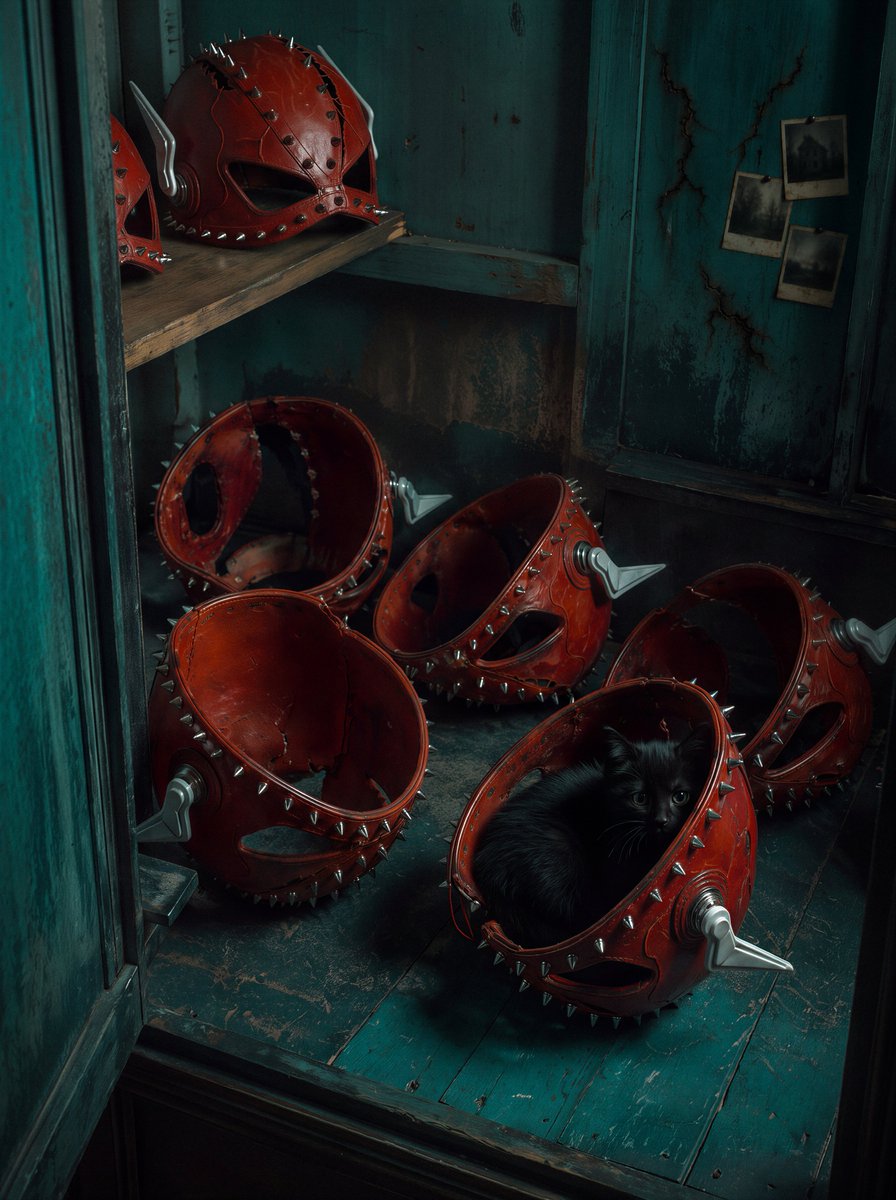
Red Spiked Mask Cabinet Still Life
Transforms a red spiked mask reference into a photorealistic abandoned-cabinet still life with seven helmets and a black cat.
Il s'agit d'un exemple de visuel pour la catégorie { GPT Image 2 Illustration et art . Utilisez le visuel ci-dessous pour générer des éléments visuels similaires et vérifiez les conditions d'utilisation (attribution Awesome GPT Image 2 Prompts et droits d'utilisation commerciale) avant toute réutilisation.
Free 1K preview
Generate one preview image instantly, no sign-up required.
Free text preview doesn’t preserve reference-image consistency.
Prompt
invite prête à être copiée
Using the provided reference image as the design source for the red spiked leather helmet/mask, transform it into a grounded photorealistic still-life scene instead of an action portrait. Remove the wearer and motion trails. Show the mask design as a collection of exactly 7 physical helmets stored in an old teal wooden cabinet: 1 main helmet on the upper shelf, 1 partial helmet cropped at the far upper-left edge, 1 large open helmet at the lower-left front, 1 broken/open helmet behind it, 1 tilted helmet in the lower center, 1 helmet at the lower-right rear, and 1 front-right helmet containing {argument name="animal" default="a small black cat"}. Preserve the red leather, black eye openings, metal studs, silver side fins, cracked seams, and worn handcrafted look from the reference, but make all helmets tangible objects with realistic scuffs and damage.

Add a new environment: {argument name="setting" default="a decayed teal wooden closet or cabinet interior"} with chipped paint, dark shadows, worn planks, grime, and moody cinematic lighting. Add exactly 3 small aged photographs pinned or hanging on the right wall. Use a dark teal-and-red color grade, shallow atmospheric shadows, subtle film grain, and high-detail photorealism. Keep the composition vertical, intimate, and slightly eerie, as if discovered inside an abandoned room. Avoid adding people, text, logos, or extra helmets beyond the 7 listed.
Variables d'invite
Espaces réservés aux arguments modifiables présents dans l'invite, avec leurs valeurs par défaut.
Best for
- - Illustration et art visual exploration
- - Image generation and reference-image edits
- - Reusable briefs that keep source attribution visible
Change these parts
- - Subject, product, character, or scene
- - Aspect ratio, camera, lighting, and background
- - Brand, text, color, and output constraints
Recommended model and settings
- - Model: gpt-image-2
- - Input mode: Image vers image
- - Aspect ratio: source
- - Commercial status: review original source
How to use this prompt
- 1. Copy the prompt and preserve its structure for the first test.
- 2. Replace the subject, context, and publishing channel.
- 3. Change one camera, lighting, or style variable per iteration.
- 4. Inspect the output, source, text, and rights before reuse.
Limitations, source, and reuse cautions
- - Generated output is an editable draft, not factual, legal, or rights evidence.
- - Review the linked source, people, brands, logos, text, and third-party media before commercial use.
Plus de cas dans cette catégorie
Priorisé par catégorie, compatibilité du mode d'entrée, qualité et risque moindre.


Réutilisation et notes de source
Utilisez cette invite en toute sécurité après avoir prévisualisé le dossier.
- 1.Copiez l'invite ou ouvrez-la directement dans Dovoo avec le bouton de génération.
- 2.Ajustez les variables, le format d'image et les images de référence en fonction de votre cas d'utilisation.
- 3.Avant toute publication ou utilisation payante, vérifiez les droits d'auteur, les exigences d'attribution et les risques liés à la marque ou à l'image.