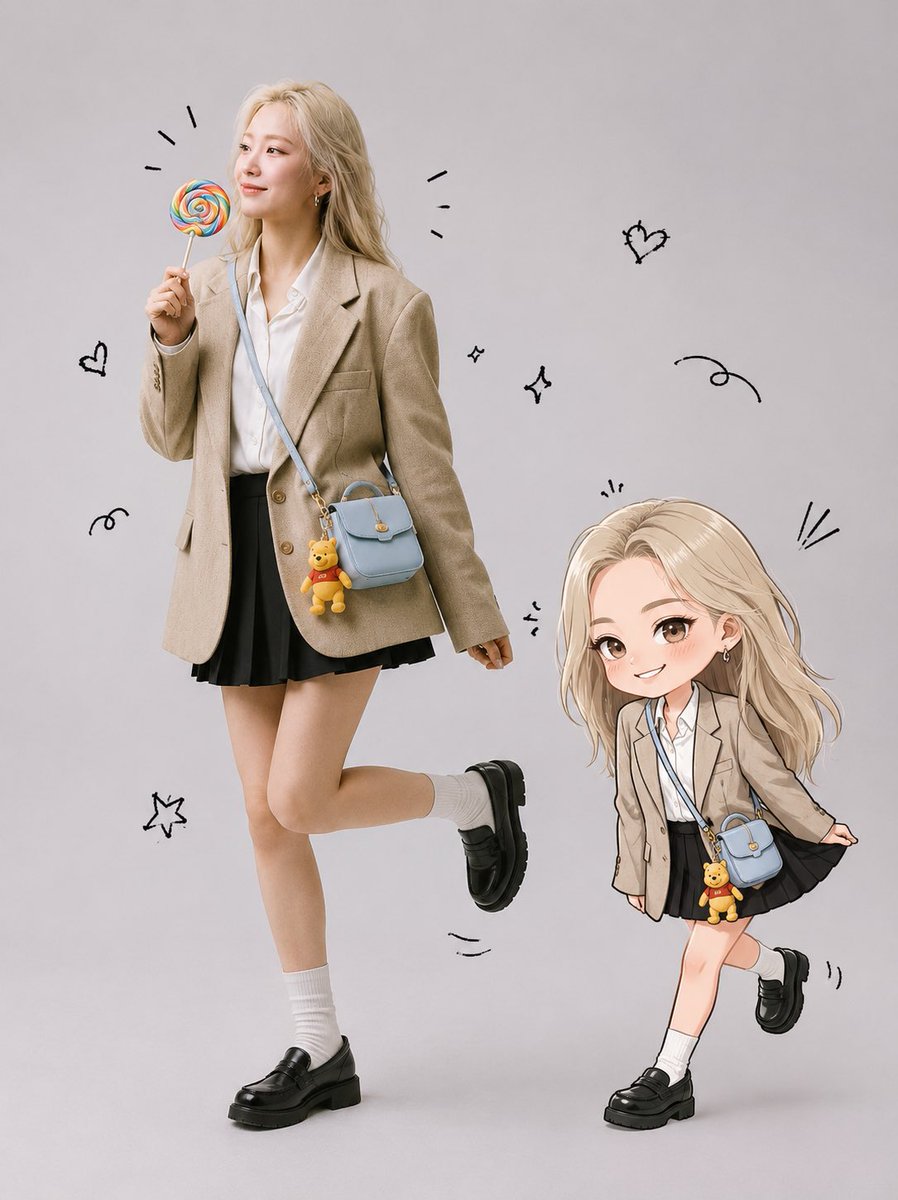
Realistic Portrait and Chibi Combo
Combines a realistic studio portrait based on a reference photo with a matching chibi illustration and playful doodles for a unique fashion aesthetic.
Il s'agit d'un exemple de visuel pour la catégorie { GPT Image 2 Portrait et personnage . Utilisez le visuel ci-dessous pour générer des éléments visuels similaires et vérifiez les conditions d'utilisation (attribution Awesome GPT Image 2 Prompts et droits d'utilisation commerciale) avant toute réutilisation.
Free 1K preview
Generate one preview image instantly, no sign-up required.
Free text preview doesn’t preserve reference-image consistency.
Prompt
invite prête à être copiée
Create a full-body ultra-realistic studio portrait using the uploaded photo as the exact face reference. Preserve the person’s face Identity with no modifications to facial structure, eyes, nose, lips, cheeks, jawline, skin tone, hairstyle, or bangs. Keep the expression natural and cute. Place the person in a {argument name="studio background" default="clean light gray seamless studio background"}. She is standing in a playful pose with one leg lifted slightly behind her, smiling naturally while holding a {argument name="prop" default="colorful rainbow lollipop"} in . Add a {argument name="accessory" default="pastel blue crossbody bag with a small Winnie the Pooh keychain"} hanging from it. Keep her hair exactly as in the original photo. Beside her, create a cute chibi illustration version of the same person with identical hairstyle and bangs, wearing the same outfit and blue bag. The chibi is playfully pulling the hem of her skirt while smiling mischievously. Add hand-drawn black doodles around both characters, including motion lines, excitement marks, tiny sparkles, and playful accents. The overall style should combine a realistic fashion studio photograph with a kawaii hand-drawn illustration. Bright, soft lighting, clean composition, adorable, cheerful, {argument name="aesthetic" default="modern Korean-inspired"} aesthetic, ultra detailed, high resolution, premium quality.Variables d'invite
Espaces réservés aux arguments modifiables présents dans l'invite, avec leurs valeurs par défaut.
Best for
- - Portrait et personnage visual exploration
- - Image generation and reference-image edits
- - Reusable briefs that keep source attribution visible
Change these parts
- - Subject, product, character, or scene
- - Aspect ratio, camera, lighting, and background
- - Brand, text, color, and output constraints
Recommended model and settings
- - Model: gpt-image-2
- - Input mode: Image vers image
- - Aspect ratio: source
- - Commercial status: review original source
How to use this prompt
- 1. Copy the prompt and preserve its structure for the first test.
- 2. Replace the subject, context, and publishing channel.
- 3. Change one camera, lighting, or style variable per iteration.
- 4. Inspect the output, source, text, and rights before reuse.
Limitations, source, and reuse cautions
- - Generated output is an editable draft, not factual, legal, or rights evidence.
- - Review the linked source, people, brands, logos, text, and third-party media before commercial use.
Plus de cas dans cette catégorie
Priorisé par catégorie, compatibilité du mode d'entrée, qualité et risque moindre.






Réutilisation et notes de source
Utilisez cette invite en toute sécurité après avoir prévisualisé le dossier.
- 1.Copiez l'invite ou ouvrez-la directement dans Dovoo avec le bouton de génération.
- 2.Ajustez les variables, le format d'image et les images de référence en fonction de votre cas d'utilisation.
- 3.Avant toute publication ou utilisation payante, vérifiez les droits d'auteur, les exigences d'attribution et les risques liés à la marque ou à l'image.