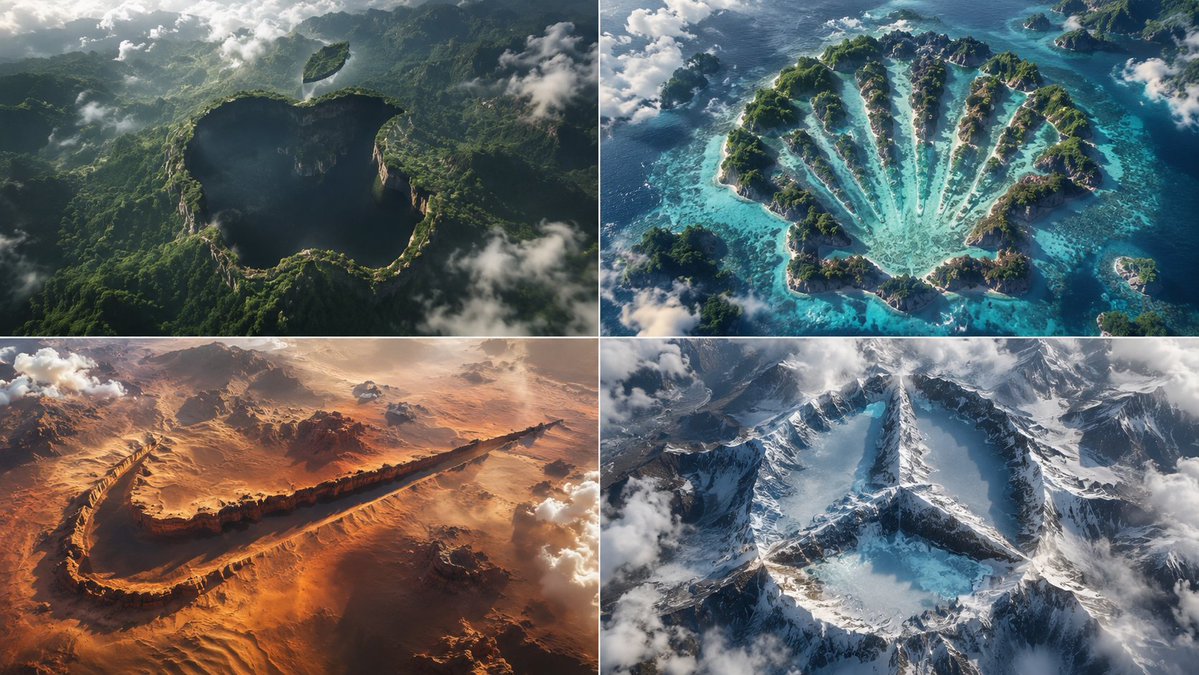
Python-Scripted Hidden Logo Landscape
A highly creative prompt formatted as a Python class to generate pareidolia-style landscapes where logos are hidden as negative space in the terrain.
Il s'agit d'un exemple de visuel pour la catégorie { GPT Image 2 Produit et commercial . Utilisez le visuel ci-dessous pour générer des éléments visuels similaires et vérifiez les conditions d'utilisation (attribution Awesome GPT Image 2 Prompts et droits d'utilisation commerciale) avant toute réutilisation.
Besoin de l'ensemble complet des invites ? Utilisez le Produit et commercial Consultez le centre thématique pour plus d'exemples connexes, ou ouvrez le GPT Image 2 catalogue rapide pour l'index complet des exemples, les structures réutilisables et l'attribution des sources.
Free 1K preview
Generate one preview image instantly, no sign-up required.
1391/4000
Prompt
invite prête à être copiée
2x2 grid, think hard and find different input as and bs that work: class HiddenLogoLandscape: def __init__(self, logo="{argument name="logo name" default="{Input A}"}", biome="{argument name="biome" default="{Input B}"}"): self.logo = logo self.biome = biome self.scene = self.__infer__() def __infer__(self): s = Scene() s.terrain = Terrain() # Carving rule: main logo shape is a negative space drop in the biome's surface s.terrain.negative_carve = self.logo.main_body s.terrain.negative_altitude = -150 # meters drop s.terrain.negative_texture = f"dark {self.biome.material} (shadowed forest, void canyon)" # Floating islands for detached parts s.terrain.floating_islands = [{ "shape": part, "material": f"{self.biome.material} floating landmass", "altitude": +200, "position": "suspended above main shape" } for part in self.logo.detached_elements] s.atmosphere = "swirling clouds, mist, god rays backlight" s.pareidolia = "edges formed organically by trees, cliffs, snow—no smooth vectors" s .camera = "aerial drone, 1:1 framing, high contrast, cinematic" return s def render(self): return NationalGeographicAerial(self.scene) exec(HiddenLogoLandscape().render())Variables d'invite
Espaces réservés aux arguments modifiables présents dans l'invite, avec leurs valeurs par défaut.
Variable
logo name
Défaut
{Input A}
Variable
biome
Défaut
{Input B}
Best for
- - Produit et commercial visual exploration
- - Image generation and reference-image edits
- - Reusable briefs that keep source attribution visible
Change these parts
- - Subject, product, character, or scene
- - Aspect ratio, camera, lighting, and background
- - Brand, text, color, and output constraints
Recommended model and settings
- - Model: gpt-image-2
- - Input mode: Texte vers image
- - Aspect ratio: source
- - Commercial status: review original source
How to use this prompt
- 1. Copy the prompt and preserve its structure for the first test.
- 2. Replace the subject, context, and publishing channel.
- 3. Change one camera, lighting, or style variable per iteration.
- 4. Inspect the output, source, text, and rights before reuse.
Limitations, source, and reuse cautions
- - Generated output is an editable draft, not factual, legal, or rights evidence.
- - Review the linked source, people, brands, logos, text, and third-party media before commercial use.
Importé de Awesome GPT Image 2 Prompts . L'attribution est requise. Le statut d'utilisation commerciale est allowed ; veuillez vérifier les droits d'auteur avant toute utilisation payante.
Plus de cas dans cette catégorie
Priorisé par catégorie, compatibilité du mode d'entrée, qualité et risque moindre.






Réutilisation et notes de source
Utilisez cette invite en toute sécurité après avoir prévisualisé le dossier.
- 1.Copiez l'invite ou ouvrez-la directement dans Dovoo avec le bouton de génération.
- 2.Ajustez les variables, le format d'image et les images de référence en fonction de votre cas d'utilisation.
- 3.Avant toute publication ou utilisation payante, vérifiez les droits d'auteur, les exigences d'attribution et les risques liés à la marque ou à l'image.