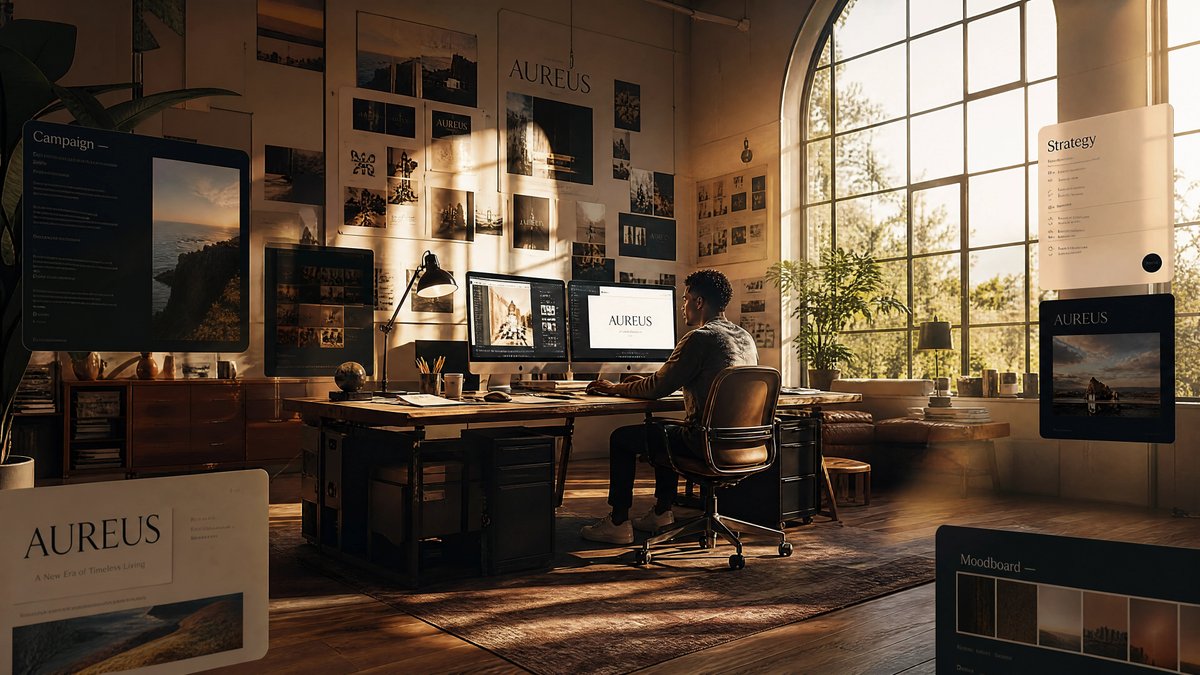
Golden Hour Brand Design Studio
Generates a cinematic premium creative studio scene with floating brand strategy panels, moodboards, and warm design-process atmosphere.
Il s'agit d'un exemple de visuel pour la catégorie { GPT Image 2 Intérieur et architecture . Utilisez le visuel ci-dessous pour générer des éléments visuels similaires et vérifiez les conditions d'utilisation (attribution Awesome GPT Image 2 Prompts et droits d'utilisation commerciale) avant toute réutilisation.
Free 1K preview
Generate one preview image instantly, no sign-up required.
Free text preview doesn’t preserve reference-image consistency.
Prompt
invite prête à être copiée
Create a cinematic ultra-realistic wide-angle scene of a premium brand design studio called {argument name="brand name" default="AUREUS"}, filled with warm golden-hour light and immersive creative-direction energy. The room is a spacious loft with tall beige walls, polished wood floors, a large arched industrial window on the right, sunlight streaming through trees outside, long shadows, indoor plants, vintage wooden furniture, and a richly textured rug. At the center, show one creative director seated in a brown leather office chair at a large wooden desk, viewed from behind in three-quarter profile, working on a dual-monitor workstation; one monitor shows a brand presentation with the {argument name="brand name" default="AUREUS"} wordmark, and the other shows a design/editing interface with imagery. Add desk details including a black task lamp, pencils in a cup, papers, notebooks, keyboard, mouse, coffee cup, small globe, and stacked design materials. Cover the back wall with a dense physical moodboard: exactly 24 pinned brand references and photo prints, mixing landscape photography, campaign imagery, typography samples, dark premium color studies, and logo lockups, with one large central brand poster reading {argument name="brand name" default="AUREUS"}. Add exactly 5 floating translucent UI panels around the studio: 1 large black “Campaign” panel on the left with a vertical landscape image and small text rows, 1 large cream brand card in the lower left with the {argument name="brand name" default="AUREUS"} logo and the tagline {argument name="tagline" default="A New Era of Timeless Living"}, 1 slim cream “Strategy” panel near the right window with checklist-like rows and a small dark circular button, 1 black brand preview card on the mid-right showing the {argument name="brand name" default="AUREUS"} logo above a moody coastal image, and 1 black “Moodboard” panel in the lower right with five visible color/photo swatches. The visual tone should feel like dream studio vibes: high-end branding, premium visuals, floating moodboards, fully inside the design process, warm amber highlights, soft dust in the air, realistic reflections, shallow depth of field, elegant serif typography, dark charcoal and cream interface cards, no cluttered unreadable text beyond the specified labels, no watermark.Variables d'invite
Espaces réservés aux arguments modifiables présents dans l'invite, avec leurs valeurs par défaut.
Best for
- - Intérieur et architecture visual exploration
- - Image generation and reference-image edits
- - Reusable briefs that keep source attribution visible
Change these parts
- - Subject, product, character, or scene
- - Aspect ratio, camera, lighting, and background
- - Brand, text, color, and output constraints
Recommended model and settings
- - Model: gpt-image-2
- - Input mode: Image vers image
- - Aspect ratio: source
- - Commercial status: review original source
How to use this prompt
- 1. Copy the prompt and preserve its structure for the first test.
- 2. Replace the subject, context, and publishing channel.
- 3. Change one camera, lighting, or style variable per iteration.
- 4. Inspect the output, source, text, and rights before reuse.
Limitations, source, and reuse cautions
- - Generated output is an editable draft, not factual, legal, or rights evidence.
- - Review the linked source, people, brands, logos, text, and third-party media before commercial use.
Plus de cas dans cette catégorie
Priorisé par catégorie, compatibilité du mode d'entrée, qualité et risque moindre.






Réutilisation et notes de source
Utilisez cette invite en toute sécurité après avoir prévisualisé le dossier.
- 1.Copiez l'invite ou ouvrez-la directement dans Dovoo avec le bouton de génération.
- 2.Ajustez les variables, le format d'image et les images de référence en fonction de votre cas d'utilisation.
- 3.Avant toute publication ou utilisation payante, vérifiez les droits d'auteur, les exigences d'attribution et les risques liés à la marque ou à l'image.