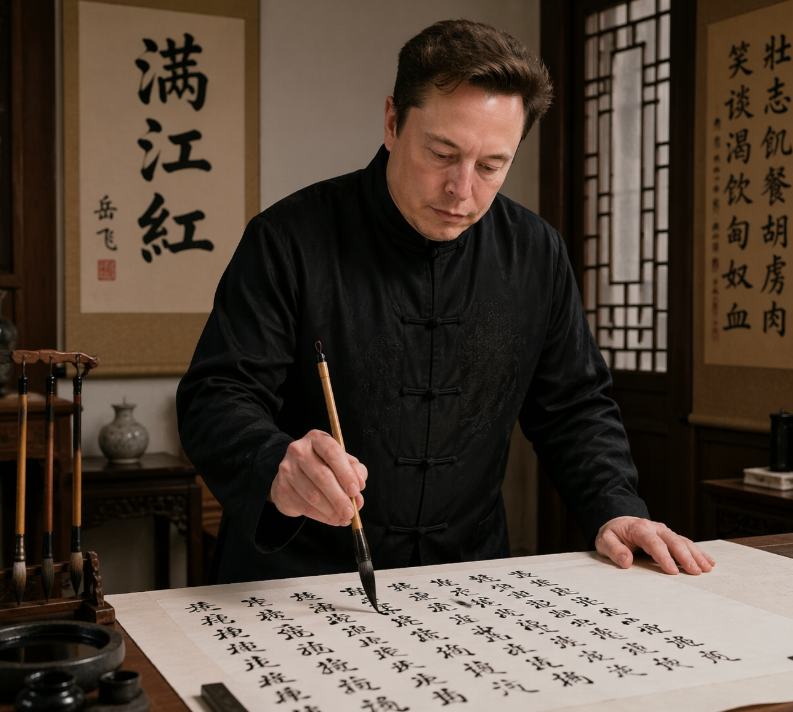
Scène photoréaliste d'un érudit en calligraphie
Ce sujet permet de créer un portrait réaliste d'une personnalité célèbre du monde de la technologie écrivant de la calligraphie chinoise dans un bureau traditionnel, idéal pour la satire éditoriale, les mélanges culturels ou les publications comparatives sur les réseaux sociaux.
Il s'agit d'un exemple de visuel pour la catégorie { GPT Image 2 Portrait et personnage . Utilisez le visuel ci-dessous pour générer des éléments visuels similaires et vérifiez les conditions d'utilisation (attribution Awesome GPT Image 2 Prompts et droits d'utilisation commerciale) avant toute réutilisation.
Free 1K preview
Generate one preview image instantly, no sign-up required.
Prompt
invite prête à être copiée
A realistic indoor portrait of {argument name="subject" default="Elon Musk"} standing at a traditional Chinese writing desk, practicing brush calligraphy on a large sheet of rice paper. He wears a black Tang-style Chinese jacket with frog-button closures and subtle embroidered texture, leaning slightly forward with one hand resting on the table and the other holding a calligraphy brush vertically over the paper. The scene is a warm, elegant scholar's studio with dark wooden furniture, a carved brush stand holding exactly 4 hanging calligraphy brushes on the left, an ink stone and small ink containers in the lower-left foreground, and a small ceramic vase on a side table in the back. Behind him are exactly 2 vertical hanging scrolls: the left scroll prominently displays the large characters {argument name="left scroll text" default="Full River Red"}, and the right scroll contains a longer column of Chinese calligraphy. A wooden lattice window appears on the right side, letting in soft ambient light. The paper on the desk is filled with many lines of black Chinese calligraphy in flowing semi-cursive script, suggesting he is writing {argument name="written poem" default="《Full River Red》"}. Use a documentary-style, photorealistic aesthetic with cinematic warm lighting, rich wood tones, authentic calligraphy tools, shallow depth of field, waist-up composition, and a serious, focused atmosphere.Variables d'invite
Espaces réservés aux arguments modifiables présents dans l'invite, avec leurs valeurs par défaut.
Best for
- - Portrait et personnage visual exploration
- - Image generation and reference-image edits
- - Reusable briefs that keep source attribution visible
Change these parts
- - Subject, product, character, or scene
- - Aspect ratio, camera, lighting, and background
- - Brand, text, color, and output constraints
Recommended model and settings
- - Model: gpt-image-2
- - Input mode: Texte vers image
- - Aspect ratio: source
- - Commercial status: review original source
How to use this prompt
- 1. Copy the prompt and preserve its structure for the first test.
- 2. Replace the subject, context, and publishing channel.
- 3. Change one camera, lighting, or style variable per iteration.
- 4. Inspect the output, source, text, and rights before reuse.
Limitations, source, and reuse cautions
- - Generated output is an editable draft, not factual, legal, or rights evidence.
- - Review the linked source, people, brands, logos, text, and third-party media before commercial use.
Plus de cas dans cette catégorie
Priorisé par catégorie, compatibilité du mode d'entrée, qualité et risque moindre.






Réutilisation et notes de source
Utilisez cette invite en toute sécurité après avoir prévisualisé le dossier.
- 1.Copiez l'invite ou ouvrez-la directement dans Dovoo avec le bouton de génération.
- 2.Ajustez les variables, le format d'image et les images de référence en fonction de votre cas d'utilisation.
- 3.Avant toute publication ou utilisation payante, vérifiez les droits d'auteur, les exigences d'attribution et les risques liés à la marque ou à l'image.