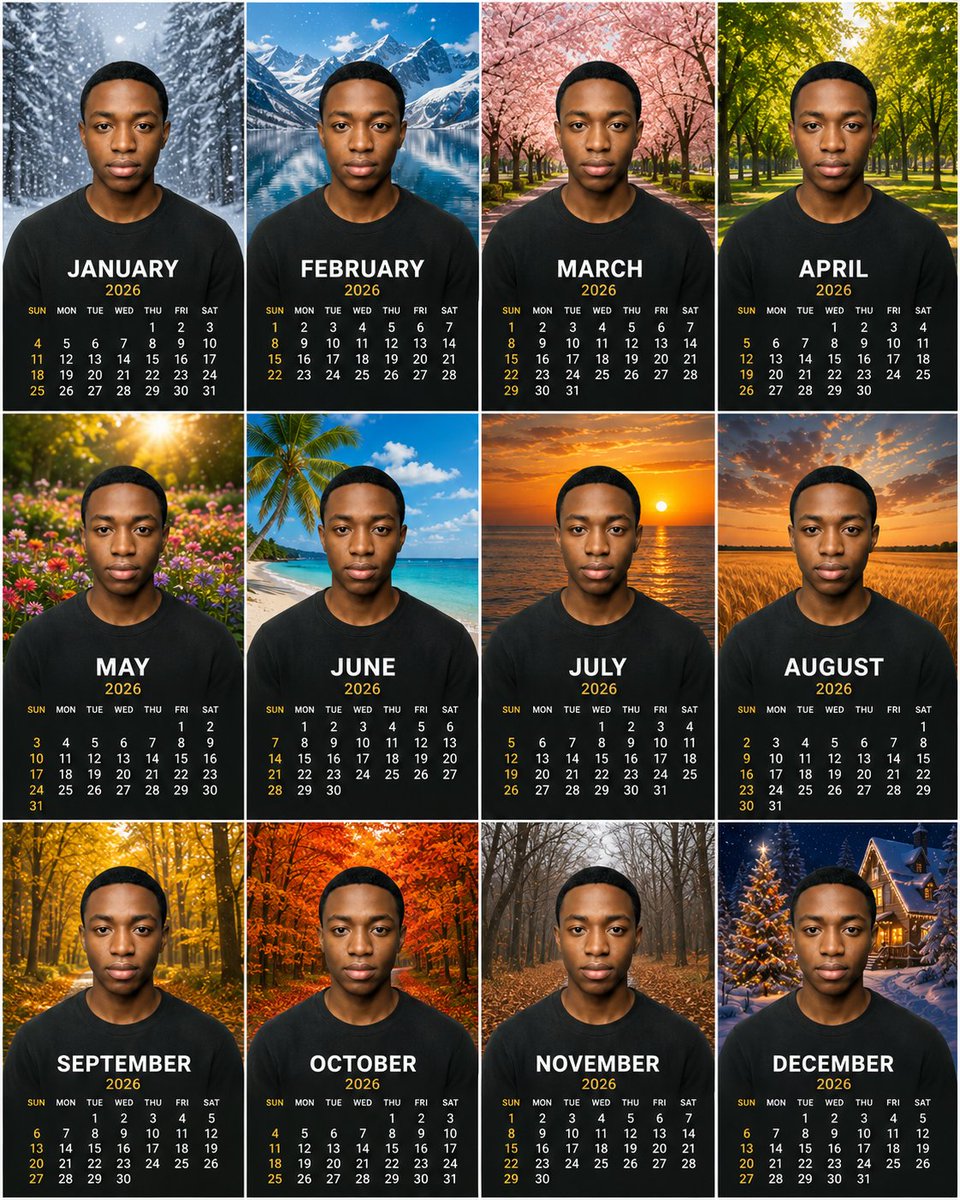
Personalized 2026 Portrait Calendar
Generates a premium 12-month photorealistic portrait calendar poster with seasonal backgrounds and consistent subject identity.
Il s'agit d'un exemple de visuel pour la catégorie { GPT Image 2 Produit et commercial . Utilisez le visuel ci-dessous pour générer des éléments visuels similaires et vérifiez les conditions d'utilisation (attribution Awesome GPT Image 2 Prompts et droits d'utilisation commerciale) avant toute réutilisation.
Besoin de l'ensemble complet des invites ? Utilisez le Produit et commercial Consultez le centre thématique pour plus d'exemples connexes, ou ouvrez le GPT Image 2 catalogue rapide pour l'index complet des exemples, les structures réutilisables et l'attribution des sources.
Free 1K preview
Generate one preview image instantly, no sign-up required.
3180/4000
Prompt
invite prête à être copiée
Objective: To create a high-end, photorealistic 12-month calendar poster for {argument name="year" default="2026"}, using the same centered portrait subject in each month panel.

Canvas: A square 4:3 ratio poster layout arranged in a clean 3x4 grid, with thin white lines separating the panels. Each panel is a vertical calendar card with the subject centered in the foreground, showing from the chest up.

Subject Details: A young Black man with a short, dark haircut and smooth medium-brown skin tone, with a neutral and serious expression, looking directly at the camera. He is wearing a plain black crew-neck t-shirt in each panel. Maintain consistent facial features, pose, proportions, facial lighting, and clothing across all 12 panels, as if the same portrait is composited into different seasonal scenes. Use {argument name="subject description" default="black"}.

Layout and Text: Each of the 12 panels contains a large, bold, white, uppercase month name below the chest area, followed by smaller gold-colored year text, and then a compact calendar grid below that. Weekday labels are small white text: SUN MON TUE WED THU FRI SAT, with Sundays and key dates highlighted in warm gold. Use a clean, high-end sans-serif font, high contrast, centered alignment, and ensure accurate month layouts for the current year.

Create 12 calendar panels, in the following order and seasonal backgrounds:
1. JANUARY — A snowy evergreen forest path, falling snowflakes, a cold blue-toned winter atmosphere.
2. FEBRUARY — A bright alpine lake, snow-covered mountains, and a clear blue sky.
3. MARCH — A pink cherry blossom avenue, trees arching over the walkway.
4. APRIL — A lush green park or forest, sunlight filtering through fresh spring leaves.
5. MAY — A colorful garden, warm golden sunlight, and blooming flowers.
6. JUNE — A tropical beach, palm trees, turquoise water, white sand, and a blue sky.
7. JULY — An orange sunset over the ocean, the sun near the horizon with golden reflections.
8. AUGUST — A golden wheat field at sunset, with dramatic warm-colored clouds.
9. SEPTEMBER — A yellow autumn forest, shimmering leaves, and a forest path.
10. OCTOBER — A vibrant red-orange autumn forest, dense autumn foliage.
11. NOVEMBER — A late autumn bare forest path, brown fallen leaves, and a soft gray atmosphere.
12. DECEMBER — A snowy Christmas village scene, decorated lit trees, and warm cabin lights at night.

Visual Style: Hyperrealistic, high-end print design, sharp high-resolution photography, cinematic seasonal backgrounds, consistent portrait proportions, balanced exposure, realistic depth of field, refined commercial calendar aesthetics. Use {argument name="calendar style" default="2026"} and {argument name="shirt color" default="Black"}.

Constraints: Do not include extra months, do not repeat panels, do not include logos, do not include watermarks, and do not include decorative borders other than the thin white grid lines. Maintain completely identical facial features and centered pose across all 12 panels. All month names should remain in English uppercase, and ensure the final composition presents clearly as a complete 12-month calendar poster.
Variables d'invite
Espaces réservés aux arguments modifiables présents dans l'invite, avec leurs valeurs par défaut.
Variable
year
Défaut
2026
Variable
subject description
Défaut
black
Variable
calendar style
Défaut
2026
Variable
shirt color
Défaut
Black
Best for
- - Produit et commercial visual exploration
- - Image generation and reference-image edits
- - Reusable briefs that keep source attribution visible
Change these parts
- - Subject, product, character, or scene
- - Aspect ratio, camera, lighting, and background
- - Brand, text, color, and output constraints
Recommended model and settings
- - Model: gpt-image-2
- - Input mode: Texte vers image
- - Aspect ratio: source
- - Commercial status: review original source
How to use this prompt
- 1. Copy the prompt and preserve its structure for the first test.
- 2. Replace the subject, context, and publishing channel.
- 3. Change one camera, lighting, or style variable per iteration.
- 4. Inspect the output, source, text, and rights before reuse.
Limitations, source, and reuse cautions
- - Generated output is an editable draft, not factual, legal, or rights evidence.
- - Review the linked source, people, brands, logos, text, and third-party media before commercial use.
Importé de Awesome GPT Image 2 Prompts . L'attribution est requise. Le statut d'utilisation commerciale est allowed ; veuillez vérifier les droits d'auteur avant toute utilisation payante.
Plus de cas dans cette catégorie
Priorisé par catégorie, compatibilité du mode d'entrée, qualité et risque moindre.

Transparent Earbuds on Stone Pedestal
Texte vers image

Overhead Pepperoni Pizza Photo
Texte vers image

Wet Transparent Earbud Macro
Texte vers image

Manga Desert Radio Telescope Road Trip
Texte vers image

Imperial Research Bunker on Volcanic Planet
Texte vers image

Android Quantum Lab Workstation
Texte vers image
Réutilisation et notes de source
Utilisez cette invite en toute sécurité après avoir prévisualisé le dossier.
- 1.Copiez l'invite ou ouvrez-la directement dans Dovoo avec le bouton de génération.
- 2.Ajustez les variables, le format d'image et les images de référence en fonction de votre cas d'utilisation.
- 3.Avant toute publication ou utilisation payante, vérifiez les droits d'auteur, les exigences d'attribution et les risques liés à la marque ou à l'image.