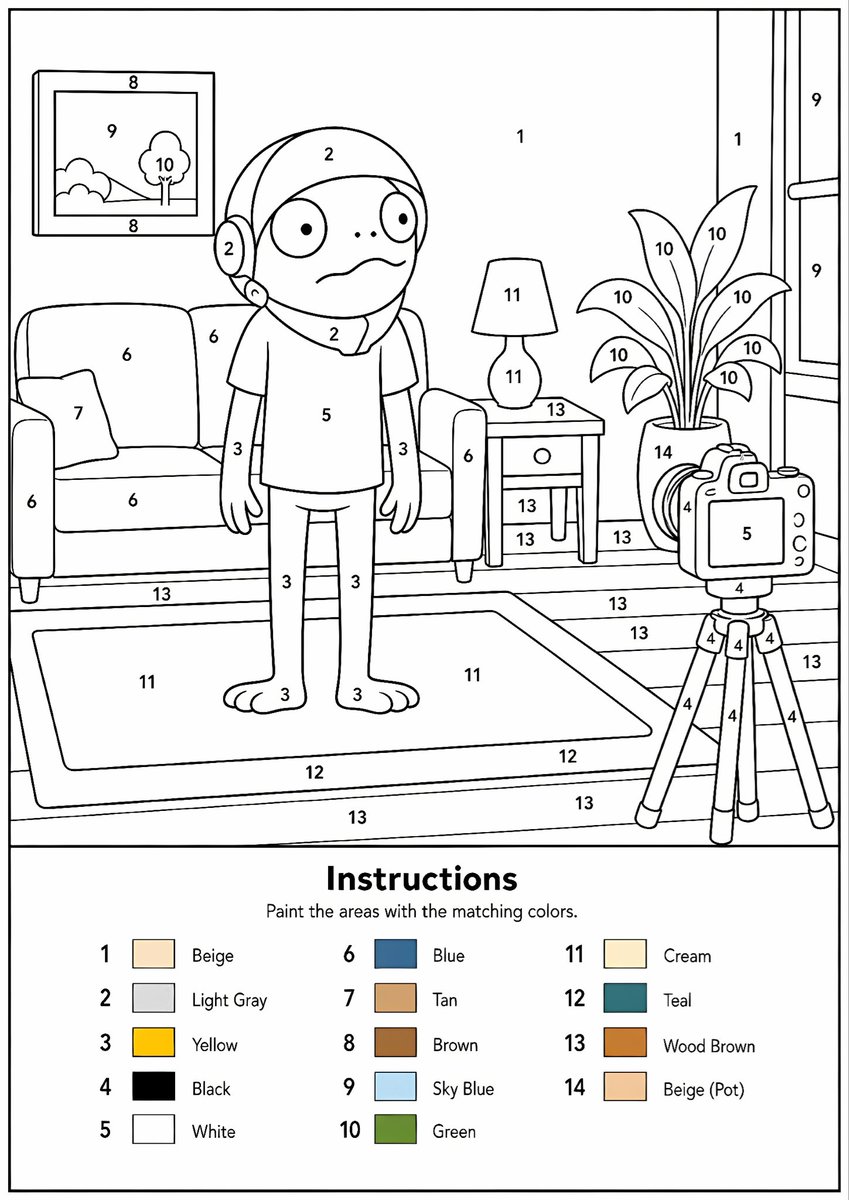
Feuille de travail de peinture par numéros pour le salon
Génère une feuille de coloriage imprimable au format A4, de type « peinture par numéros », avec une scène de salon de dessin animé numérotée et une légende de 14 couleurs.
Il s'agit d'un exemple de visuel pour la catégorie { GPT Image 2 Illustration et art . Utilisez le visuel ci-dessous pour générer des éléments visuels similaires et vérifiez les conditions d'utilisation (attribution Awesome GPT Image 2 Prompts et droits d'utilisation commerciale) avant toute réutilisation.
Free 1K preview
Generate one preview image instantly, no sign-up required.
Prompt
invite prête à être copiée
Goal: Create a printable paint-by-numbers worksheet showing a cartoon living room scene with a child-like character standing in the center, designed as clean black-and-white line art with numbered regions and a color legend.

Canvas: A4 portrait page at 300 DPI, white background, thin black outer border, crisp vector-like outlines, no shading except the tiny color swatches in the legend. The main illustration fills the upper roughly 70% of the page, and the instruction/color-key panel fills the bottom roughly 30%.

Main illustration layout: Draw a cozy living room in simple rounded cartoon style. Center: one standing cartoon character with large round eyes, small dot nose, worried wavy mouth, hood or helmet-like hair/head covering, short-sleeve shirt, slim arms, long pants, and bare feet. Left: one sofa with two seat/back cushions, one armrest visible on each side, and one small throw pillow. Above the sofa: one framed wall picture containing a small landscape with hills, sky, and one tree. Right of the character: one side table with a lamp on top and one drawer; behind/right is one tall potted plant with exactly 10 visible leaves. Far right: one camera on a tripod aimed at the character, with a screen/body, lens/buttons, and exactly three tripod legs. Background includes a wall, a large window on the right with vertical panes, a floor with wood plank lines, and a large rectangular rug in the foreground.

Numbered paint areas: Place black numbers inside the line-art regions throughout the scene, using numbers 1 through 14. Use many repeated numbers on matching surfaces. Keep the numbers legible and centered in their shapes. Match the apparent assignments: 1 for beige wall areas, 2 for light gray head/hood areas, 3 for yellow skin/limbs, 4 for black camera/tripod details, 5 for white shirt and camera screen, 6 for blue sofa, 7 for tan pillow, 8 for brown picture frame, 9 for sky blue window/picture sky, 10 for green plant/tree leaves, 11 for cream lamp/rug interior, 12 for teal rug border, 13 for wood-brown floor/table/plank areas, and 14 for beige plant pot.

Bottom instruction panel: Add a horizontal divider line above the legend. Center a bold title reading {argument name="instruction title" default="Instructions"}. Under it, add smaller text reading {argument name="instruction subtitle" default="Paint the areas with the matching colors."}. Below, arrange exactly 14 color legend entries in three neat columns. Each entry has a number, a small filled color square, and an English color label. The 14 entries must be: 1 Beige, 2 Light Gray, 3 Yellow, 4 Black, 5 White, 6 Blue, 7 Tan, 8 Brown, 9 Sky Blue, 10 Green, 11 Cream, 12 Teal, 13 Wood Brown, 14 Beige (Pot).

Style constraints: Make it look like a polished printable worksheet for children, with smooth uniform black outlines, rounded friendly shapes, lots of enclosed regions suitable for coloring, no gradients, no realistic textures, no extra text, no watermark. Subject can be customized as {argument name="central character" default="a worried cartoon child-like figure"}, setting as {argument name="room setting" default="cozy living room"}, and palette as {argument name="color palette" default="14-color paint-by-numbers palette"}.
Variables d'invite
Espaces réservés aux arguments modifiables présents dans l'invite, avec leurs valeurs par défaut.
Best for
- - Illustration et art visual exploration
- - Image generation and reference-image edits
- - Reusable briefs that keep source attribution visible
Change these parts
- - Subject, product, character, or scene
- - Aspect ratio, camera, lighting, and background
- - Brand, text, color, and output constraints
Recommended model and settings
- - Model: gpt-image-2
- - Input mode: Texte vers image
- - Aspect ratio: source
- - Commercial status: review original source
How to use this prompt
- 1. Copy the prompt and preserve its structure for the first test.
- 2. Replace the subject, context, and publishing channel.
- 3. Change one camera, lighting, or style variable per iteration.
- 4. Inspect the output, source, text, and rights before reuse.
Limitations, source, and reuse cautions
- - Generated output is an editable draft, not factual, legal, or rights evidence.
- - Review the linked source, people, brands, logos, text, and third-party media before commercial use.
Plus de cas dans cette catégorie
Priorisé par catégorie, compatibilité du mode d'entrée, qualité et risque moindre.






Réutilisation et notes de source
Utilisez cette invite en toute sécurité après avoir prévisualisé le dossier.
- 1.Copiez l'invite ou ouvrez-la directement dans Dovoo avec le bouton de génération.
- 2.Ajustez les variables, le format d'image et les images de référence en fonction de votre cas d'utilisation.
- 3.Avant toute publication ou utilisation payante, vérifiez les droits d'auteur, les exigences d'attribution et les risques liés à la marque ou à l'image.