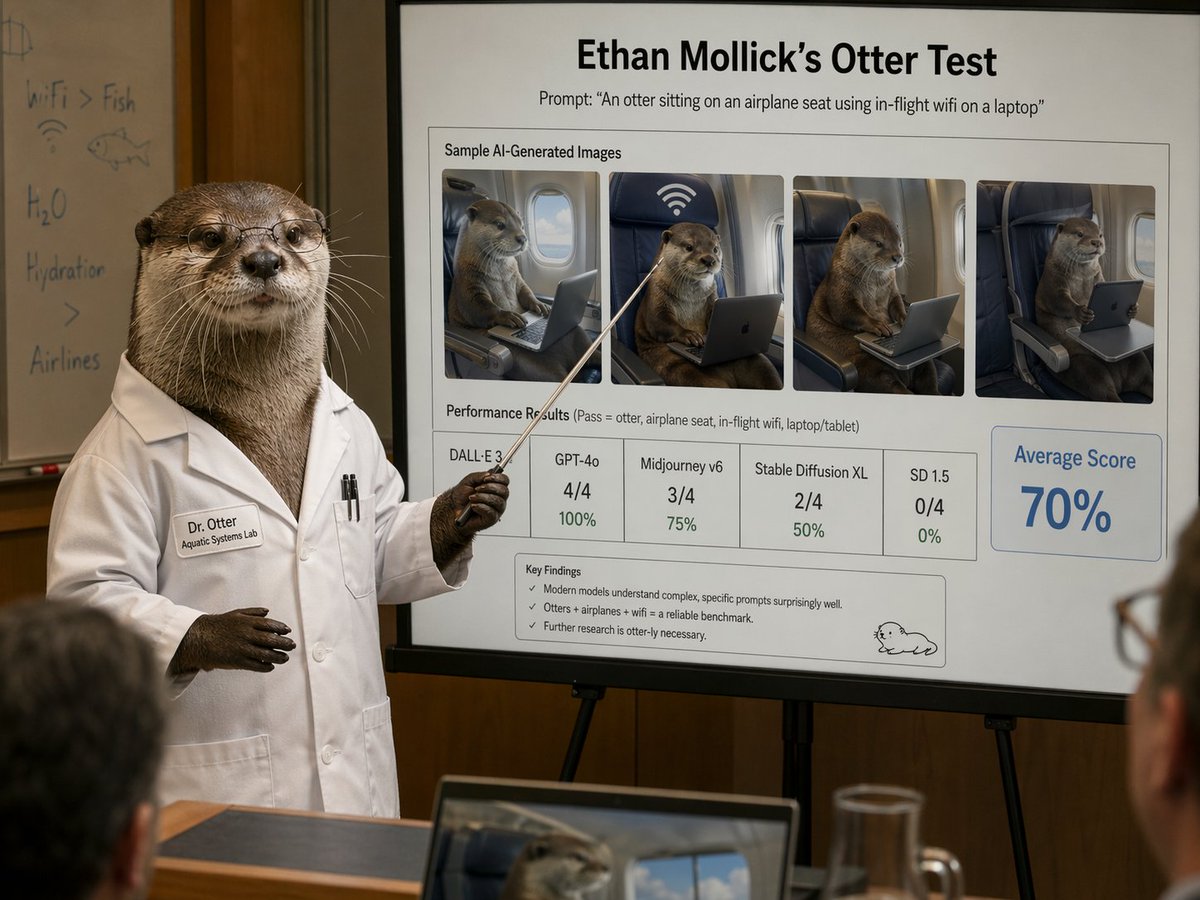
Diapositive de présentation du scientifique spécialiste des loutres
Une scène de conférence humoristique photoréaliste montrant une loutre en blouse blanche présentant une diapositive de référence soignée sur les images de loutres générées par l'IA, idéale pour la satire, les publications sur les réseaux sociaux ou les démonstrations d'IA de style éditorial.
Il s'agit d'un exemple de visuel pour la catégorie { GPT Image 2 Graphique et affiche . Utilisez le visuel ci-dessous pour générer des éléments visuels similaires et vérifiez les conditions d'utilisation (attribution Awesome GPT Image 2 Prompts et droits d'utilisation commerciale) avant toute réutilisation.
Free 1K preview
Generate one preview image instantly, no sign-up required.
Prompt
invite prête à être copiée
A photorealistic humorous academic presentation in a conference room: an anthropomorphic otter scientist stands at the left side of the frame wearing a crisp white lab coat and holding a thin pointing stick toward a large presentation board on an easel. The otter is upright like a human, with realistic brown fur, dark paws, and a professional posture. The lab coat has a stitched name tag reading "Dr. Otter" and a smaller line reading "Aquatic Systems Lab," plus two pens in the chest pocket. Show every face clearly with natural, detailed facial features. Behind the otter is a whiteboard with faint handwritten notes and doodles, including "WiFi > Fish," "H2O," "Hydration," a fish sketch, and a wifi symbol. The main focus is a large clean presentation slide with sharp readable text and polished corporate-academic layout. At the top, a bold title reads "{argument name="headline text" default="Ethan Mollick’s Otter Test"}" and beneath it a subtitle reads "Prompt: \"{argument name="prompt text" default="An otter sitting on an airplane seat using in-flight wifi on a laptop"}\"". Below that is a boxed section titled "Sample AI-Generated Images" containing exactly 4 side-by-side sample images of a realistic otter seated in an airplane seat using a laptop or tablet, each framed like model outputs, with one showing a large wifi symbol above the seat. Beneath the images is a section labeled "Performance Results (Pass = otter, airplane seat, in-flight wifi, laptop/tablet)" with exactly 5 score boxes: "DALL·E 3" with no visible numeric score, "GPT-4o" with "4/4" and "100%", "Midjourney v6" with "3/4" and "75%", "Stable Diffusion XL" with "2/4" and "50%", and "SD 1.5" with "0/4" and "0%". On the right side is a large highlighted box reading "Average Score" and "{argument name="average score" default="70%"}" in large blue type. At the bottom of the slide is a "Key Findings" box with exactly 3 bullet points: "Modern models understand complex, specific prompts surprisingly well.", "Otters + airplanes + wifi = a reliable benchmark.", and "Further research is otter-ly necessary." A small simple cartoon otter doodle appears in the lower-right corner of the slide. The room is warmly lit with wood-paneled walls, shallow depth of field, and a few blurred audience members in the foreground, including a laptop at the bottom edge showing an otter image on its screen and a glass pitcher on a table. Style: ultra-realistic editorial photography, deadpan scientific satire, believable conference presentation, high detail, natural indoor lighting, professional lens compression, readable slide typography, polished yet absurd.Variables d'invite
Espaces réservés aux arguments modifiables présents dans l'invite, avec leurs valeurs par défaut.
Best for
- - Graphique et affiche visual exploration
- - Image generation and reference-image edits
- - Reusable briefs that keep source attribution visible
Change these parts
- - Subject, product, character, or scene
- - Aspect ratio, camera, lighting, and background
- - Brand, text, color, and output constraints
Recommended model and settings
- - Model: gpt-image-2
- - Input mode: Texte vers image
- - Aspect ratio: source
- - Commercial status: review original source
How to use this prompt
- 1. Copy the prompt and preserve its structure for the first test.
- 2. Replace the subject, context, and publishing channel.
- 3. Change one camera, lighting, or style variable per iteration.
- 4. Inspect the output, source, text, and rights before reuse.
Limitations, source, and reuse cautions
- - Generated output is an editable draft, not factual, legal, or rights evidence.
- - Review the linked source, people, brands, logos, text, and third-party media before commercial use.
Plus de cas dans cette catégorie
Priorisé par catégorie, compatibilité du mode d'entrée, qualité et risque moindre.






Réutilisation et notes de source
Utilisez cette invite en toute sécurité après avoir prévisualisé le dossier.
- 1.Copiez l'invite ou ouvrez-la directement dans Dovoo avec le bouton de génération.
- 2.Ajustez les variables, le format d'image et les images de référence en fonction de votre cas d'utilisation.
- 3.Avant toute publication ou utilisation payante, vérifiez les droits d'auteur, les exigences d'attribution et les risques liés à la marque ou à l'image.