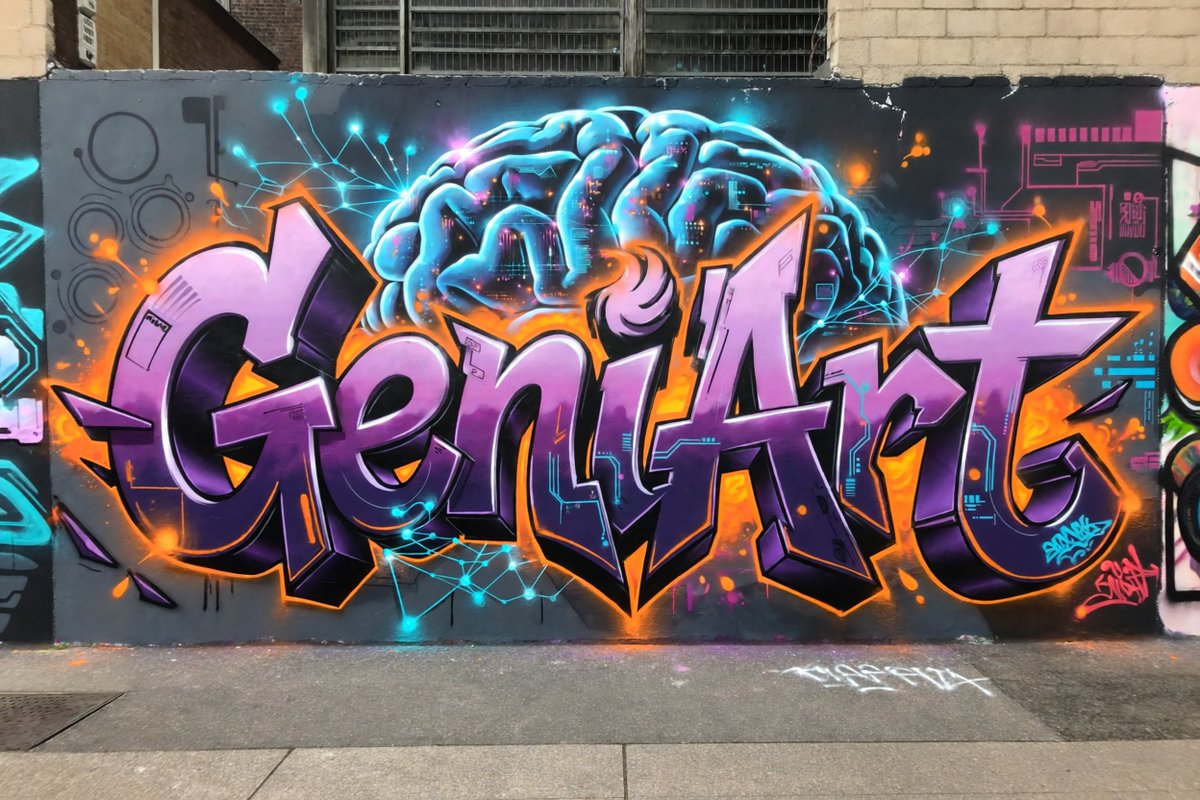
Neon Brain Graffiti Mural
A photorealistic prompt for generating a cyberpunk-inspired graffiti mural with purple lettering and a glowing neural brain on an urban wall.
Il s'agit d'un exemple de visuel pour la catégorie { GPT Image 2 Illustration et art . Utilisez le visuel ci-dessous pour générer des éléments visuels similaires et vérifiez les conditions d'utilisation (attribution Awesome GPT Image 2 Prompts et droits d'utilisation commerciale) avant toute réutilisation.
Besoin de l'ensemble complet des invites ? Utilisez le Illustration et art Consultez le centre thématique pour plus d'exemples connexes, ou ouvrez le GPT Image 2 catalogue rapide pour l'index complet des exemples, les structures réutilisables et l'attribution des sources.
Free 1K preview
Generate one preview image instantly, no sign-up required.
1411/4000
Prompt
invite prête à être copiée
Create a photorealistic urban street photograph of a large graffiti mural on a dark gray city wall. The mural features the word {argument name="graffiti word" default="GeniArt"} in huge wildstyle bubble lettering, centered and spanning nearly the full width of the wall. Use glossy lavender-to-deep-purple letter fills, thick black 3D shadows, bright white highlights, and a vivid orange outer glow with orange paint splashes. Behind the lettering, paint a glowing futuristic brain in electric cyan and blue at the top center, with visible folds, neon rim lighting, and tiny magenta and orange digital details inside it. Add cyan neural-network lines and glowing nodes radiating around the brain and across the wall, plus subtle circuit-board graphics in cyan and magenta on both sides. Include exactly 2 small graffiti signatures: one cyan tag near the lower right of the main letters and one pink tag at the far lower right. The scene should look like real spray paint on a slightly worn exterior wall, with brick buildings and barred industrial windows visible above, a sidewalk and curb in the foreground, minor drips, overspray, chips, and street grime. Style: high-detail realistic graffiti photography, wide horizontal composition, straight-on perspective, natural daylight, saturated neon colors, crisp focus, no people, no vehicles, no extra words besides the main graffiti word and the two small tags.Variables d'invite
Espaces réservés aux arguments modifiables présents dans l'invite, avec leurs valeurs par défaut.
Variable
graffiti word
Défaut
GeniArt
Best for
- - Illustration et art visual exploration
- - Image generation and reference-image edits
- - Reusable briefs that keep source attribution visible
Change these parts
- - Subject, product, character, or scene
- - Aspect ratio, camera, lighting, and background
- - Brand, text, color, and output constraints
Recommended model and settings
- - Model: gpt-image-2
- - Input mode: Texte vers image
- - Aspect ratio: source
- - Commercial status: review original source
How to use this prompt
- 1. Copy the prompt and preserve its structure for the first test.
- 2. Replace the subject, context, and publishing channel.
- 3. Change one camera, lighting, or style variable per iteration.
- 4. Inspect the output, source, text, and rights before reuse.
Limitations, source, and reuse cautions
- - Generated output is an editable draft, not factual, legal, or rights evidence.
- - Review the linked source, people, brands, logos, text, and third-party media before commercial use.
Importé de Awesome GPT Image 2 Prompts . L'attribution est requise. Le statut d'utilisation commerciale est allowed ; veuillez vérifier les droits d'auteur avant toute utilisation payante.
Plus de cas dans cette catégorie
Priorisé par catégorie, compatibilité du mode d'entrée, qualité et risque moindre.

Cute Focus Desk Flat Lay and Kawaii Illustration
Texte vers image

Street Selfie with Cat in Matching Cap
Texte vers image

Gray Denim Lace-Up Top Prompt for GPT Image 2
Texte vers image

Tuxedo Cat Photo and Line Art Diptych
Texte vers image

Orange Rooftop Fashion Photo Prompt
Texte vers image

GPT Image 2 Real-Life Character Street Snap
Texte vers image
Réutilisation et notes de source
Utilisez cette invite en toute sécurité après avoir prévisualisé le dossier.
- 1.Copiez l'invite ou ouvrez-la directement dans Dovoo avec le bouton de génération.
- 2.Ajustez les variables, le format d'image et les images de référence en fonction de votre cas d'utilisation.
- 3.Avant toute publication ou utilisation payante, vérifiez les droits d'auteur, les exigences d'attribution et les risques liés à la marque ou à l'image.