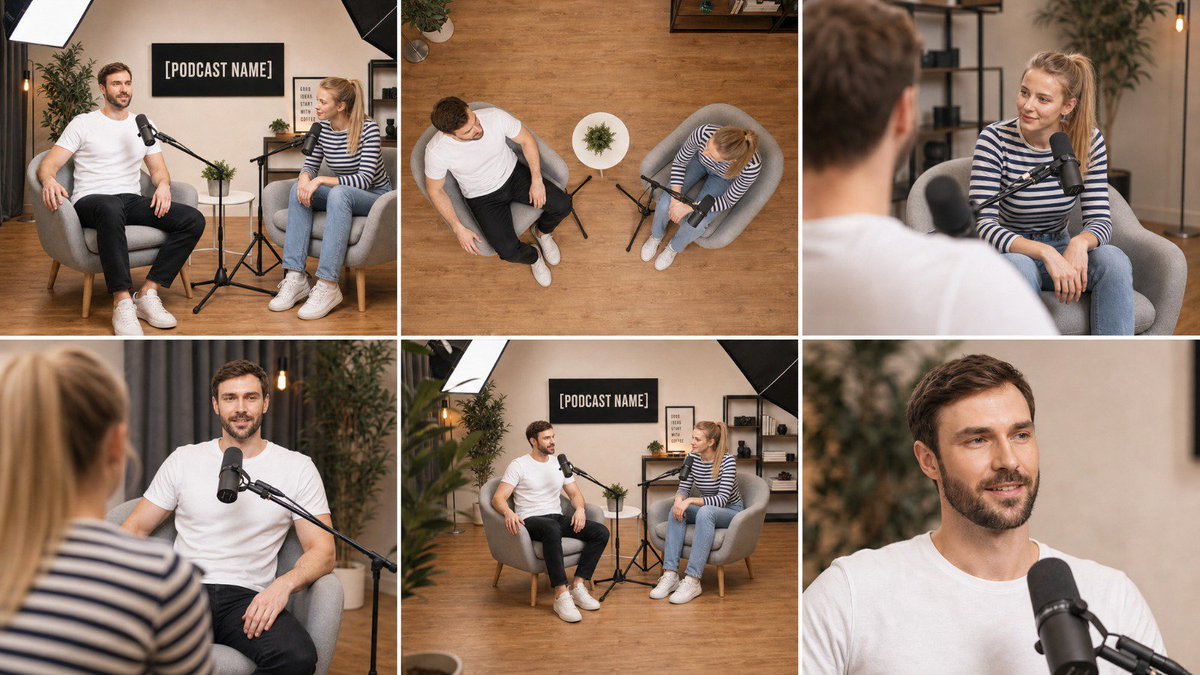
Multi-Angle Scene Reconstruction Grid
A specialized master prompt for GPT Image 2 that transforms a single wide-angle photograph into a clean 3x2 grid of six consistent shots from different camera positions, lens types, and angles.
Il s'agit d'un exemple de visuel pour la catégorie { GPT Image 2 Intérieur et architecture . Utilisez le visuel ci-dessous pour générer des éléments visuels similaires et vérifiez les conditions d'utilisation (attribution Awesome GPT Image 2 Prompts et droits d'utilisation commerciale) avant toute réutilisation.
Besoin de l'ensemble complet des invites ? Utilisez le Intérieur et architecture Consultez le centre thématique pour plus d'exemples connexes, ou ouvrez le GPT Image 2 catalogue rapide pour l'index complet des exemples, les structures réutilisables et l'attribution des sources.
Free 1K preview
Generate one preview image instantly, no sign-up required.
Free text preview doesn’t preserve reference-image consistency.
2711/4000
Prompt
invite prête à être copiée
Using the attached image as the single source of truth, create ONE image that is a clean 3-column by 2-row grid of six photographs of the EXACT same scene, captured from six different camera positions, as if six cameras were placed around the room at the same instant.

Lock everything from the attached image: the same people with the same faces, hair, skin tone, glasses, clothing and body proportions; the same furniture, props, walls, signage with the same text, lighting setup and color grade; the same time of day. Nothing is added, removed, or rearranged — only the camera position, lens and framing change between panels. Every object stays in the same physical place in the room, so the spatial relationships remain consistent from angle to angle.

Panel 1 (top-left): Wide master shot — the same framing and camera position as the attached image, eye-level, 35mm lens, the full scene visible.

Panel 2 (top-center): High-angle top-down shot — camera mounted directly above the center of the scene looking straight down at the floor, 24mm lens, showing the layout of the furniture, props and people from above, like a ceiling camera.

Panel 3 (top-right): Over-the-shoulder shot from behind the subject on the LEFT of the original image, looking across at the subject on the RIGHT, 50mm lens at f/2.0, the near shoulder soft in the foreground, the far subject sharp.

Panel 4 (bottom-left): Reverse over-the-shoulder shot from behind the subject on the RIGHT of the original image, looking across at the subject on the LEFT, 50mm lens at f/2.0, near shoulder soft, far subject sharp.

Panel 5 (bottom-center): Low-angle three-quarter shot — camera placed low near floor height at the front-left corner of the scene, tilted slightly upward, 28mm lens, showing the scene with depth toward the back wall.

Panel 6 (bottom-right): Tight close-up on the main subject's face and upper body, 85mm lens at f/1.8, eye-level, shallow depth of field, background softly blurred, natural skin texture, catchlights in the eyes.

If the scene contains only one person, apply the over-the-shoulder panels as a three-quarter side angle from the left and from the right of that person instead. If the scene contains no people, treat the main object or furniture group as the subject for panels 3, 4 and 6.

Grid rules: six equal-sized panels, thin clean white gutters between them, no borders, no text labels, no numbers, no captions, no watermarks inside the image. All six panels share identical photographic style: photorealistic, same white balance, same exposure, same color grade, same subtle film grain, consistent lighting direction as in the attached image. Sharp, professional, real-camera look in every panel.
Best for
- - Intérieur et architecture visual exploration
- - Image generation and reference-image edits
- - Reusable briefs that keep source attribution visible
Change these parts
- - Subject, product, character, or scene
- - Aspect ratio, camera, lighting, and background
- - Brand, text, color, and output constraints
Recommended model and settings
- - Model: gpt-image-2
- - Input mode: Image vers image
- - Aspect ratio: source
- - Commercial status: review original source
How to use this prompt
- 1. Copy the prompt and preserve its structure for the first test.
- 2. Replace the subject, context, and publishing channel.
- 3. Change one camera, lighting, or style variable per iteration.
- 4. Inspect the output, source, text, and rights before reuse.
Limitations, source, and reuse cautions
- - Generated output is an editable draft, not factual, legal, or rights evidence.
- - Review the linked source, people, brands, logos, text, and third-party media before commercial use.
Importé de Awesome GPT Image 2 Prompts . L'attribution est requise. Le statut d'utilisation commerciale est allowed ; veuillez vérifier les droits d'auteur avant toute utilisation payante.
Plus de cas dans cette catégorie
Priorisé par catégorie, compatibilité du mode d'entrée, qualité et risque moindre.

Sci-Fi Cyan Lighting Effect
Image vers image

Stylish Man Street Lamp Portrait
Image vers image

Oversized Head Cartoon Caricature Prompt
Image vers imageRisque moyen

MotoGP POV Cornering Shot
Texte vers image

Luxury Travel Fashion Portrait Prompt
Texte vers image

Cinematic Blue Backlit Portrait
Texte vers image
Réutilisation et notes de source
Utilisez cette invite en toute sécurité après avoir prévisualisé le dossier.
- 1.Copiez l'invite ou ouvrez-la directement dans Dovoo avec le bouton de génération.
- 2.Ajustez les variables, le format d'image et les images de référence en fonction de votre cas d'utilisation.
- 3.Avant toute publication ou utilisation payante, vérifiez les droits d'auteur, les exigences d'attribution et les risques liés à la marque ou à l'image.