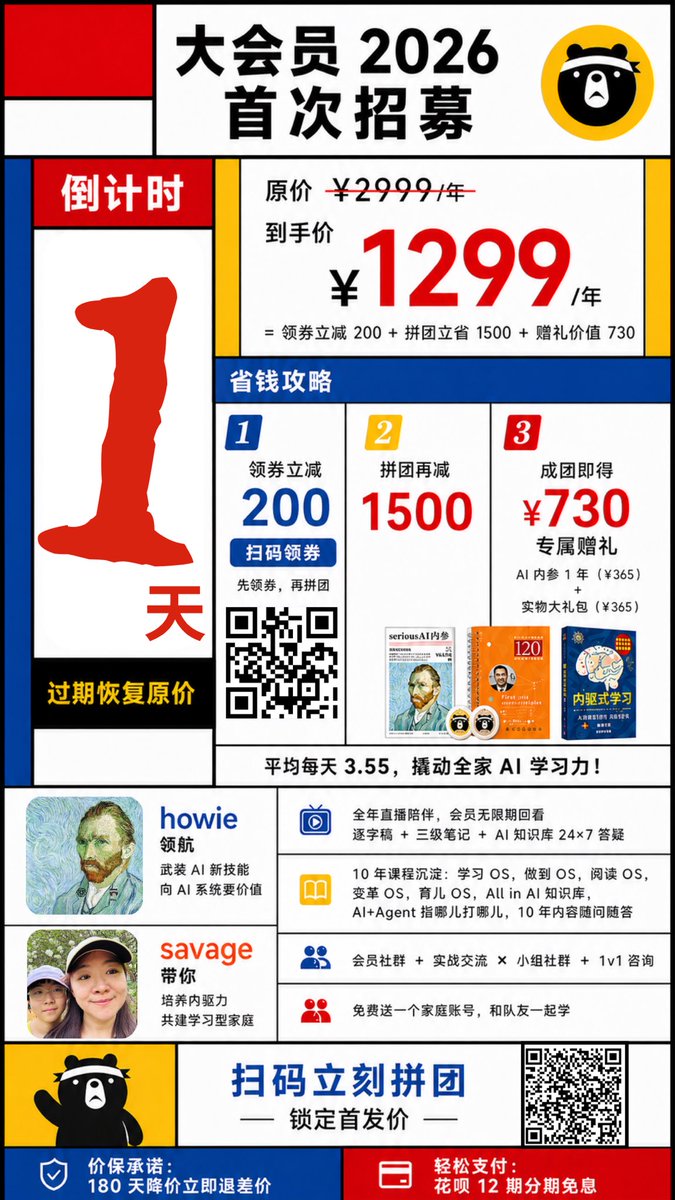
Affiche promotionnelle chinoise de style Mondrian
Cette invite génère une affiche de recrutement de membres chinoise géométrique et colorée pour les campagnes marketing, les promotions des ventes et les graphiques des opérations sur les réseaux sociaux.
Il s'agit d'un exemple de visuel pour la catégorie { GPT Image 2 Graphique et affiche . Utilisez le visuel ci-dessous pour générer des éléments visuels similaires et vérifiez les conditions d'utilisation (attribution Awesome GPT Image 2 Prompts et droits d'utilisation commerciale) avant toute réutilisation.
Besoin de l'ensemble complet des invites ? Utilisez le Graphique et affiche Consultez le centre thématique pour plus d'exemples connexes, ou ouvrez le GPT Image 2 catalogue rapide pour l'index complet des exemples, les structures réutilisables et l'attribution des sources.
Free 1K preview
Generate one preview image instantly, no sign-up required.
4000/4000
Prompt
invite prête à être copiée
Create a bold Chinese promotional poster in the style of Mondrian, Fauvism, and slight Cubism, featuring thick black grid lines, flat primary color blocks, and a simple white background. The poster should be a vertical mobile format, with a highly structured layout reminiscent of retail advertising, high contrast, sharp edges like a vector graphic, a playful design style, and a strong sales orientation. At the top center, a large white panel contains the prominent black Chinese characters “大会员 2026 首次招募” (Grand Membership 2026 First Recruitment), with a yellow circular badge in the upper right corner featuring a simple black cartoon bear face icon. The upper left corner includes 3 abstract rectangular blocks in a Mondrian-style composition: a red square, a white rectangle, and a blue vertical rectangle. Create a tall countdown bar on the left side, with the red title “倒计时” (Countdown) at the top, a large, thick-bordered red number “1” in the center, and a red “天” (days) near the bottom. A black stripe at the bottom contains the yellow text “过期恢复原价” (Price reverts to original upon expiration). On the right side, a main pricing panel displays the small black text “原价 ¥2999/年” (Original Price ¥2999/year) with a strikethrough, followed by the larger black text “到手价” (Final Price), and the oversized red price “¥1299”, followed by black “/年” (per year). Below this, a smaller black formula reads: “= 领券立减 200 + 拼团立省 1500 + 赠礼价值 730” (= ¥200 off with coupon + ¥1500 off with group purchase + ¥730 value of gifts). Below this, place a full-width blue section labeled “省钱攻略” (Money-Saving Guide). Below that, construct a 3-column money-saving guide with 3 numbered panels: Panel 1 has a blue badge “1”, the text “领券立减 200” (¥200 off with coupon), a blue button-shaped strip “扫码领券” (Scan to get coupon), small text below “先领券,再拼团” (Get coupon first, then group purchase), and a black and white QR code; Panel 2 has a yellow badge “2”, the text “拼团再减 1500” (¥1500 off with group purchase), and a small thumbnail of a book or magazine cover at the bottom; Panel 3 has a red badge “3”, the text “成团即得 ¥730 专属赠礼” (Get ¥730 exclusive gift upon successful group purchase), small text below “AI 内参 1 年(¥365)” (1 year of AI Insights ¥365) and “实物大礼包(¥365)” (Physical Gift Package ¥365), and 2 small gift thumbnails at the bottom. Add a white strip below the 3 columns with the bold black text: “平均每天 3.55,撬动全家 AI 学习力!” (Average of ¥3.55 per day, unlock the AI learning potential of the whole family!). In the middle-lower section, place 2 host/profile blocks on the left: the first displays a square avatar, the blue name “howie”, and the small black text “领航” (Leading) plus “武装 AI 新技能” (Equip new AI skills) and “向 AI 系统要价值” (Extract value from AI systems); the second displays a square avatar, the orange-red name “savage”, and the small black text “带你” (Take you) plus “培养内驱力” (Cultivate intrinsic motivation) and “共建学习型家庭” (Build a learning family). To the right of these profile blocks, create a list of 4 horizontally arranged benefits, each with a colored icon on the left and black text on a white background: The first row uses a blue TV or screen icon, with text about all-year live streaming, replay permissions, transcripts, notes, and 24/7 AI knowledge support; The second row uses a yellow book icon, with text about 10 years of in-depth experience, Learning OS, Becoming OS, Reading OS, Variable OS, Parenting OS, all in the AI knowledge base, and long-term Q&A support; The third row uses a blue person icon, with text about membership communities, practical exchanges, group communities, and 1-on-1 consultation; The fourth row uses a red person icon, with text about a free family account for teammates to learn together. Near the bottom, add a yellow panel on the left with a waving full-body black cartoon bear mascot. Place a prominent blue call-to-action text in the bottom center: “扫码立刻拼团” (Scan to group purchase now), followed by a black decorative short line and the subtitle “锁定首发价” (Lock in the initial price). Place a large black and white QR code in the lower right corner. Finally, divide the bottom bar into 2 colored areas: a blue area on the left with a white shield icon and white text “价保承诺:180 天降价立即退差价” (Price Guarantee: 180-day price drop, immediate refund of the difference); and a red area on the right with a white card/payment icon and white text “轻松支付:花呗 12 期分期免息” (Easy Payment: 12 interest-free installments with Huabei). Use thick black borders around each block, asymmetrical geometric composition, minimal shadows, poster-level typography hierarchy, Chinese e-commerce event design, vibrant and colorful.
Best for
- - Graphique et affiche visual exploration
- - Image generation and reference-image edits
- - Reusable briefs that keep source attribution visible
Change these parts
- - Subject, product, character, or scene
- - Aspect ratio, camera, lighting, and background
- - Brand, text, color, and output constraints
Recommended model and settings
- - Model: gpt-image-2
- - Input mode: Texte vers image
- - Aspect ratio: source
- - Commercial status: review original source
How to use this prompt
- 1. Copy the prompt and preserve its structure for the first test.
- 2. Replace the subject, context, and publishing channel.
- 3. Change one camera, lighting, or style variable per iteration.
- 4. Inspect the output, source, text, and rights before reuse.
Limitations, source, and reuse cautions
- - Generated output is an editable draft, not factual, legal, or rights evidence.
- - Review the linked source, people, brands, logos, text, and third-party media before commercial use.
Importé de Awesome GPT Image 2 Prompts . L'attribution est requise. Le statut d'utilisation commerciale est allowed ; veuillez vérifier les droits d'auteur avant toute utilisation payante.
Plus de cas dans cette catégorie
Priorisé par catégorie, compatibilité du mode d'entrée, qualité et risque moindre.

Spring Editorial Fashion Collage
Texte vers image

Transparent Earbuds on Stone Pedestal
Texte vers image

Grumpy Rhino Storybook Illustration
Texte vers image

Martial Arts Legend Character Bible Sheet
Texte vers image

Surreal 3D Chess Match Artwork
Texte vers image

Pink Hijab Mirror Selfie Portrait
Texte vers image
Réutilisation et notes de source
Utilisez cette invite en toute sécurité après avoir prévisualisé le dossier.
- 1.Copiez l'invite ou ouvrez-la directement dans Dovoo avec le bouton de génération.
- 2.Ajustez les variables, le format d'image et les images de référence en fonction de votre cas d'utilisation.
- 3.Avant toute publication ou utilisation payante, vérifiez les droits d'auteur, les exigences d'attribution et les risques liés à la marque ou à l'image.