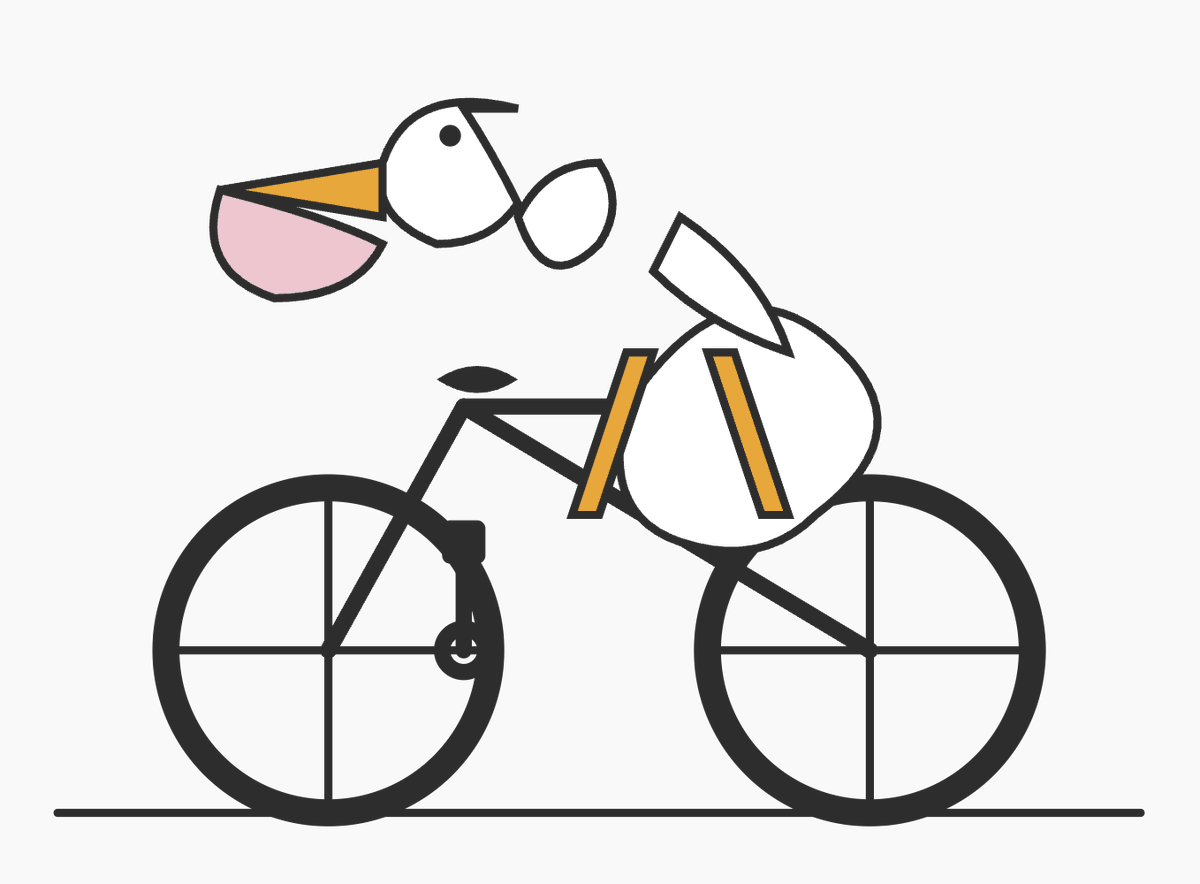
Vélo de randonnée Pelican minimaliste
Cette invite génère une illustration vectorielle géométrique épurée d'un pélican à vélo, utile pour tester une composition de formes simples ou créer une image ludique et abstraite de style icône.
Il s'agit d'un exemple de visuel pour la catégorie { GPT Image 2 Graphique et affiche . Utilisez le visuel ci-dessous pour générer des éléments visuels similaires et vérifiez les conditions d'utilisation (attribution Awesome GPT Image 2 Prompts et droits d'utilisation commerciale) avant toute réutilisation.
Besoin de l'ensemble complet des invites ? Utilisez le Graphique et affiche Consultez le centre thématique pour plus d'exemples connexes, ou ouvrez le GPT Image 2 catalogue rapide pour l'index complet des exemples, les structures réutilisables et l'attribution des sources.
Free 1K preview
Generate one preview image instantly, no sign-up required.
1502/4000
Prompt
invite prête à être copiée
A minimalist vector-style illustration on a flat light gray background showing a pelican riding a bicycle, drawn from simple geometric shapes with thick dark charcoal outlines. The composition is wide and centered, with the bicycle occupying the lower two-thirds of the image and the bird’s head floating slightly above and forward of the handlebars in a deliberately abstract, diagram-like way. The bicycle is a simple black road-bike silhouette in side view with exactly 2 large wheels, each with a thick outer rim and exactly 4 visible spoke lines forming a cross, a straight horizontal ground line beneath both wheels, a triangular frame, a short black saddle, and simplified crank and pedal details near the rear of the frame. The pelican is constructed from clean abstract pieces: a white rounded head with a small black circular eye, a long open beak pointing left made of 2 parts with an upper orange triangular section and a lower pale pink pouch section, a short dark curve on top of the head, a small separate white oval neck/body connector, a larger white rounded body positioned over the bike, and a single white wing-like shape angled upward over the back. Add exactly 2 orange leg shapes, long narrow rectangles leaning downward from the body toward the bicycle frame, suggesting the bird is pedaling. Keep the forms intentionally sparse and slightly surreal, like a logo test or simple code-editor doodle, with no shading, no gradients, no textures, no text, and lots of negative space.
Best for
- - Graphique et affiche visual exploration
- - Image generation and reference-image edits
- - Reusable briefs that keep source attribution visible
Change these parts
- - Subject, product, character, or scene
- - Aspect ratio, camera, lighting, and background
- - Brand, text, color, and output constraints
Recommended model and settings
- - Model: gpt-image-2
- - Input mode: Texte vers image
- - Aspect ratio: source
- - Commercial status: review original source
How to use this prompt
- 1. Copy the prompt and preserve its structure for the first test.
- 2. Replace the subject, context, and publishing channel.
- 3. Change one camera, lighting, or style variable per iteration.
- 4. Inspect the output, source, text, and rights before reuse.
Limitations, source, and reuse cautions
- - Generated output is an editable draft, not factual, legal, or rights evidence.
- - Review the linked source, people, brands, logos, text, and third-party media before commercial use.
Importé de Awesome GPT Image 2 Prompts . L'attribution est requise. Le statut d'utilisation commerciale est allowed ; veuillez vérifier les droits d'auteur avant toute utilisation payante.
Plus de cas dans cette catégorie
Priorisé par catégorie, compatibilité du mode d'entrée, qualité et risque moindre.

Pink Hijab Mirror Selfie Portrait
Texte vers image

Spring Editorial Fashion Collage
Texte vers image

Y2K Style Photo Booth Collage
Texte vers image

Transparent Earbuds on Stone Pedestal
Texte vers image

Grumpy Rhino Storybook Illustration
Texte vers image

Martial Arts Legend Character Bible Sheet
Texte vers image
Réutilisation et notes de source
Utilisez cette invite en toute sécurité après avoir prévisualisé le dossier.
- 1.Copiez l'invite ou ouvrez-la directement dans Dovoo avec le bouton de génération.
- 2.Ajustez les variables, le format d'image et les images de référence en fonction de votre cas d'utilisation.
- 3.Avant toute publication ou utilisation payante, vérifiez les droits d'auteur, les exigences d'attribution et les risques liés à la marque ou à l'image.