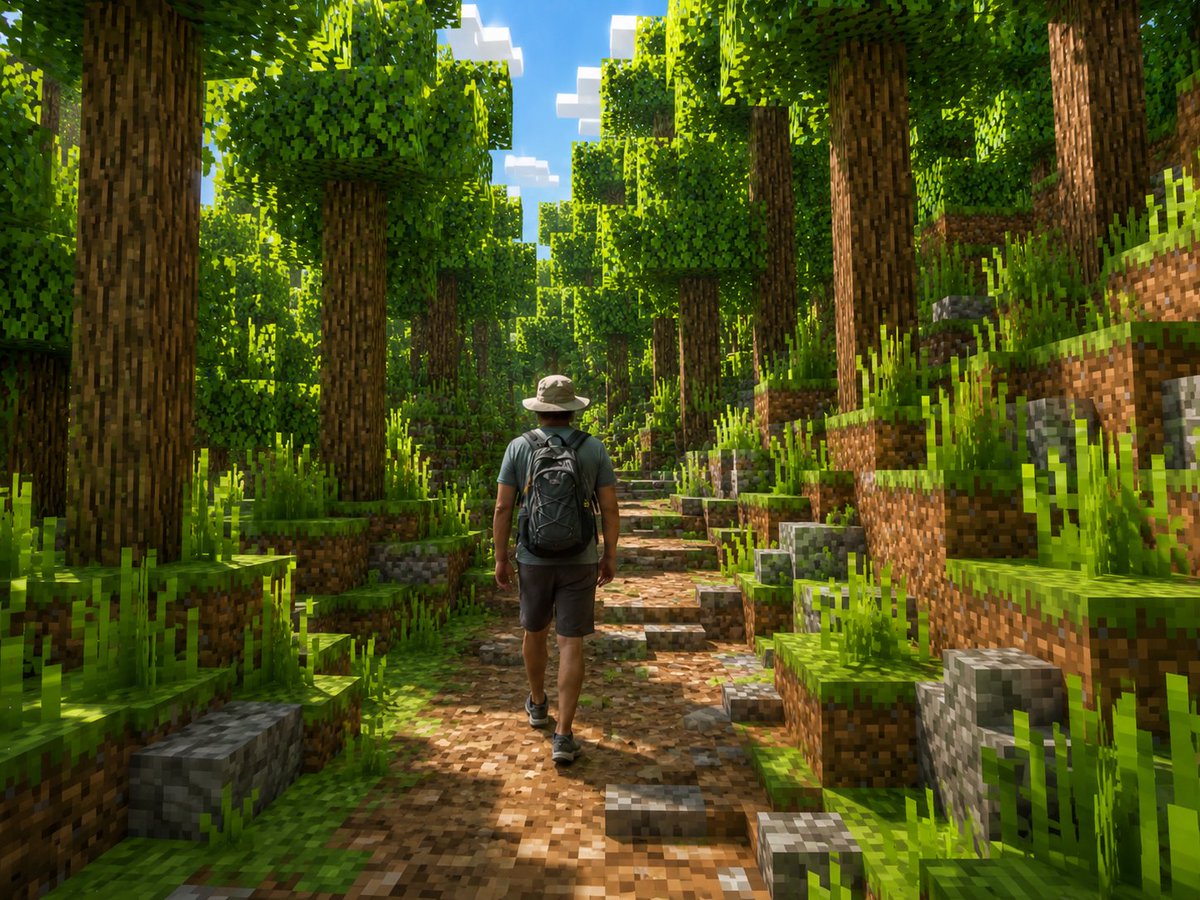
Un vrai randonneur dans la forêt de Minecraft
Génère une scène cinématographique où un randonneur réaliste traverse un environnement forestier entièrement cubique de style Minecraft.
Il s'agit d'un exemple de visuel pour la catégorie { GPT Image 2 Anime et jeux . Utilisez le visuel ci-dessous pour générer des éléments visuels similaires et vérifiez les conditions d'utilisation (attribution Awesome GPT Image 2 Prompts et droits d'utilisation commerciale) avant toute réutilisation.
Free 1K preview
Generate one preview image instantly, no sign-up required.
Free text preview doesn’t preserve reference-image consistency.
Prompt
invite prête à être copiée
Create a cinematic Minecraft-style screenshot of a lone real human hiker walking away from the camera through a dense blocky forest. The person should remain realistic rather than voxelized: an adult man seen from behind, wearing a light beige wide-brim hiking hat, muted teal short-sleeve shirt, dark gray shorts, black hiking shoes, and a large black backpack, centered slightly left on a dirt-and-stone trail. Transform the entire environment into a vivid Minecraft world made of cubes: tall square-trunk trees with pixelated bark, cubic leafy canopies, stepped grassy dirt banks on both sides, blocky gray stone cubes, pixelated tall grass, and a winding path of brown dirt and cobblestone blocks leading into the distance. Use bright midday sunlight filtering through the trees, strong dappled shadows, saturated greens, blue sky with blocky white clouds visible through the canopy, high detail, wide-angle adventure-game composition, realistic lighting with voxel geometry, no text, no UI, no watermark. Customize the subject as {argument name="main subject" default="adult male hiker"}, clothing as {argument name="outfit" default="beige hiking hat, muted teal T-shirt, dark gray shorts, black backpack"}, setting as {argument name="environment" default="dense Minecraft forest trail"}, lighting as {argument name="lighting" default="bright midday sun with dappled shadows"}, and camera view as {argument name="camera view" default="rear view, eye-level wide shot"}.Variables d'invite
Espaces réservés aux arguments modifiables présents dans l'invite, avec leurs valeurs par défaut.
Best for
- - Anime et jeux visual exploration
- - Image generation and reference-image edits
- - Reusable briefs that keep source attribution visible
Change these parts
- - Subject, product, character, or scene
- - Aspect ratio, camera, lighting, and background
- - Brand, text, color, and output constraints
Recommended model and settings
- - Model: gpt-image-2
- - Input mode: Image vers image
- - Aspect ratio: source
- - Commercial status: review original source
How to use this prompt
- 1. Copy the prompt and preserve its structure for the first test.
- 2. Replace the subject, context, and publishing channel.
- 3. Change one camera, lighting, or style variable per iteration.
- 4. Inspect the output, source, text, and rights before reuse.
Limitations, source, and reuse cautions
- - Generated output is an editable draft, not factual, legal, or rights evidence.
- - Review the linked source, people, brands, logos, text, and third-party media before commercial use.
Plus de cas dans cette catégorie
Priorisé par catégorie, compatibilité du mode d'entrée, qualité et risque moindre.






Réutilisation et notes de source
Utilisez cette invite en toute sécurité après avoir prévisualisé le dossier.
- 1.Copiez l'invite ou ouvrez-la directement dans Dovoo avec le bouton de génération.
- 2.Ajustez les variables, le format d'image et les images de référence en fonction de votre cas d'utilisation.
- 3.Avant toute publication ou utilisation payante, vérifiez les droits d'auteur, les exigences d'attribution et les risques liés à la marque ou à l'image.