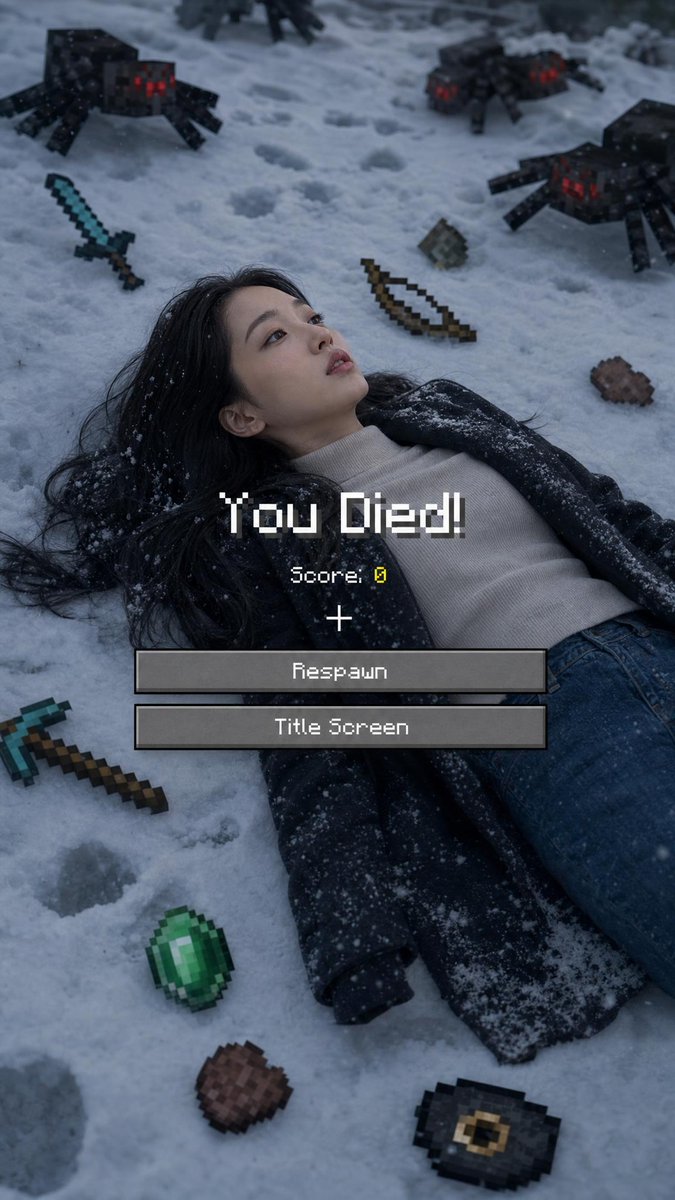
Minecraft Death Screen Portrait
A realistic winter photography prompt that blends a photographic portrait with Minecraft game elements like the 'You Died' screen and pixelated items.
Il s'agit d'un exemple de visuel pour la catégorie { GPT Image 2 Portrait et personnage . Utilisez le visuel ci-dessous pour générer des éléments visuels similaires et vérifiez les conditions d'utilisation (attribution Awesome GPT Image 2 Prompts et droits d'utilisation commerciale) avant toute réutilisation.
Free 1K preview
Generate one preview image instantly, no sign-up required.
Free text preview doesn’t preserve reference-image consistency.
Prompt
invite prête à être copiée
Use 100% of the face and body from my reference image. Create a cinematic winter scene with a side face close-up view, inspired by a Minecraft death screen. The person is lying face up in the snow, wearing {argument name="clothing" default="casual winter clothing"}, in a realistic pose, with cool atmospheric lighting, slightly desaturated tones, and visible footprints in the snow. Surround the person with floating or placed pixelated objects in the Minecraft style, including a {argument name="weapon" default="diamond sword"}, bow, pickaxe, emerald, steak, Eye of Ender, music disc, and a mob of spiders. Add a realistic Minecraft "You Died!" overlay on top with pixel font, including "Score: 0," the reticle symbol, and two retro UI buttons labeled "Respawn" and "Title Screen." Naturally blend the realistic photography with pixel-art game elements. Soft shadows, melancholic winter aesthetic, ultra-detailed, vertical composition, DSLR realism, subtle depth of field, high contrast, 9:16 aspect ratio.

Negative Prompt:

"Low quality, Show every face clearly with natural, detailed facial features, distorted body, extra limbs, incorrect facial features, cartoonish body, unrealistic"
Variables d'invite
Espaces réservés aux arguments modifiables présents dans l'invite, avec leurs valeurs par défaut.
Best for
- - Portrait et personnage visual exploration
- - Image generation and reference-image edits
- - Reusable briefs that keep source attribution visible
Change these parts
- - Subject, product, character, or scene
- - Aspect ratio, camera, lighting, and background
- - Brand, text, color, and output constraints
Recommended model and settings
- - Model: gpt-image-2
- - Input mode: Image vers image
- - Aspect ratio: source
- - Commercial status: review original source
How to use this prompt
- 1. Copy the prompt and preserve its structure for the first test.
- 2. Replace the subject, context, and publishing channel.
- 3. Change one camera, lighting, or style variable per iteration.
- 4. Inspect the output, source, text, and rights before reuse.
Limitations, source, and reuse cautions
- - Generated output is an editable draft, not factual, legal, or rights evidence.
- - Review the linked source, people, brands, logos, text, and third-party media before commercial use.
Plus de cas dans cette catégorie
Priorisé par catégorie, compatibilité du mode d'entrée, qualité et risque moindre.






Réutilisation et notes de source
Utilisez cette invite en toute sécurité après avoir prévisualisé le dossier.
- 1.Copiez l'invite ou ouvrez-la directement dans Dovoo avec le bouton de génération.
- 2.Ajustez les variables, le format d'image et les images de référence en fonction de votre cas d'utilisation.
- 3.Avant toute publication ou utilisation payante, vérifiez les droits d'auteur, les exigences d'attribution et les risques liés à la marque ou à l'image.