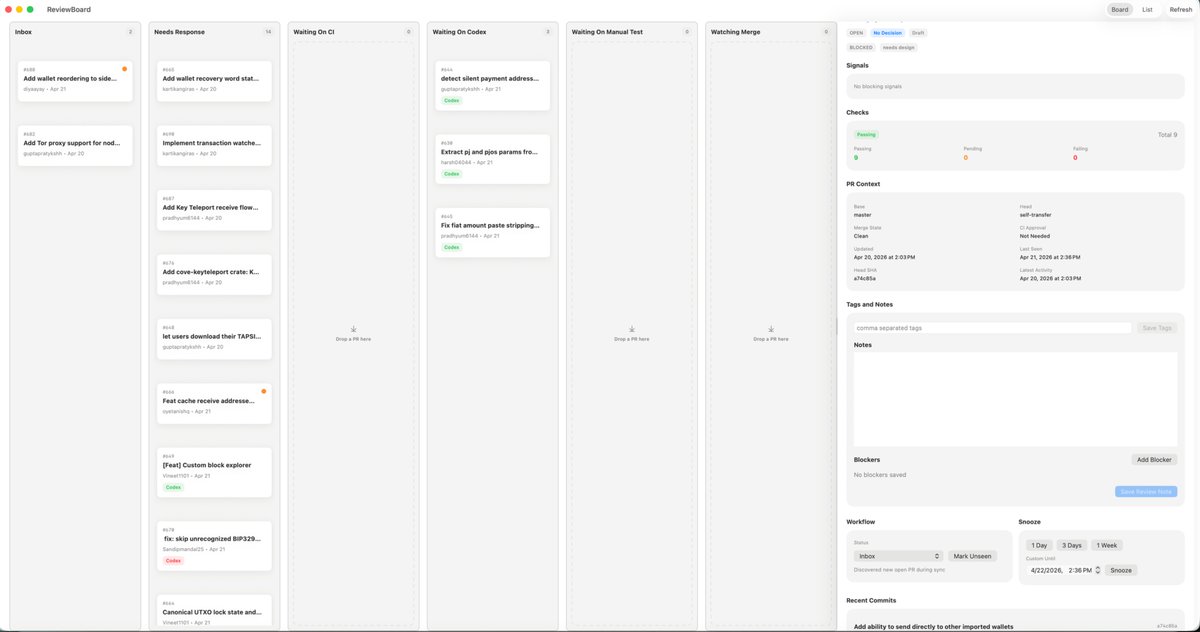
Interface utilisateur de l'application de révision Kanban pour macOS
Une maquette soignée de tableau de bord de type Kanban pour macOS en mode clair, destinée à la refonte d'une application de productivité de bureau ou de triage technique.
Il s'agit d'un exemple de visuel pour la catégorie { GPT Image 2 Produit et commercial . Utilisez le visuel ci-dessous pour générer des éléments visuels similaires et vérifiez les conditions d'utilisation (attribution Awesome GPT Image 2 Prompts et droits d'utilisation commerciale) avant toute réutilisation.
Besoin de l'ensemble complet des invites ? Utilisez le Produit et commercial Consultez le centre thématique pour plus d'exemples connexes, ou ouvrez le GPT Image 2 catalogue rapide pour l'index complet des exemples, les structures réutilisables et l'attribution des sources.
Free 1K preview
Generate one preview image instantly, no sign-up required.
4000/4000
Prompt
invite prête à être copiée
{
  "type": "desktop app UI mockup",
  "platform": "macOS",
  "style": "clean light-mode productivity dashboard, soft gray background, rounded cards, subtle shadows, thin dividers, minimalist modern SaaS aesthetic, dense but calm layout",
  "app": {
    "name": "ReviewBoard",
    "window_controls": "top-left macOS red yellow green traffic lights"
  },
  "layout": {
    "structure": "single wide application window split into 7 vertical columns plus a right inspector panel",
    "sections": [
      {
        "title": "Inbox",
        "position": "far left column",
        "count": 2,
        "labels": [
          "Add wallet reordering to side...",
          "Add Tor proxy support for nod..."
        ]
      },
      {
        "title": "Needs Response",
        "position": "second column from left",
        "count": 7,
        "labels": [
          "Add wallet recovery word sta...",
          "Implement transaction watche...",
          "Add Key Teleport receive flow...",
          "Add cove-keyteleport crate: K...",
          "let users download their TAPSI...",
          "Feat cache receive addresse...",
          "[Feat] Custom block explorer"
        ]
      },
      {
        "title": "Waiting On CI",
        "position": "third column",
        "count": 0,
        "labels": []
      },
      {
        "title": "Waiting On Codex",
        "position": "fourth column",
        "count": 3,
        "labels": [
          "detect silent payment address...",
          "Extract pi and pjs params fro...",
          "Fix fiat amount paste stripping..."
        ]
      },
      {
        "title": "Waiting On Manual Test",
        "position": "fifth column",
        "count": 0,
        "labels": []
      },
      {
        "title": "Watching Merge",
        "position": "sixth column",
        "count": 0,
        "labels": []
      },
      {
        "title": "Inspector",
        "position": "far right sidebar",
        "count": 8,
        "labels": [
          "Signals",
          "Checks",
          "PR Context",
          "Tags and Notes",
          "Notes",
          "Blockers",
          "Workflow",
          "Recent Commits"
        ]
      }
    ],
    "top_right_controls": {
      "count": 3,
      "labels": [
        "Board",
        "List",
        "Refresh"
      ]
    }
  },
  "board": {
    "column_style": "tall pale gray kanban lanes with header labels, tiny count chevrons, and centered empty-state drop targets in empty lanes",
    "cards": {
      "shape": "small white rounded rectangles with faint shadow and thin border",
      "metadata": "issue or PR number at top left, bold truncated title, author and date line below, occasional small colored status pill such as green Code or red Codex, some cards with a tiny orange notification dot at top right"
    }
  },
  "inspector": {
    "tabs": {
      "count": 3,
      "labels": [
        "OPEN",
        "NEEDS DESIGN",
        "DRAFT"
      ],
      "active": "NEEDS DESIGN"
    },
    "signals": "empty light gray panel with text indicating no blocking signals",
    "checks": {
      "summary": "horizontal status card with three columns for Passing, Pending, and Failing, plus Total 9 on the right",
      "counts": {
        "Passing": 9,
        "Pending": 0,
        "Failing": 0
      }
    },
    "pr_context": {
      "fields": [
        "Base",
        "Head",
        "Merge State",
        "CI Approval",
        "Clean",
        "Last Need",
        "Updated",
        "Apr 21, 2026 at 2:36 PM",
        "Last Push",
        "Apr 20, 2026 at 2:03 PM",
        "SHA",
        "a7c48b5a"
      ]
    },
    "tags_and_notes": {
      "elements": 3,
      "labels": [
        "comma separated tags",
        "Save Tags",
        "Notes"
      ]
    },
    "blockers": {
      "elements": 3,
      "labels": [
        "No blockers saved",
        "Add Blocker",
        "Save Review Note"
      ]
    },
    "workflow": {
      "groups": 2,
      "labels": [
        "Inbox",
        "Snooze"
      ],
      "buttons": [
        "Mark Unseen",
        "1 Day",
        "3 Days",
        "1 Week",
        "Snooze"
      ]
    },
    "recent_commits": {
      "visible_count": 1,
      "labels": [
        "Add ability to send directly to other imported wallets"
      ]
    }
  },
  "camera": "straight-on full-window screenshot",
  "text_rendering": "tiny crisp UI text, realistic product design presentation",
  "color_palette": {
    "background": "very light warm gray",
    "columns": "light gray",
    "cards": "white",
    "accent": "green active states, pale blue selected tab, orange notification dots, muted black text"
  }
}
Best for
- - Produit et commercial visual exploration
- - Image generation and reference-image edits
- - Reusable briefs that keep source attribution visible
Change these parts
- - Subject, product, character, or scene
- - Aspect ratio, camera, lighting, and background
- - Brand, text, color, and output constraints
Recommended model and settings
- - Model: gpt-image-2
- - Input mode: Texte vers image
- - Aspect ratio: source
- - Commercial status: review original source
How to use this prompt
- 1. Copy the prompt and preserve its structure for the first test.
- 2. Replace the subject, context, and publishing channel.
- 3. Change one camera, lighting, or style variable per iteration.
- 4. Inspect the output, source, text, and rights before reuse.
Limitations, source, and reuse cautions
- - Generated output is an editable draft, not factual, legal, or rights evidence.
- - Review the linked source, people, brands, logos, text, and third-party media before commercial use.
Importé de Awesome GPT Image 2 Prompts . L'attribution est requise. Le statut d'utilisation commerciale est allowed ; veuillez vérifier les droits d'auteur avant toute utilisation payante.
Plus de cas dans cette catégorie
Priorisé par catégorie, compatibilité du mode d'entrée, qualité et risque moindre.






Réutilisation et notes de source
Utilisez cette invite en toute sécurité après avoir prévisualisé le dossier.
- 1.Copiez l'invite ou ouvrez-la directement dans Dovoo avec le bouton de génération.
- 2.Ajustez les variables, le format d'image et les images de référence en fonction de votre cas d'utilisation.
- 3.Avant toute publication ou utilisation payante, vérifiez les droits d'auteur, les exigences d'attribution et les risques liés à la marque ou à l'image.