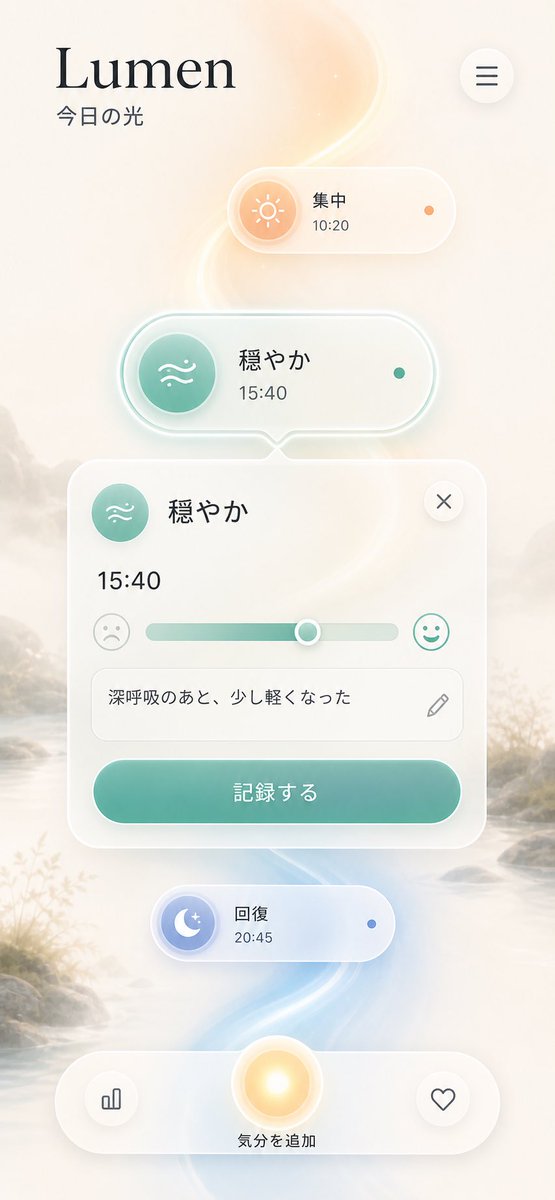
Lumen iOS Wellness App Mockup
Generates a serene Japanese iOS-style mood tracking app interface with glassmorphism, floating cards, and soft luminous background effects.
Il s'agit d'un exemple de visuel pour la catégorie { GPT Image 2 Autres sources d'inspiration . Utilisez le visuel ci-dessous pour générer des éléments visuels similaires et vérifiez les conditions d'utilisation (attribution Awesome GPT Image 2 Prompts et droits d'utilisation commerciale) avant toute réutilisation.
Besoin de l'ensemble complet des invites ? Utilisez le Autres sources d'inspiration Consultez le centre thématique pour plus d'exemples connexes, ou ouvrez le GPT Image 2 catalogue rapide pour l'index complet des exemples, les structures réutilisables et l'attribution des sources.
Free 1K preview
Generate one preview image instantly, no sign-up required.
3000/4000
Prompt
invite prête à être copiée
Goal: Create a polished iOS-style wellness app mockup for {argument name="app name" default="Lumen"}, a light-themed mood and breathing tracker, with soft Apple-inspired glassmorphism and Japanese UI text.

Canvas: Vertical mobile screenshot, 9:16 aspect ratio, approximately 563 × 1008 px. Use an airy cream-white background with a misty watercolor landscape at the bottom and edges, subtle mountains, reeds, and a glowing winding light trail running vertically through the center in warm peach near the top and pale blue near the bottom.

Layout: Place the app title at top left in a refined serif font, large black text reading “Lumen”, with the subtitle “今日の光” underneath in smaller dark gray Japanese text. Place one circular hamburger menu button at top right with three dark horizontal lines and a soft shadow.

Main UI elements: Use exactly 5 floating rounded glass cards/buttons stacked vertically down the center:
1. Top small pill card: warm peach sun icon on the left, label “集中”, time “10:20”, and one small orange status dot on the right.
2. Middle selected pill card: larger white translucent pill with teal glow outline, teal circular wave/breath icon on the left, label “穏やか”, time “15:40”, and one small teal status dot on the right. Add a small downward notch centered at the bottom of this pill, visually connecting to the expanded card below.
3. Expanded mood entry card: large rounded white translucent panel. Top left has the same teal wave icon, title “穏やか”, and a circular close button with an “×” at top right. Show the time “15:40” in large text. Include one horizontal mood slider with exactly 3 visible parts: a sad face icon on the left, a teal-to-gray slider track with the knob slightly right of center, and a happy face icon on the right. Beneath it, include a rounded text input containing “深呼吸のあと、少し軽くなった” with a small pencil icon on the right. At the bottom, include a large teal gradient rounded button labeled “記録する”.
4. Lower small pill card: blue moon-and-star icon on the left, label “回復”, time “20:45”, and one small blue status dot on the right.
5. Bottom navigation / action bar: wide translucent rounded capsule near the bottom. It contains exactly 3 circular controls: left small circular button with a bar chart icon, center larger glowing golden circular button, and right small circular button with a heart outline. Under the center glowing button, show the label “気分を追加”.

Visual style: Minimal premium iOS app design, translucent frosted glass surfaces, rounded corners, soft drop shadows, delicate glow, subtle depth, clean spacing, calm wellness atmosphere. Use warm peach, mint teal, pale blue, cream white, and charcoal typography. Icons should be simple line icons and feel native to iOS.

Constraints: Keep all visible Japanese text exactly as specified. Do not add extra cards, extra text, logos, watermarks, device frame, or status bar. The mockup should look like a generated app UI concept rather than a screenshot of a real installed app.
Variables d'invite
Espaces réservés aux arguments modifiables présents dans l'invite, avec leurs valeurs par défaut.
Variable
app name
Défaut
Lumen
Best for
- - Autres sources d'inspiration visual exploration
- - Image generation and reference-image edits
- - Reusable briefs that keep source attribution visible
Change these parts
- - Subject, product, character, or scene
- - Aspect ratio, camera, lighting, and background
- - Brand, text, color, and output constraints
Recommended model and settings
- - Model: gpt-image-2
- - Input mode: Texte vers image
- - Aspect ratio: source
- - Commercial status: review original source
How to use this prompt
- 1. Copy the prompt and preserve its structure for the first test.
- 2. Replace the subject, context, and publishing channel.
- 3. Change one camera, lighting, or style variable per iteration.
- 4. Inspect the output, source, text, and rights before reuse.
Limitations, source, and reuse cautions
- - Generated output is an editable draft, not factual, legal, or rights evidence.
- - Review the linked source, people, brands, logos, text, and third-party media before commercial use.
Importé de Awesome GPT Image 2 Prompts . L'attribution est requise. Le statut d'utilisation commerciale est allowed ; veuillez vérifier les droits d'auteur avant toute utilisation payante.
Plus de cas dans cette catégorie
Priorisé par catégorie, compatibilité du mode d'entrée, qualité et risque moindre.

Android Quantum Lab Workstation
Texte vers image

Surreal 3D Chess Match Artwork
Texte vers image

Transparent Earbuds on Stone Pedestal
Texte vers image

Grumpy Rhino Storybook Illustration
Texte vers image

Martial Arts Legend Character Bible Sheet
Texte vers image

Pink Hijab Mirror Selfie Portrait
Texte vers image
Réutilisation et notes de source
Utilisez cette invite en toute sécurité après avoir prévisualisé le dossier.
- 1.Copiez l'invite ou ouvrez-la directement dans Dovoo avec le bouton de génération.
- 2.Ajustez les variables, le format d'image et les images de référence en fonction de votre cas d'utilisation.
- 3.Avant toute publication ou utilisation payante, vérifiez les droits d'auteur, les exigences d'attribution et les risques liés à la marque ou à l'image.