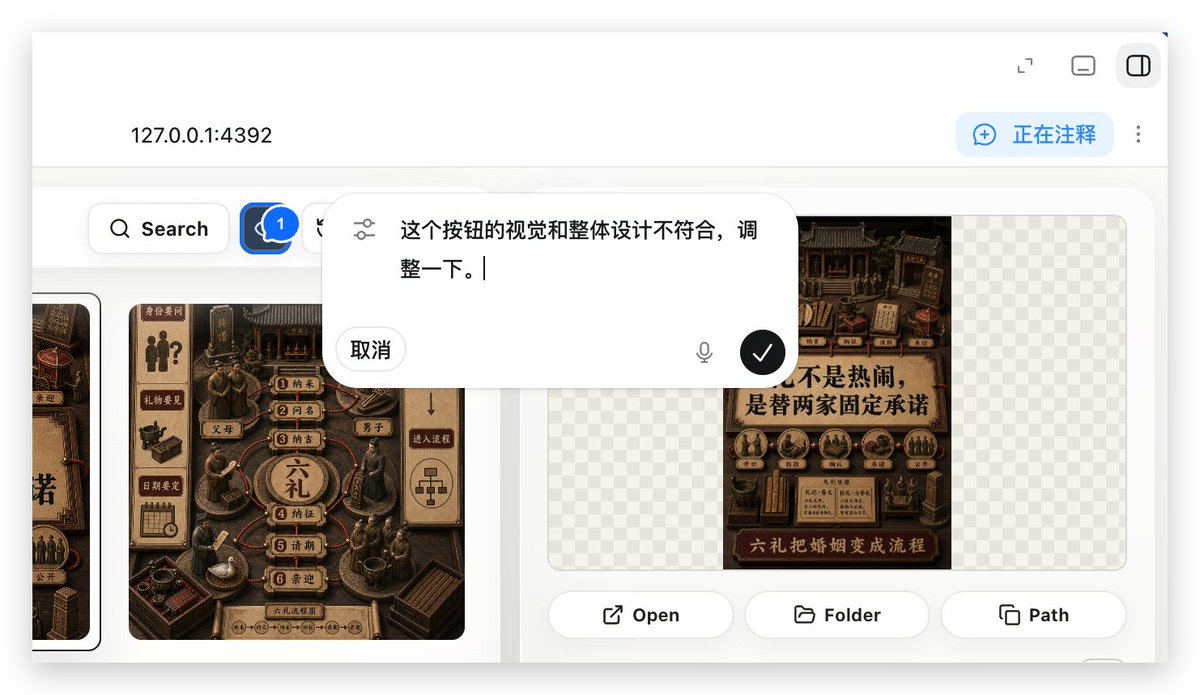
Démonstration d'annotation d'application Web locale
Génère un aperçu réaliste d'une application web locale affichant une superposition d'annotations utilisée pour demander des ajustements d'interface utilisateur dans un flux de travail de création d'applications web.
Il s'agit d'un exemple de visuel pour la catégorie { GPT Image 2 Autres sources d'inspiration . Utilisez le visuel ci-dessous pour générer des éléments visuels similaires et vérifiez les conditions d'utilisation (attribution Awesome GPT Image 2 Prompts et droits d'utilisation commerciale) avant toute réutilisation.
Free 1K preview
Generate one preview image instantly, no sign-up required.
Prompt
invite prête à être copiée
With REFERENCE_0 as context, create a follow-up screenshot demonstrating the “Build Web Apps” tool running as a local web app preview. Replace the plugin list view with a browser-style localhost workspace for {argument name="local address" default="127.0.0.1:4392"}, employing a clean white UI, soft shadows, and rounded corner panels.

Key Changes: Showcase an app building/annotation interface instead of the original plugin directory. Add a top bar with the local address displayed on the left and 3 small window/control icons on the right. Include a blue annotation status capsule in the upper right corner with the text {argument name="annotation status" default="Commenting"}, accompanied by a vertical three-dot menu.

Content Area: Create a gallery-style UI showcasing Chinese poster/card designs within rounded white panels. Include a left-side toolbar row with a search button and a blue comment/annotation button marked with “1”. Display at least two visible poster/card thumbnails in a dark brown, traditional Chinese visual style, while maintaining some grid-pattern transparent placeholder areas on the right panel.

Overlay: Position a large, floating, rounded corner annotation input bubble centered in the upper-middle of the content area. It should resemble an embedded AI comment editor, with slider/settings icons on the left, containing Chinese instruction text {argument name="comment text" default="The visual and overall design of this button doesn't align, please adjust it."}, a “Cancel” button, a microphone icon, and a black circular confirmation button with a white checkmark.

Bottom of the right preview panel: Add 3 operation buttons labeled “Open”, “Folder”, and “Path”, each accompanied by a simple line icon. Maintain the realism of the screenshot, as if it were a product demo requesting UI optimization using Build Web Apps combined with built-in HTML annotation.
Variables d'invite
Espaces réservés aux arguments modifiables présents dans l'invite, avec leurs valeurs par défaut.
Best for
- - Autres sources d'inspiration visual exploration
- - Image generation and reference-image edits
- - Reusable briefs that keep source attribution visible
Change these parts
- - Subject, product, character, or scene
- - Aspect ratio, camera, lighting, and background
- - Brand, text, color, and output constraints
Recommended model and settings
- - Model: gpt-image-2
- - Input mode: Texte vers image
- - Aspect ratio: source
- - Commercial status: review original source
How to use this prompt
- 1. Copy the prompt and preserve its structure for the first test.
- 2. Replace the subject, context, and publishing channel.
- 3. Change one camera, lighting, or style variable per iteration.
- 4. Inspect the output, source, text, and rights before reuse.
Limitations, source, and reuse cautions
- - Generated output is an editable draft, not factual, legal, or rights evidence.
- - Review the linked source, people, brands, logos, text, and third-party media before commercial use.
Related prompt packs
Plus de cas dans cette catégorie
Priorisé par catégorie, compatibilité du mode d'entrée, qualité et risque moindre.






Réutilisation et notes de source
Utilisez cette invite en toute sécurité après avoir prévisualisé le dossier.
- 1.Copiez l'invite ou ouvrez-la directement dans Dovoo avec le bouton de génération.
- 2.Ajustez les variables, le format d'image et les images de référence en fonction de votre cas d'utilisation.
- 3.Avant toute publication ou utilisation payante, vérifiez les droits d'auteur, les exigences d'attribution et les risques liés à la marque ou à l'image.