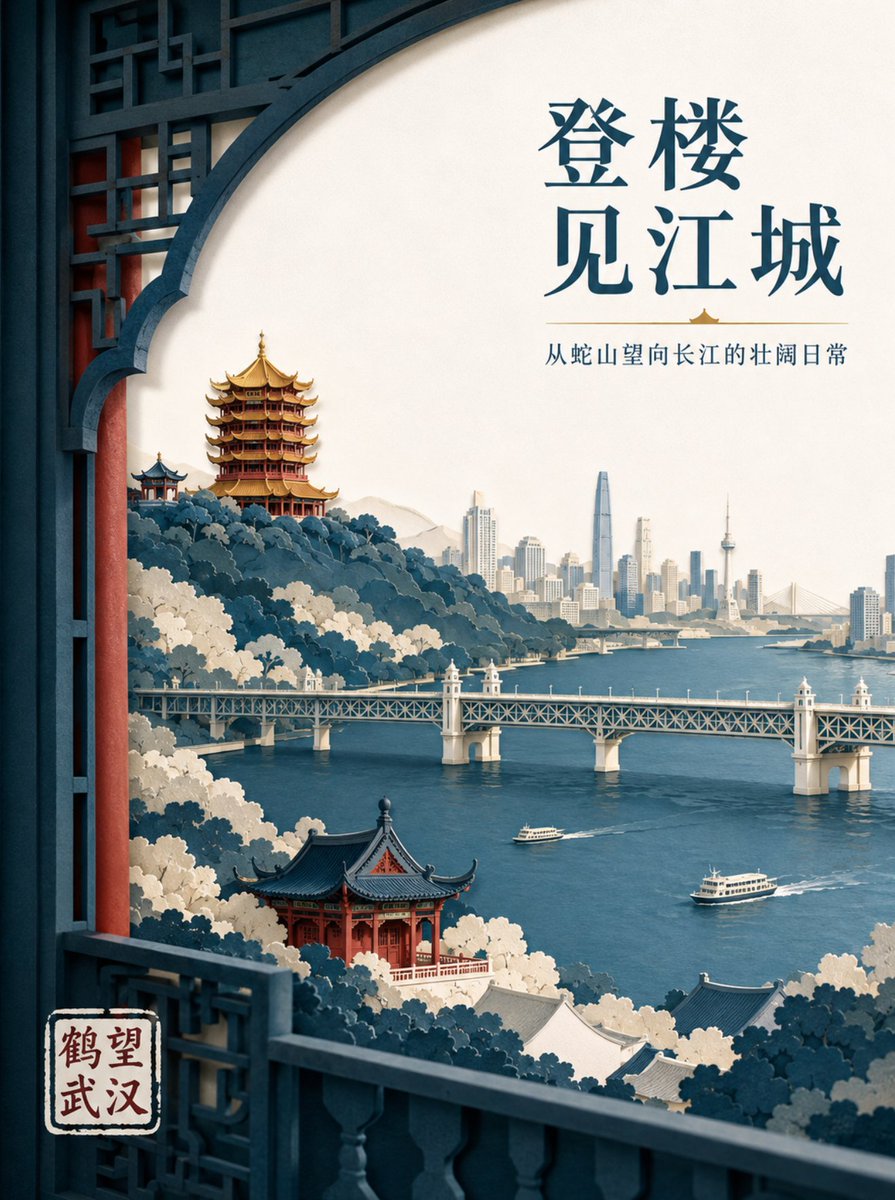
Wuhan Paper Cut Illustration Poster
A sophisticated prompt for creating layered paper-cut style posters featuring Wuhan's iconic landmarks with professional layout and lighting.
Il s'agit d'un exemple de visuel pour la catégorie { GPT Image 2 Graphique et affiche . Utilisez le visuel ci-dessous pour générer des éléments visuels similaires et vérifiez les conditions d'utilisation (attribution Awesome GPT Image 2 Prompts et droits d'utilisation commerciale) avant toute réutilisation.
Besoin de l'ensemble complet des invites ? Utilisez le Graphique et affiche Consultez le centre thématique pour plus d'exemples connexes, ou ouvrez le GPT Image 2 catalogue rapide pour l'index complet des exemples, les structures réutilisables et l'attribution des sources.
Free 1K preview
Generate one preview image instantly, no sign-up required.
1346/4000
Prompt
invite prête à être copiée
Create a high-end layered paper-cut illustration poster for the tourism brand "{argument name="brand name" default="He Wang Wuhan"}" with the theme "{argument name="theme" default="Looking at the river from the tower, seeing the landscape skeleton of Wuhan at a glance"}" in 3:4 vertical format. The composition uses a foreground window framing, with five to seven layers of thick textured paper forming Snake Hill, the Yellow Crane Tower, the Yangtze River, the Wuhan Yangtze River Bridge, and the city skyline on the opposite bank. The Yellow Crane Tower is located on the ridge in the background, with accurate relationships between layered eaves, golden glazed tiles, and vermilion pillars. The Yangtze River Bridge extends horizontally in the middle ground, with two small ferries on the river in controlled scale. The paper edges are sharp, with uniform soft lighting from the top left and realistic shadows between layers. Colors are indigo, warm off-white, cinnabar red, and a small amount of gilded gold for visual focus. The main title "{argument name="main title" default="Seeing the River City from the Tower"}" is placed in the large white space at the top right in two lines of modern Song typeface. The brand name "He Wang Wuhan" is placed at the bottom left in a paper seal format, keeping it modern rather than imitation antique.Variables d'invite
Espaces réservés aux arguments modifiables présents dans l'invite, avec leurs valeurs par défaut.
Variable
brand name
Défaut
He Wang Wuhan
Variable
theme
Défaut
Looking at the river from the tower, seeing the landscape skeleton of Wuhan at a glance
Variable
main title
Défaut
Seeing the River City from the Tower
Best for
- - Graphique et affiche visual exploration
- - Image generation and reference-image edits
- - Reusable briefs that keep source attribution visible
Change these parts
- - Subject, product, character, or scene
- - Aspect ratio, camera, lighting, and background
- - Brand, text, color, and output constraints
Recommended model and settings
- - Model: gpt-image-2
- - Input mode: Texte vers image
- - Aspect ratio: source
- - Commercial status: review original source
How to use this prompt
- 1. Copy the prompt and preserve its structure for the first test.
- 2. Replace the subject, context, and publishing channel.
- 3. Change one camera, lighting, or style variable per iteration.
- 4. Inspect the output, source, text, and rights before reuse.
Limitations, source, and reuse cautions
- - Generated output is an editable draft, not factual, legal, or rights evidence.
- - Review the linked source, people, brands, logos, text, and third-party media before commercial use.
Importé de Awesome GPT Image 2 Prompts . L'attribution est requise. Le statut d'utilisation commerciale est allowed ; veuillez vérifier les droits d'auteur avant toute utilisation payante.
Plus de cas dans cette catégorie
Priorisé par catégorie, compatibilité du mode d'entrée, qualité et risque moindre.

Luxury Brand Campaign Prompt Template
Texte vers image

Cross-armed toast interaction prompt
Texte vers image

Martial Arts Legend Character Bible Sheet
Texte vers image

Pink Hijab Mirror Selfie Portrait
Texte vers image

Fashion Studio Portrait with Blue Rim Lighting
Texte vers image

Spring Editorial Fashion Collage
Texte vers image
Réutilisation et notes de source
Utilisez cette invite en toute sécurité après avoir prévisualisé le dossier.
- 1.Copiez l'invite ou ouvrez-la directement dans Dovoo avec le bouton de génération.
- 2.Ajustez les variables, le format d'image et les images de référence en fonction de votre cas d'utilisation.
- 3.Avant toute publication ou utilisation payante, vérifiez les droits d'auteur, les exigences d'attribution et les risques liés à la marque ou à l'image.