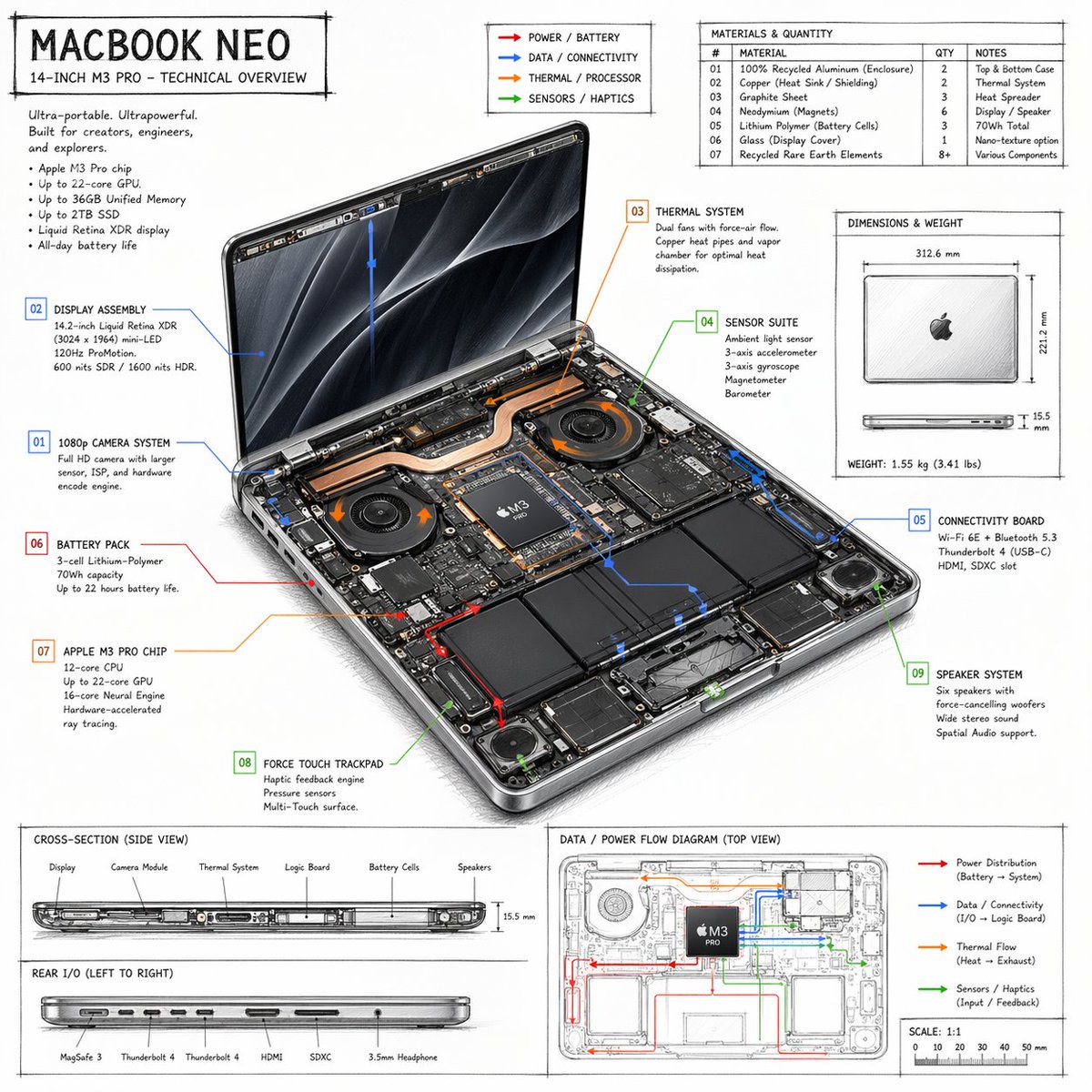
Infographie présentant les caractéristiques techniques d'un ordinateur portable
Fiche technique détaillée, dessinée à la main, pour un ordinateur portable, comprenant des indications sur les composants internes, des tableaux de matériaux et des diagrammes de flux.
Il s'agit d'un exemple de visuel pour la catégorie { GPT Image 2 Graphique et affiche . Utilisez le visuel ci-dessous pour générer des éléments visuels similaires et vérifiez les conditions d'utilisation (attribution Awesome GPT Image 2 Prompts et droits d'utilisation commerciale) avant toute réutilisation.
Free 1K preview
Generate one preview image instantly, no sign-up required.
Prompt
invite prête à être copiée
{
  "type": "technical overview infographic",
  "style": "{argument name=\"visual style\" default=\"hand-drawn technical sketch with clean typography\"}",
  "product": {
    "name": "{argument name=\"product name\" default=\"MACBOOK NEO\"}",
    "subtitle": "14-INCH {argument name=\"processor model\" default=\"M3 PRO\"} - TECHNICAL OVERVIEW"
  },
  "layout": {
    "centerpiece": {
      "description": "isometric view of an opened laptop revealing internal hardware components like dual fans, copper heat pipes, battery cells, and logic board",
      "callouts_count": 9,
      "callout_labels": [
        "01 1080p CAMERA SYSTEM",
        "02 DISPLAY ASSEMBLY",
        "03 THERMAL SYSTEM",
        "04 SENSOR SUITE",
        "05 CONNECTIVITY BOARD",
        "06 BATTERY PACK",
        "07 {argument name=\"main component\" default=\"APPLE M3 PRO CHIP\"}",
        "08 FORCE TOUCH TRACKPAD",
        "09 SPEAKER SYSTEM"
      ]
    },
    "sections": [
      {
        "title": "Header Text",
        "position": "top-left",
        "content": "Marketing blurb and 5-bullet specification list"
      },
      {
        "title": "Legend",
        "position": "top-center",
        "content": "4 color-coded arrows indicating {argument name=\"accent colors\" default=\"red, blue, orange, green\"} flow lines for Power, Data, Thermal, and Sensors"
      },
      {
        "title": "MATERIALS & QUANTITY",
        "position": "top-right",
        "type": "table",
        "rows_count": 7,
        "columns": [
          "#",
          "MATERIAL",
          "QTY",
          "NOTES"
        ]
      },
      {
        "title": "DIMENSIONS & WEIGHT",
        "position": "mid-right",
        "content": "Top and side views of closed laptop with measurements"
      },
      {
        "title": "CROSS-SECTION (SIDE VIEW)",
        "position": "bottom-left (top half)",
        "content": "Side profile showing internal component layout with 6 labels"
      },
      {
        "title": "REAR I/O (LEFT TO RIGHT)",
        "position": "bottom-left (bottom half)",
        "content": "Side profile showing 6 ports"
      },
      {
        "title": "DATA / POWER FLOW DIAGRAM (TOP VIEW)",
        "position": "bottom-right",
        "content": "Wireframe top-down view with colored flow lines, legend, and scale bar"
      }
    ]
  }
}
Variables d'invite
Espaces réservés aux arguments modifiables présents dans l'invite, avec leurs valeurs par défaut.
Best for
- - Graphique et affiche visual exploration
- - Image generation and reference-image edits
- - Reusable briefs that keep source attribution visible
Change these parts
- - Subject, product, character, or scene
- - Aspect ratio, camera, lighting, and background
- - Brand, text, color, and output constraints
Recommended model and settings
- - Model: gpt-image-2
- - Input mode: Texte vers image
- - Aspect ratio: source
- - Commercial status: review original source
How to use this prompt
- 1. Copy the prompt and preserve its structure for the first test.
- 2. Replace the subject, context, and publishing channel.
- 3. Change one camera, lighting, or style variable per iteration.
- 4. Inspect the output, source, text, and rights before reuse.
Limitations, source, and reuse cautions
- - Generated output is an editable draft, not factual, legal, or rights evidence.
- - Review the linked source, people, brands, logos, text, and third-party media before commercial use.
Plus de cas dans cette catégorie
Priorisé par catégorie, compatibilité du mode d'entrée, qualité et risque moindre.






Réutilisation et notes de source
Utilisez cette invite en toute sécurité après avoir prévisualisé le dossier.
- 1.Copiez l'invite ou ouvrez-la directement dans Dovoo avec le bouton de génération.
- 2.Ajustez les variables, le format d'image et les images de référence en fonction de votre cas d'utilisation.
- 3.Avant toute publication ou utilisation payante, vérifiez les droits d'auteur, les exigences d'attribution et les risques liés à la marque ou à l'image.