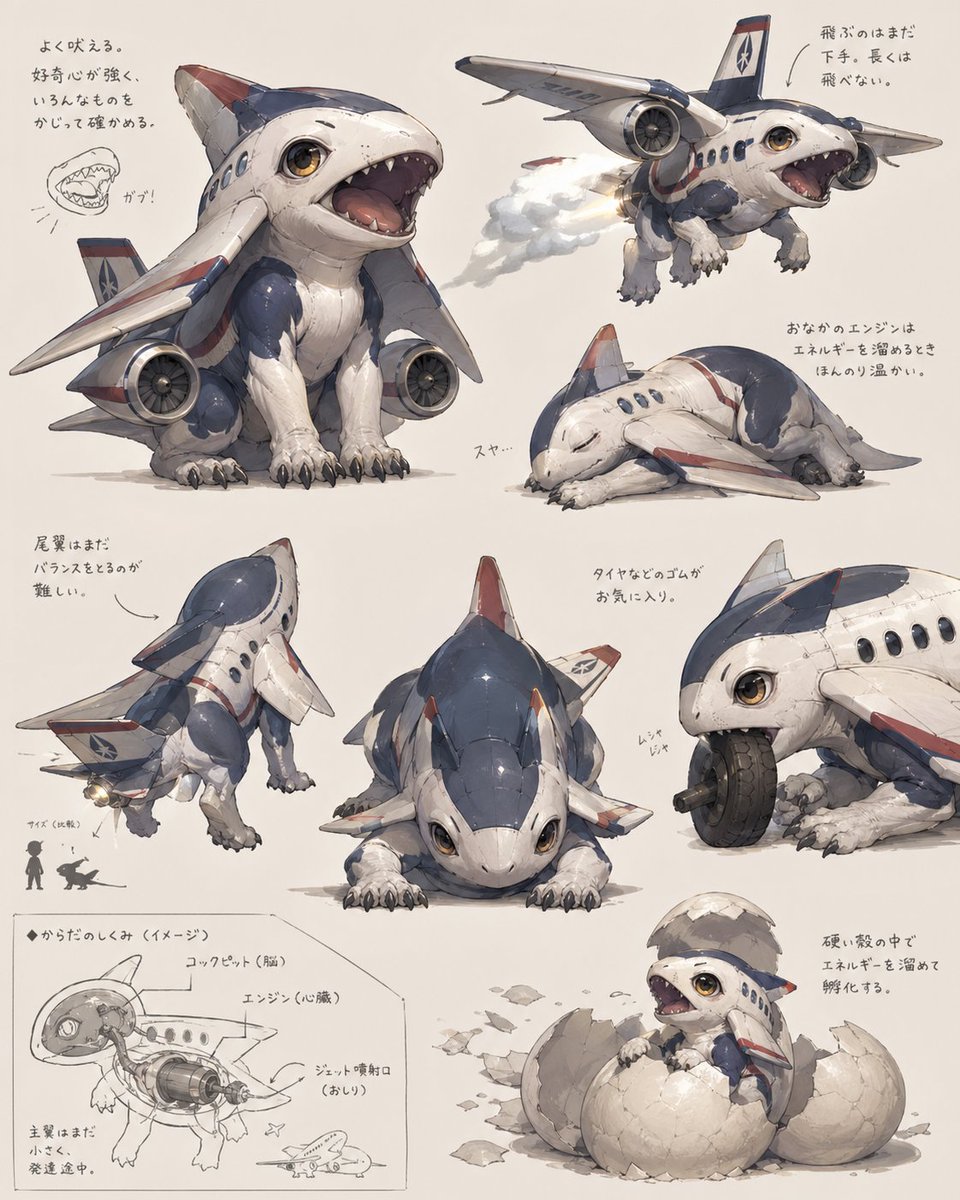
Fiche de créature Avion à réaction Chiot
Une planche de concept art soignée présentant un adorable hybride avion-animal sous 8 angles et études, idéale pour la conception de créatures, la création d'univers ou des visuels de fantasy industrielle imaginatifs.
Il s'agit d'un exemple de visuel pour la catégorie { GPT Image 2 Anime et jeux . Utilisez le visuel ci-dessous pour générer des éléments visuels similaires et vérifiez les conditions d'utilisation (attribution Awesome GPT Image 2 Prompts et droits d'utilisation commerciale) avant toute réutilisation.
Besoin de l'ensemble complet des invites ? Utilisez le Anime et jeux Consultez le centre thématique pour plus d'exemples connexes, ou ouvrez le GPT Image 2 catalogue rapide pour l'index complet des exemples, les structures réutilisables et l'attribution des sources.
Free 1K preview
Generate one preview image instantly, no sign-up required.
3580/4000
Prompt
invite prête à être copiée
{
  "type": "concept art creature sheet",
  "subject": {
    "category": "inorganic animal creature hybrid",
    "theme": "a cute baby shark-dog fused with a passenger jet airplane",
    "style": "detailed Japanese concept art on an off-white sketchbook background, painterly industrial design illustration, soft shadows, slightly worn surface textures, believable mechanical-organic fusion, adorable but functional creature design",
    "color_palette": {
      "primary": "white fuselage body",
      "secondary": "navy blue upper panels",
      "accent": "muted red striping and fin tips",
      "details": "warm amber eyes, gray claws, metallic engine parts"
    },
    "design": {
      "head": "rounded shark-like airplane nose with large glossy eyes and a wide open mouth full of small triangular teeth",
      "body": "compact puppy-like quadruped body with soft belly and aircraft fuselage shell",
      "wings": "2 short airplane wings attached as forelimb-side fins",
      "engines": "2 visible jet engines mounted low at the sides of the body",
      "tail": "vertical tail fin and small rear stabilizer surfaces",
      "legs": "4 animal legs with fluffy fur texture and dark claws",
      "surface_details": "panel seams, rivets, passenger windows, airline insignia, weathering scuffs"
    }
  },
  "layout": {
    "background": "plain warm ivory paper",
    "sections": [
      {
        "title": "main pose",
        "position": "upper left",
        "count": 1,
        "labels": [
          "front three-quarter sitting pose with mouth open"
        ]
      },
      {
        "title": "flying pose",
        "position": "upper right",
        "count": 1,
        "labels": [
          "airborne view with engine exhaust"
        ]
      },
      {
        "title": "sleeping pose",
        "position": "right center",
        "count": 1,
        "labels": [
          "curled up asleep"
        ]
      },
      {
        "title": "rear view",
        "position": "lower left",
        "count": 1,
        "labels": [
          "back three-quarter standing pose"
        ]
      },
      {
        "title": "front low pose",
        "position": "lower center",
        "count": 1,
        "labels": [
          "crouched front view"
        ]
      },
      {
        "title": "wheel chewing detail",
        "position": "lower right upper",
        "count": 1,
        "labels": [
          "close-up biting and playing with a tire"
        ]
      },
      {
        "title": "cross-section diagram",
        "position": "bottom left corner",
        "count": 1,
        "labels": [
          "internal anatomy sketch with labeled engine and cockpit"
        ]
      },
      {
        "title": "hatching pose",
        "position": "bottom right corner",
        "count": 1,
        "labels": [
          "baby creature emerging from a cracked egg"
        ]
      }
    ],
    "total_views": 8,
    "extra_elements": {
      "small_mouth_sketches": 1,
      "size_comparison_icons": 2,
      "handwritten_note_groups": 7
    }
  },
  "text": {
    "language": "Japanese handwritten annotations scattered near each drawing",
    "include_text": true,
    "text_density": "light notes around the poses and technical diagram"
  },
  "composition": "arrange all 8 drawings like a creature design reference sheet with generous spacing, asymmetrical but balanced layout, the largest view in the upper left and smaller supporting studies around it",
  "quality": "highly polished concept illustration for creature ideation, whimsical aerospace biology aesthetic"
}
Best for
- - Anime et jeux visual exploration
- - Image generation and reference-image edits
- - Reusable briefs that keep source attribution visible
Change these parts
- - Subject, product, character, or scene
- - Aspect ratio, camera, lighting, and background
- - Brand, text, color, and output constraints
Recommended model and settings
- - Model: gpt-image-2
- - Input mode: Texte vers image
- - Aspect ratio: source
- - Commercial status: review original source
How to use this prompt
- 1. Copy the prompt and preserve its structure for the first test.
- 2. Replace the subject, context, and publishing channel.
- 3. Change one camera, lighting, or style variable per iteration.
- 4. Inspect the output, source, text, and rights before reuse.
Limitations, source, and reuse cautions
- - Generated output is an editable draft, not factual, legal, or rights evidence.
- - Review the linked source, people, brands, logos, text, and third-party media before commercial use.
Importé de Awesome GPT Image 2 Prompts . L'attribution est requise. Le statut d'utilisation commerciale est allowed ; veuillez vérifier les droits d'auteur avant toute utilisation payante.
Plus de cas dans cette catégorie
Priorisé par catégorie, compatibilité du mode d'entrée, qualité et risque moindre.

Manga Desert Radio Telescope Road Trip
Texte vers image

Grumpy Rhino Storybook Illustration
Texte vers image

Martial Arts Legend Character Bible Sheet
Texte vers image

Female Clown Cyborg Portrait
Texte vers image

Greyscale Puzzle Portrait with Color Accent
Texte vers image

Glitch Aesthetic Surreal Portrait
Texte vers image
Réutilisation et notes de source
Utilisez cette invite en toute sécurité après avoir prévisualisé le dossier.
- 1.Copiez l'invite ou ouvrez-la directement dans Dovoo avec le bouton de génération.
- 2.Ajustez les variables, le format d'image et les images de référence en fonction de votre cas d'utilisation.
- 3.Avant toute publication ou utilisation payante, vérifiez les droits d'auteur, les exigences d'attribution et les risques liés à la marque ou à l'image.