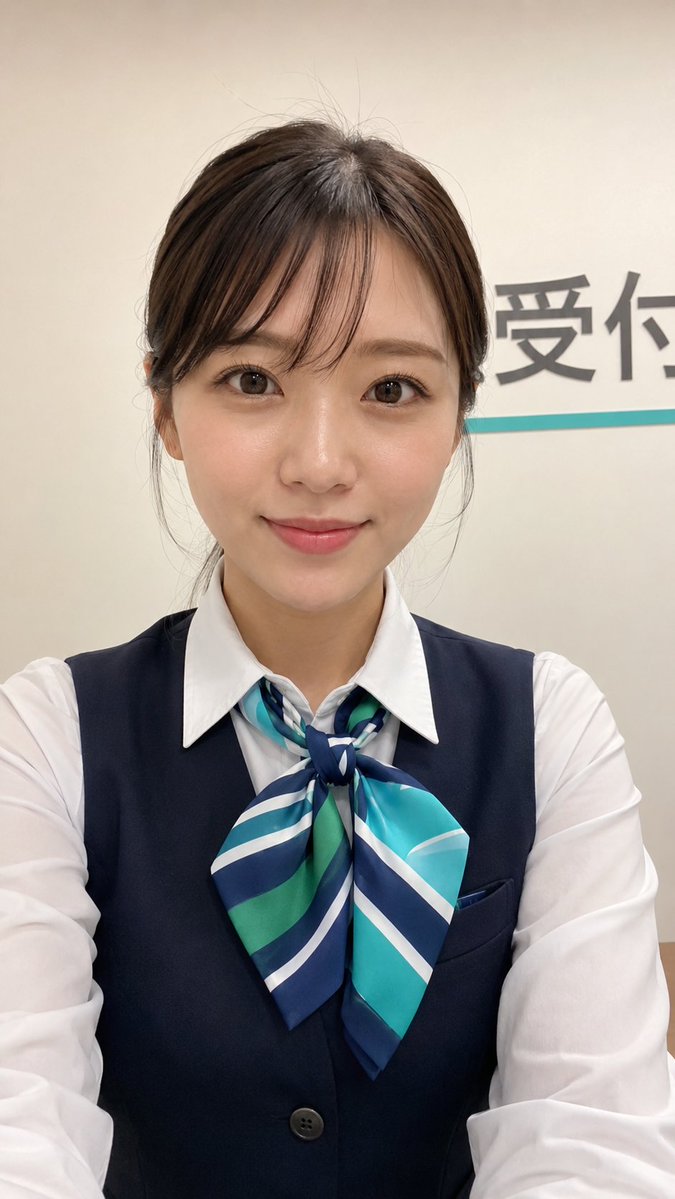
Japanese Receptionist Smartphone Selfie
A realistic vertical smartphone selfie of a friendly uniformed Japanese receptionist for social profile or story-style portrait generation.
Il s'agit d'un exemple de visuel pour la catégorie { GPT Image 2 Portrait et personnage . Utilisez le visuel ci-dessous pour générer des éléments visuels similaires et vérifiez les conditions d'utilisation (attribution Awesome GPT Image 2 Prompts et droits d'utilisation commerciale) avant toute réutilisation.
Besoin de l'ensemble complet des invites ? Utilisez le Portrait et personnage Consultez le centre thématique pour plus d'exemples connexes, ou ouvrez le GPT Image 2 catalogue rapide pour l'index complet des exemples, les structures réutilisables et l'attribution des sources.
Free 1K preview
Generate one preview image instantly, no sign-up required.
1430/4000
Prompt
invite prête à être copiée
Create a vertical 9:16 smartphone selfie that looks like a real casual high-quality photo taken with a modern phone, suitable for a social media profile or story. The subject is a friendly young {argument name="character ethnicity" default="Japanese"} woman centered close to the camera, photographed from slightly above chest level with her arms subtly visible at the bottom as if holding the phone. She has {argument name="hair color and style" default="dark brown hair tied back neatly with wispy bangs and a few loose flyaway strands"}, smooth natural skin, large brown eyes, soft pink lips, minimal fresh makeup, and a gentle approachable smile while looking directly into the lens. She wears a crisp white long-sleeve collared shirt under a dark navy office vest with one visible button and a pocket, plus a large tied neck scarf in {argument name="scarf colors" default="teal, navy, green, and white diagonal stripes"}. The background is an indoor reception or service counter area with an off-white wall, partial large Japanese wall text visible on the right reading {argument name="visible wall text" default="Reception"}, and a thin turquoise horizontal line beneath it. Use bright even indoor lighting, natural phone-camera sharpness, slight wide-angle lens distortion, realistic skin texture, subtle JPEG compression, no studio lighting, no glamour advertising look, no heavy retouching, no extra people, no watermark.Variables d'invite
Espaces réservés aux arguments modifiables présents dans l'invite, avec leurs valeurs par défaut.
Variable
character ethnicity
Défaut
Japanese
Variable
hair color and style
Défaut
dark brown hair tied back neatly with wispy bangs and a few loose flyaway strands
Variable
scarf colors
Défaut
teal, navy, green, and white diagonal stripes
Variable
visible wall text
Défaut
Reception
Best for
- - Portrait et personnage visual exploration
- - Image generation and reference-image edits
- - Reusable briefs that keep source attribution visible
Change these parts
- - Subject, product, character, or scene
- - Aspect ratio, camera, lighting, and background
- - Brand, text, color, and output constraints
Recommended model and settings
- - Model: gpt-image-2
- - Input mode: Texte vers image
- - Aspect ratio: source
- - Commercial status: review original source
How to use this prompt
- 1. Copy the prompt and preserve its structure for the first test.
- 2. Replace the subject, context, and publishing channel.
- 3. Change one camera, lighting, or style variable per iteration.
- 4. Inspect the output, source, text, and rights before reuse.
Limitations, source, and reuse cautions
- - Generated output is an editable draft, not factual, legal, or rights evidence.
- - Review the linked source, people, brands, logos, text, and third-party media before commercial use.
Importé de Awesome GPT Image 2 Prompts . L'attribution est requise. Le statut d'utilisation commerciale est allowed ; veuillez vérifier les droits d'auteur avant toute utilisation payante.
Plus de cas dans cette catégorie
Priorisé par catégorie, compatibilité du mode d'entrée, qualité et risque moindre.






Réutilisation et notes de source
Utilisez cette invite en toute sécurité après avoir prévisualisé le dossier.
- 1.Copiez l'invite ou ouvrez-la directement dans Dovoo avec le bouton de génération.
- 2.Ajustez les variables, le format d'image et les images de référence en fonction de votre cas d'utilisation.
- 3.Avant toute publication ou utilisation payante, vérifiez les droits d'auteur, les exigences d'attribution et les risques liés à la marque ou à l'image.