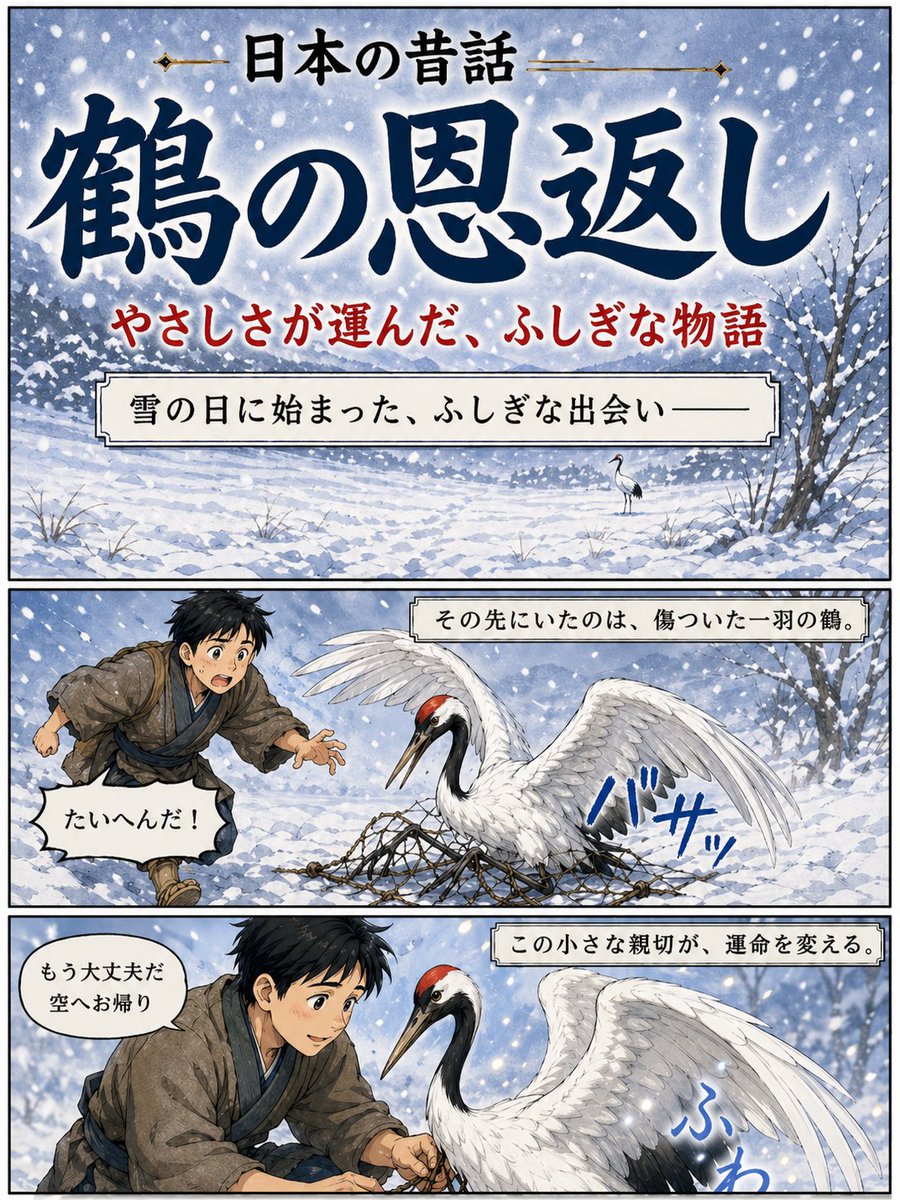
Affiche du conte populaire japonais sur la grue
Une affiche illustrée en trois panneaux représentant un conte populaire japonais, « La Grue reconnaissante », dans un format manga enneigé, idéale pour les couvertures narratives ou les illustrations d'histoires culturelles.
Il s'agit d'un exemple de visuel pour la catégorie { GPT Image 2 Illustration et art . Utilisez le visuel ci-dessous pour générer des éléments visuels similaires et vérifiez les conditions d'utilisation (attribution Awesome GPT Image 2 Prompts et droits d'utilisation commerciale) avant toute réutilisation.
Free 1K preview
Generate one preview image instantly, no sign-up required.
Prompt
invite prête à être copiée
{
  "type": "Japanese folktale manga-style poster",
  "style": "dramatic watercolor anime illustration with inked outlines, vintage storybook poster design, soft snowy atmosphere, vertical three-panel layout with black panel borders",
  "theme": "kindness, winter, folklore, gratitude",
  "text": {
    "topHeader": "日本の昔話",
    "mainTitle": "{argument name=\"title text\" default=\"鶴の恩返し\"}",
    "subtitle": "やさしさが運んだ、ふしぎな物語"
  },
  "layout": {
    "orientation": "portrait",
    "sections": [
      {
        "title": "cover panel",
        "position": "top",
        "count": 1,
        "labels": [
          "title area",
          "subtitle line",
          "narration box"
        ]
      },
      {
        "title": "story panel 1",
        "position": "middle",
        "count": 1,
        "labels": [
          "boy running in snow",
          "injured crane in net",
          "sound effect",
          "speech bubble",
          "caption box"
        ]
      },
      {
        "title": "story panel 2",
        "position": "bottom",
        "count": 1,
        "labels": [
          "boy helping crane",
          "crane close-up",
          "sound effect",
          "speech bubble",
          "caption box"
        ]
      }
    ],
    "panelCount": 3
  },
  "scene": {
    "season": "winter",
    "weather": "heavy falling snow with large visible flakes",
    "background": "snow-covered field with distant tree line, pale blue-gray sky, bare winter trees at the right edge, uneven snowdrifts and sparse grasses poking through snow"
  },
  "topPanel": {
    "composition": "large title-dominant cover image over a snowy landscape",
    "narrationBox": "雪の日に始まった、ふしぎな出会い——",
    "backgroundDetail": "a single small crane standing in the snowy distance near the center-right"
  },
  "middlePanel": {
    "caption": "その先にいたのは、傷ついた一羽の鶴。",
    "characters": [
      {
        "role": "boy",
        "count": 1,
        "appearance": "young Japanese boy in rustic old-fashioned village clothing, messy short black hair, brown kimono-style outer robe, blue inner layer and sash, running urgently from the left with one hand reaching forward"
      },
      {
        "role": "crane",
        "count": 1,
        "appearance": "red-crowned crane with white body, black neck and tail accents, one wing raised, trapped in a rope net spread across the snow"
      }
    ],
    "speechBubble": "たいへんだ!",
    "soundEffect": "バサッ"
  },
  "bottomPanel": {
    "caption": "この小さな親切が、運命を変える。",
    "characters": [
      {
        "role": "boy",
        "count": 1,
        "appearance": "the same boy kneeling and carefully loosening the net with both hands, leaning close to the bird"
      },
      {
        "role": "crane",
        "count": 1,
        "appearance": "large red-crowned crane facing left, calmer now, wings partially lifted, feathers detailed and luminous against the snow"
      }
    ],
    "speechBubble": "もう大丈夫だ 空へお帰り",
    "soundEffect": "ふわ"
  },
  "colorPalette": {
    "primary": [
      "indigo blue",
      "snow white",
      "soft gray",
      "muted brown"
    ],
    "accents": [
      "crane crown red",
      "subtitle red",
      "sound effect blue"
    ]
  },
  "rendering": "highly polished illustration, elegant Japanese calligraphy for the main title, readable printed Japanese text in captions and speech balloons, cinematic contrast between white snow and deep blue lettering"
}
Variables d'invite
Espaces réservés aux arguments modifiables présents dans l'invite, avec leurs valeurs par défaut.
Best for
- - Illustration et art visual exploration
- - Image generation and reference-image edits
- - Reusable briefs that keep source attribution visible
Change these parts
- - Subject, product, character, or scene
- - Aspect ratio, camera, lighting, and background
- - Brand, text, color, and output constraints
Recommended model and settings
- - Model: gpt-image-2
- - Input mode: Texte vers image
- - Aspect ratio: source
- - Commercial status: review original source
How to use this prompt
- 1. Copy the prompt and preserve its structure for the first test.
- 2. Replace the subject, context, and publishing channel.
- 3. Change one camera, lighting, or style variable per iteration.
- 4. Inspect the output, source, text, and rights before reuse.
Limitations, source, and reuse cautions
- - Generated output is an editable draft, not factual, legal, or rights evidence.
- - Review the linked source, people, brands, logos, text, and third-party media before commercial use.
Plus de cas dans cette catégorie
Priorisé par catégorie, compatibilité du mode d'entrée, qualité et risque moindre.






Réutilisation et notes de source
Utilisez cette invite en toute sécurité après avoir prévisualisé le dossier.
- 1.Copiez l'invite ou ouvrez-la directement dans Dovoo avec le bouton de génération.
- 2.Ajustez les variables, le format d'image et les images de référence en fonction de votre cas d'utilisation.
- 3.Avant toute publication ou utilisation payante, vérifiez les droits d'auteur, les exigences d'attribution et les risques liés à la marque ou à l'image.