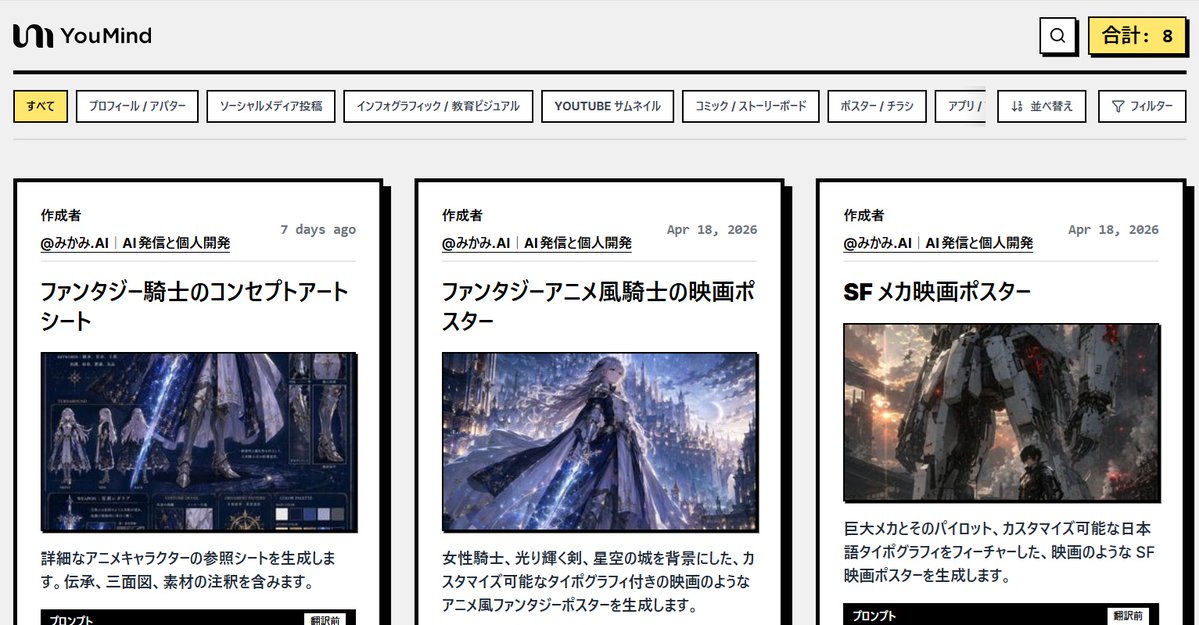
Interface utilisateur de la galerie d'invites IA japonaise
Maquette épurée d'application web de bureau présentant une galerie de bibliothèque d'invites japonaises avec des onglets de catégories, des commandes de recherche et trois grandes cartes de présentation, idéale pour les pages d'accueil, les démonstrations de produits et les illustrations conceptuelles d'interface.
Il s'agit d'un exemple de visuel pour la catégorie { GPT Image 2 Graphique et affiche . Utilisez le visuel ci-dessous pour générer des éléments visuels similaires et vérifiez les conditions d'utilisation (attribution Awesome GPT Image 2 Prompts et droits d'utilisation commerciale) avant toute réutilisation.
Free 1K preview
Generate one preview image instantly, no sign-up required.
Prompt
invite prête à être copiée
{
  "type": "Japanese AI prompt gallery web interface mockup",
  "style": "clean editorial web UI with bold black outlines, light gray page background, minimal flat design, subtle retro-tech aesthetic, high contrast typography, screenshot-like composition",
  "brand": {
    "name": "YouMind",
    "logo_position": "top left",
    "logo_style": "simple black abstract icon followed by bold wordmark"
  },
  "page": {
    "background": "#f3f3f3",
    "header_height": "compact",
    "top_bar": {
      "count": 3,
      "items": [
        "brand logo left",
        "search button near top right",
        "highlighted total counter on far right"
      ],
      "counter_text": "Total: 8"
    },
    "category_tabs": {
      "position": "below header",
      "count": 9,
      "labels": [
        "すべて",
        "プロフィール / アバター",
        "ソーシャルメディア投稿",
        "インフォグラフィック / 教育ビジュアル",
        "YOUTUBE サムネイル",
        "コミック / ストーリーボード",
        "ポスター / チラシ",
        "アプリ / ",
        "並べ替え",
        "フィルター"
      ],
      "active_tab": "すべて",
      "tab_style": "rectangular white tabs with black borders, active tab filled pale yellow"
    }
  },
  "layout": {
    "main_view": "three-column card gallery cropped at the bottom edge",
    "visible_cards": 3,
    "card_style": "large white cards with thick black border and offset black drop shadow, generous padding, editorial magazine layout",
    "card_spacing": "even horizontal spacing"
  },
  "cards": [
    {
      "position": "left",
      "author_section": {
        "title": "Creator",
        "handle": "@みかみ..AI | AI発信と個人開発",
        "date": "7 days ago"
      },
      "headline": "ファンタジー騎士のコンセプトアートシート",
      "image_type": "fantasy knight character reference sheet in cool blue tones",
      "body_text": "詳細なアニメキャラクターの参照シートを生成します。伝承、三面図、素材の注釈を含みます。",
      "footer_hint": "bottom edge shows the beginning of a black button labeled プロンプト, partially cropped"
    },
    {
      "position": "center",
      "author_section": {
        "title": "Creator",
        "handle": "@みかみ..AI | AI発信と個人開発",
        "date": "Apr 18, 2026"
      },
      "headline": "ファンタジーアニメ風騎士の映画ポスター",
      "image_type": "anime-style fantasy knight poster with a female knight, glowing sword, flowing cape, and luminous castle city background",
      "body_text": "女性騎士、光り輝く剣、星空の城を背景にした、カスタマイズ可能なタイポグラフィ付きの映画のようなアニメ風ファンタジーポスターを生成します。"
    },
    {
      "position": "right",
      "author_section": {
        "title": "Creator",
        "handle": "@みかみ..AI | AI発信と個人開発",
        "date": "Apr 18, 2026"
      },
      "headline": "SFメカ映画ポスター",
      "image_type": "cinematic science-fiction mech poster with a gigantic humanoid robot and a small pilot figure in an urban war setting, warm sunset sparks and smoke",
      "body_text": "巨大メカとそのパイロット、カスタマイズ可能な日本語タイポグラフィをフィーチャーした、映画のような SF 映画ポスターを生成します。",
      "footer_hint": "bottom edge shows the beginning of a black button labeled プロンプト, partially cropped"
    }
  ],
  "composition": {
    "aspect_ratio": "wide desktop screenshot, approximately 16:9",
    "camera": "straight-on full page capture",
    "crop": "bottom of the cards slightly cut off, preserving header, tabs, and most of the card content"
  },
  "text_rendering": "all visible interface text and card text in Japanese, crisp sans-serif UI font, bold headlines, smaller gray dates, black body copy",
  "color_palette": {
    "count": 5,
    "colors": [
      "light gray background",
      "white cards and tabs",
      "black borders and text",
      "pale yellow highlights",
      "muted blue and orange tones inside thumbnail images"
    ]
  }
}
Best for
- - Graphique et affiche visual exploration
- - Image generation and reference-image edits
- - Reusable briefs that keep source attribution visible
Change these parts
- - Subject, product, character, or scene
- - Aspect ratio, camera, lighting, and background
- - Brand, text, color, and output constraints
Recommended model and settings
- - Model: gpt-image-2
- - Input mode: Texte vers image
- - Aspect ratio: source
- - Commercial status: review original source
How to use this prompt
- 1. Copy the prompt and preserve its structure for the first test.
- 2. Replace the subject, context, and publishing channel.
- 3. Change one camera, lighting, or style variable per iteration.
- 4. Inspect the output, source, text, and rights before reuse.
Limitations, source, and reuse cautions
- - Generated output is an editable draft, not factual, legal, or rights evidence.
- - Review the linked source, people, brands, logos, text, and third-party media before commercial use.
Plus de cas dans cette catégorie
Priorisé par catégorie, compatibilité du mode d'entrée, qualité et risque moindre.






Réutilisation et notes de source
Utilisez cette invite en toute sécurité après avoir prévisualisé le dossier.
- 1.Copiez l'invite ou ouvrez-la directement dans Dovoo avec le bouton de génération.
- 2.Ajustez les variables, le format d'image et les images de référence en fonction de votre cas d'utilisation.
- 3.Avant toute publication ou utilisation payante, vérifiez les droits d'auteur, les exigences d'attribution et les risques liés à la marque ou à l'image.