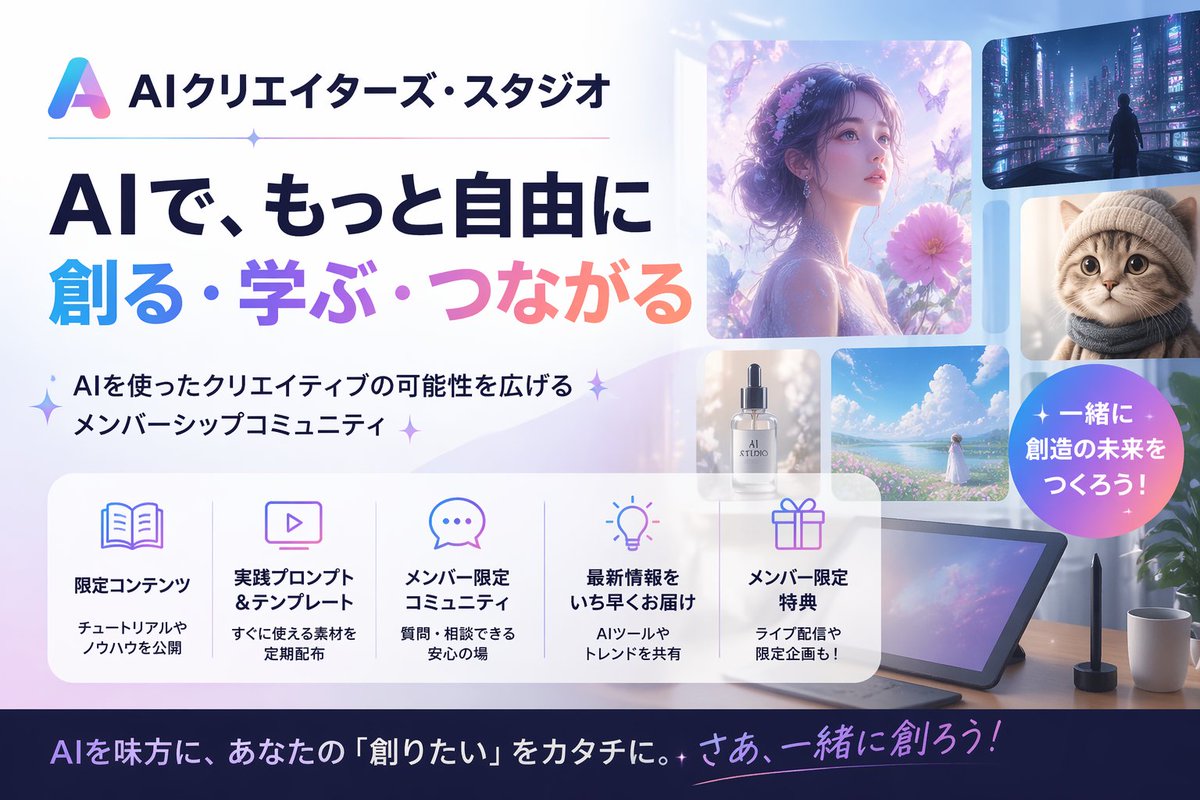
Bannière du studio japonais de création d'IA
Une bannière promotionnelle japonaise soignée pour une communauté de membres créateurs d'IA, idéale pour les en-têtes de sites web, les publications sur les réseaux sociaux et les vignettes d'annonces.
Il s'agit d'un exemple de visuel pour la catégorie { GPT Image 2 Graphique et affiche . Utilisez le visuel ci-dessous pour générer des éléments visuels similaires et vérifiez les conditions d'utilisation (attribution Awesome GPT Image 2 Prompts et droits d'utilisation commerciale) avant toute réutilisation.
Free 1K preview
Generate one preview image instantly, no sign-up required.
Prompt
invite prête à être copiée
Create a polished Japanese promotional website hero banner for an AI creator community, in a clean modern tech-advertising style with a soft pastel blue, lavender, pink, and white palette. Wide 16:9 composition. On the left, place a gradient triangular abstract logo and the Japanese brand name {argument name="brand name" default="AIクリエイターズ・スタジオ"} at the top, followed by a thin horizontal divider line with a small sparkle in the middle. Below that, a very large bold Japanese headline in 2 lines: first line in dark navy, 「AIで、もっと自由に」, second line in large gradient letters from cyan to purple to pink, 「創る・学ぶ・つながる」. Under the headline, add a short Japanese subheadline with sparkle marks, 「AIを使ったクリエイティブの可能性を広げるメンバーシップコミュニティ」. On the right half, create a collage of 6 rounded-rectangle visual cards showing AI-generated creative examples: 1 large dreamy portrait of a woman in profile surrounded by flowers and butterflies in ethereal purple light, 1 small cyberpunk city nightscape with a lone figure, 1 small close-up portrait of a fluffy cat, 1 small luxury cosmetic bottle labeled “AI STUDIO”, 1 small bright seascape or flower-field landscape with a woman in white, and 1 large tablet drawing device on a desk with a stylus, plus a coffee mug and plant nearby. Add a circular gradient badge overlapping the right side with bold white Japanese text {argument name="badge text" default="一緒に創造の未来をつくろう!"}. Across the lower middle, place a translucent white rounded feature panel containing exactly 5 equal columns with thin separators and pastel line icons. Each column has an icon, a bold Japanese title, and a smaller 2-line description. The 5 titles are: 「限定コンテンツ」, 「実践プロンプト&テンプレート」, 「メンバー限定コミュニティ」, 「最新情報をいち早くお届け」, 「メンバー限定特典」. Use fitting icons for book, monitor, chat bubble, light bulb, and gift. Add concise Japanese descriptions beneath each title. At the very bottom, add a dark navy footer strip with a large Japanese call-to-action sentence in white and pink-purple gradient accent text, {argument name="footer text" default="AIを味方に、あなたの『創りたい』をカタチに。さあ、一緒に創ろう!"}. Overall look: premium startup landing page, glossy soft lighting, subtle sparkles, glassmorphism panels, clean typography, Japanese text rendered accurately, highly legible, visually balanced, professional social media thumbnail quality.Variables d'invite
Espaces réservés aux arguments modifiables présents dans l'invite, avec leurs valeurs par défaut.
Best for
- - Graphique et affiche visual exploration
- - Image generation and reference-image edits
- - Reusable briefs that keep source attribution visible
Change these parts
- - Subject, product, character, or scene
- - Aspect ratio, camera, lighting, and background
- - Brand, text, color, and output constraints
Recommended model and settings
- - Model: gpt-image-2
- - Input mode: Texte vers image
- - Aspect ratio: source
- - Commercial status: review original source
How to use this prompt
- 1. Copy the prompt and preserve its structure for the first test.
- 2. Replace the subject, context, and publishing channel.
- 3. Change one camera, lighting, or style variable per iteration.
- 4. Inspect the output, source, text, and rights before reuse.
Limitations, source, and reuse cautions
- - Generated output is an editable draft, not factual, legal, or rights evidence.
- - Review the linked source, people, brands, logos, text, and third-party media before commercial use.
Plus de cas dans cette catégorie
Priorisé par catégorie, compatibilité du mode d'entrée, qualité et risque moindre.






Réutilisation et notes de source
Utilisez cette invite en toute sécurité après avoir prévisualisé le dossier.
- 1.Copiez l'invite ou ouvrez-la directement dans Dovoo avec le bouton de génération.
- 2.Ajustez les variables, le format d'image et les images de référence en fonction de votre cas d'utilisation.
- 3.Avant toute publication ou utilisation payante, vérifiez les droits d'auteur, les exigences d'attribution et les risques liés à la marque ou à l'image.