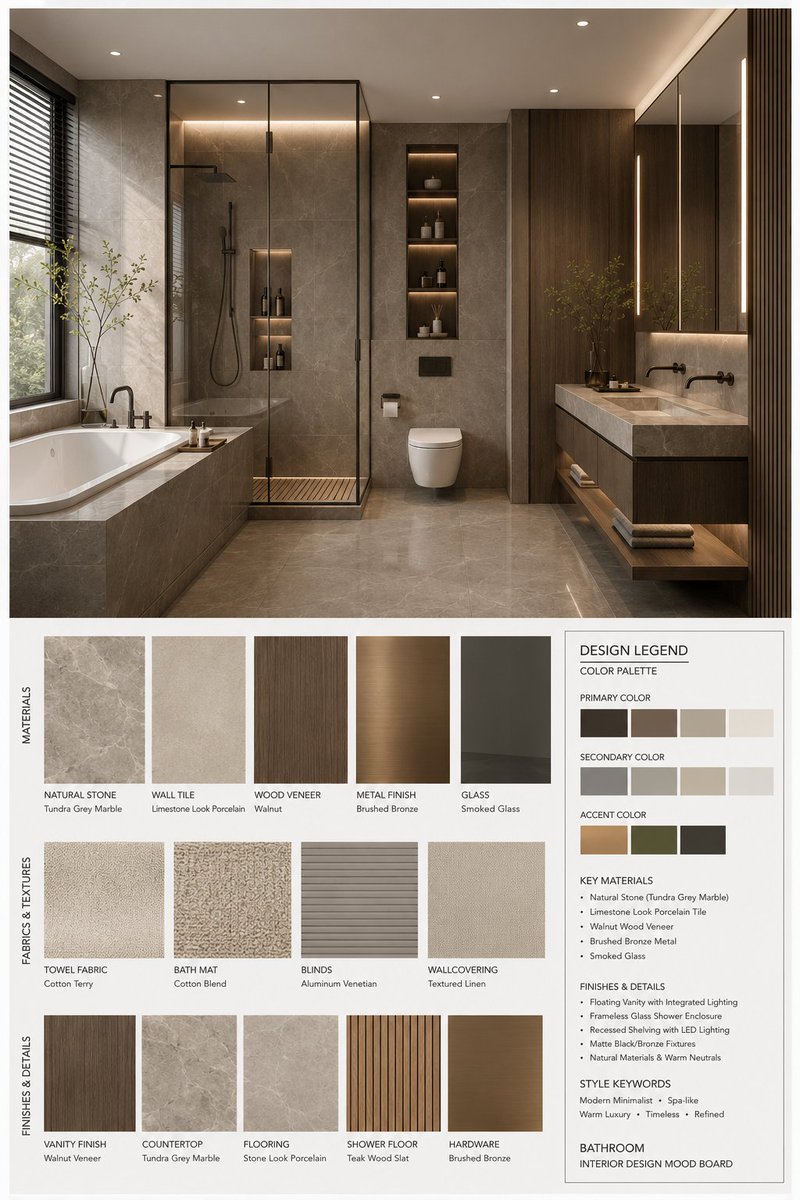
Générateur de planches d'inspiration pour la décoration intérieure
Un outil complet pour créer des planches d'inspiration professionnelles en design d'intérieur. Il génère une mise en page structurée présentant un rendu 3D haute résolution d'un espace, associé à des échantillons de matériaux, des textures de tissus et une légende détaillée incluant les palettes de couleurs et les spécifications des matériaux.
Il s'agit d'un exemple de visuel pour la catégorie { GPT Image 2 Intérieur et architecture . Utilisez le visuel ci-dessous pour générer des éléments visuels similaires et vérifiez les conditions d'utilisation (attribution Awesome GPT Image 2 Prompts et droits d'utilisation commerciale) avant toute réutilisation.
Free 1K preview
Generate one preview image instantly, no sign-up required.
Free text preview doesn’t preserve reference-image consistency.
Prompt
invite prête à être copiée
You are a professional interior design Mood Board creator. Based on the provided {argument name="space type" default="bedroom"} design photo, generate a high-end vertical 3:4 mood board. The overall visual should reference professional design proposals, showing {argument name="style name" default="Modern Mid-century"} aesthetic features, possessing a [Mood Keywords] atmosphere, and conforming to [Branding Tone] design expression.
Space Type: {argument name="space type" default="bedroom"}
Layout Requirements:
Upper section: A high-resolution, photorealistic {argument name="space type" default="bedroom"} interior rendering. It must be consistent with the user's photo in structure, furniture, materials, colors, and lighting, but refined for a professional proposal. Focus on: [Key Furniture Elements], [Material Keywords], [Color Palette], [Lighting Style].
Lower section: Display material and furnishing samples strictly corresponding to the upper design, including: Material samples, fabric samples, color swatches, finish samples, and related wood/stone/metal/glass/leather samples. All must reflect the core material and color logic of the plan.
Bottom right: A Design Legend / Color Palette info box showing: Primary color, secondary color, accent color, core materials, finish descriptions, and style keywords.
Style and Output:
Professional firm-level layout; minimalist, clean, restrained, and orderly; clear visual hierarchy and white space control; material/color labels clear and modern; overall vibe matching {argument name="style name" default="Modern Mid-century"}; Render Quality: 4K Ultra HD, hyper-detailed, photorealistic rendering. Vertical 3:4 composition.
Label Requirements:
Each sample must have a clear label organized by [Label Language] material/color/finish names in a concise, professional, and well-aligned style.
Variables d'invite
Espaces réservés aux arguments modifiables présents dans l'invite, avec leurs valeurs par défaut.
Best for
- - Intérieur et architecture visual exploration
- - Image generation and reference-image edits
- - Reusable briefs that keep source attribution visible
Change these parts
- - Subject, product, character, or scene
- - Aspect ratio, camera, lighting, and background
- - Brand, text, color, and output constraints
Recommended model and settings
- - Model: gpt-image-2
- - Input mode: Image vers image
- - Aspect ratio: source
- - Commercial status: review original source
How to use this prompt
- 1. Copy the prompt and preserve its structure for the first test.
- 2. Replace the subject, context, and publishing channel.
- 3. Change one camera, lighting, or style variable per iteration.
- 4. Inspect the output, source, text, and rights before reuse.
Limitations, source, and reuse cautions
- - Generated output is an editable draft, not factual, legal, or rights evidence.
- - Review the linked source, people, brands, logos, text, and third-party media before commercial use.
Plus de cas dans cette catégorie
Priorisé par catégorie, compatibilité du mode d'entrée, qualité et risque moindre.






Réutilisation et notes de source
Utilisez cette invite en toute sécurité après avoir prévisualisé le dossier.
- 1.Copiez l'invite ou ouvrez-la directement dans Dovoo avec le bouton de génération.
- 2.Ajustez les variables, le format d'image et les images de référence en fonction de votre cas d'utilisation.
- 3.Avant toute publication ou utilisation payante, vérifiez les droits d'auteur, les exigences d'attribution et les risques liés à la marque ou à l'image.