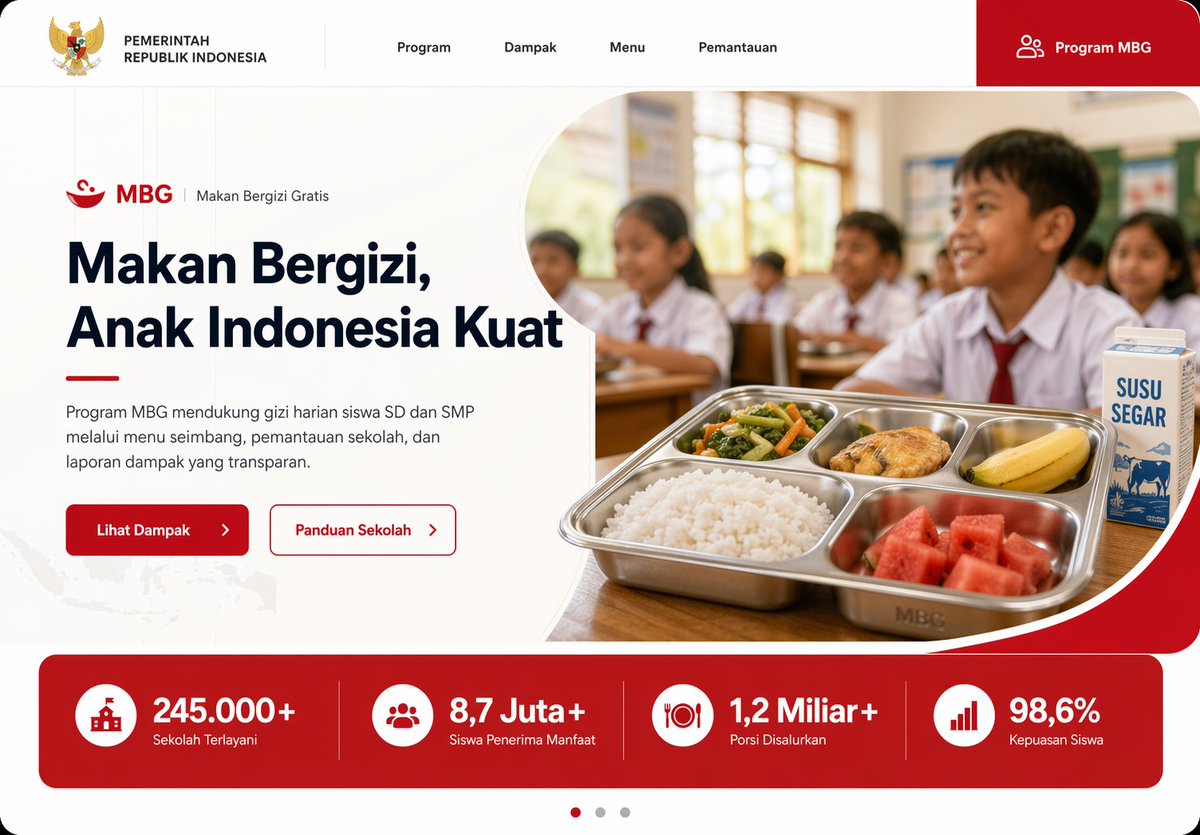
Page d'accueil sur la nutrition scolaire indonésienne
Maquette soignée de site web pour ordinateur de bureau, présentant le programme de nutrition scolaire MBG d'Indonésie, idéale pour les présentations gouvernementales, de technologies civiques ou de conception front-end.
Il s'agit d'un exemple de visuel pour la catégorie { GPT Image 2 Graphique et affiche . Utilisez le visuel ci-dessous pour générer des éléments visuels similaires et vérifiez les conditions d'utilisation (attribution Awesome GPT Image 2 Prompts et droits d'utilisation commerciale) avant toute réutilisation.
Free 1K preview
Generate one preview image instantly, no sign-up required.
Prompt
invite prête à être copiée
Create a modern government program landing page UI mockup for Indonesia in a clean, professional web design style, desktop widescreen aspect ratio. The page uses a white background with bold red accents, soft rounded corners, subtle gray dividers, and a polished frontend-dribbble presentation look. At the very top, build a horizontal navigation bar with 6 visible elements: the Indonesian Garuda emblem and the text "PEMERINTAH REPUBLIK INDONESIA" on the left, then 4 centered menu items labeled "Program", "Dampak", "Menu", and "Pemantauan", and on the far right a large red rounded button labeled "Program MBG" with a small people icon. Below it, design a hero section split into two columns. On the left, show a small program label line with a red bowl icon, the text "MBG", a vertical divider, and "Makan Bergizi Gratis". Under that, place a large bold headline reading "{argument name="headline text" default="Makan Bergizi, Anak Indonesia Kuat"}" in dark navy, spanning 3 lines. Add a short paragraph in Indonesian below: "Program MBG mendukung gizi harian siswa SD dan SMP melalui menu seimbang, pemantauan sekolah, dan laporan dampak yang transparan." Then place 2 call-to-action buttons side by side: a solid red button labeled "Lihat Dampak" with a right arrow, and an outlined white button with red border labeled "Panduan Sekolah" with a right arrow. On the right side of the hero, place a rounded large photo-style image framed by a sweeping white curved divider and red corner background. The image shows an Indonesian elementary classroom with 5 visible schoolchildren in white uniforms with red ties, seated at desks, warm daylight from windows, shallow depth of field, documentary-photo realism. In the foreground, on a wooden desk, show a stainless steel compartment tray meal with exactly 5 food items: white rice, mixed vegetables, a piece of fried chicken, a banana, and watermelon cubes. Beside the tray, place 1 milk carton labeled "SUSU SEGAR". Under the hero, add a full-width red statistics band with 4 equally spaced metric cards separated by thin vertical dividers. Each card has a white circular icon and bold white text. The 4 metrics are: "245.000+" with label "Sekolah Terlayani", "8,7 Juta+" with label "Siswa Penerima Manfaat", "1,2 Miliar+" with label "Porsi Disalurkan", and "98,6%" with label "Kepuasan Siswa". At the bottom center, add a 3-dot carousel indicator with the left dot active in red and the other 2 dots gray. Include a faint Indonesia map texture in the lower-left background. Use crisp typography, generous whitespace, high-end fintech/government website aesthetics, realistic UI proportions, and a production-ready landing page mockup appearance.Variables d'invite
Espaces réservés aux arguments modifiables présents dans l'invite, avec leurs valeurs par défaut.
Best for
- - Graphique et affiche visual exploration
- - Image generation and reference-image edits
- - Reusable briefs that keep source attribution visible
Change these parts
- - Subject, product, character, or scene
- - Aspect ratio, camera, lighting, and background
- - Brand, text, color, and output constraints
Recommended model and settings
- - Model: gpt-image-2
- - Input mode: Texte vers image
- - Aspect ratio: source
- - Commercial status: review original source
How to use this prompt
- 1. Copy the prompt and preserve its structure for the first test.
- 2. Replace the subject, context, and publishing channel.
- 3. Change one camera, lighting, or style variable per iteration.
- 4. Inspect the output, source, text, and rights before reuse.
Limitations, source, and reuse cautions
- - Generated output is an editable draft, not factual, legal, or rights evidence.
- - Review the linked source, people, brands, logos, text, and third-party media before commercial use.
Plus de cas dans cette catégorie
Priorisé par catégorie, compatibilité du mode d'entrée, qualité et risque moindre.






Réutilisation et notes de source
Utilisez cette invite en toute sécurité après avoir prévisualisé le dossier.
- 1.Copiez l'invite ou ouvrez-la directement dans Dovoo avec le bouton de génération.
- 2.Ajustez les variables, le format d'image et les images de référence en fonction de votre cas d'utilisation.
- 3.Avant toute publication ou utilisation payante, vérifiez les droits d'auteur, les exigences d'attribution et les risques liés à la marque ou à l'image.