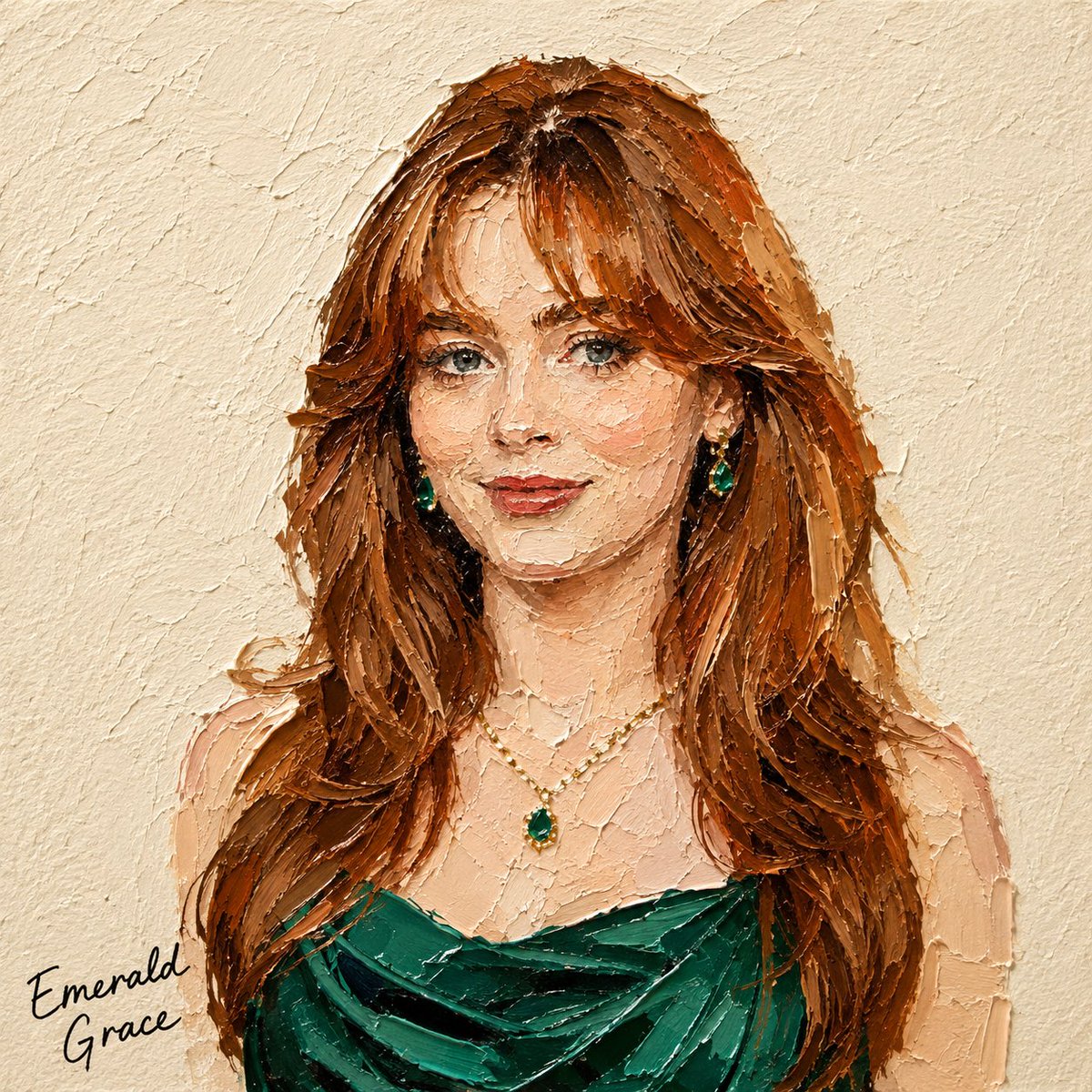
Impasto Oil Miniature Painting Style
Transforms photos into 3D-textured miniature oil paintings using a thick palette-knife impasto technique with realistic lighting.
Il s'agit d'un exemple de visuel pour la catégorie { GPT Image 2 Illustration et art . Utilisez le visuel ci-dessous pour générer des éléments visuels similaires et vérifiez les conditions d'utilisation (attribution Awesome GPT Image 2 Prompts et droits d'utilisation commerciale) avant toute réutilisation.
Free 1K preview
Generate one preview image instantly, no sign-up required.
Free text preview doesn’t preserve reference-image consistency.
Prompt
invite prête à être copiée
Transform the subject in the attached photo into a square miniature painting in a {argument name="painting style" default="palette-knife impasto oil-painting style"}.

[Style — Emphasize 3D Texture]

Use bold, thick impasto paint applied with a palette knife, raised approximately 3–5 mm from the surface.

Each paint mass should show clear directional knife marks, including visible grooves and ridges.

Assume lighting from the upper left. Add bright highlights to raised paint and distinct shadows to recessed or overlapping areas, creating strong light-and-shadow contrast like a real oil-paint surface.

Add subtle shadows along paint edges so each color mass appears layered and built up at different depths, rather than flat.

Preserve the subject’s silhouette, colors, and composition from the original photo, but avoid realistic rendering. Simplify the form using thick masses of paint.

Keep the texture controlled and not overly detailed. The subject should remain recognizable through a limited number of bold, dimensional palette-knife strokes.

[Background]

Use a fixed {argument name="background color" default="warm ivory/cream watercolor-paper background"} with a subtle, slightly bumpy texture.

Keep the background flat to contrast with the dimensional subject.

[Text]

Add a black handwritten caption in a corner along the bottom or wherever there is the most empty space.

Automatically determine the caption based on the subject:

Food/drink → menu name (e.g., “Pancake,” “Earl Grey Cake”)

Product → product name or category

Person → a short descriptive phrase or name-like text

Animal → animal name or species

Landscape → place name or a short word describing the scene

The handwriting should look naturally imperfect, slightly uneven, and tactile—not like a clean digital font.

Text color must remain black.

[Composition]

Aspect ratio: 1:1

Place the subject in the center with generous negative space.

Show only the main subject, with no additional props or distracting elements.
Variables d'invite
Espaces réservés aux arguments modifiables présents dans l'invite, avec leurs valeurs par défaut.
Best for
- - Illustration et art visual exploration
- - Image generation and reference-image edits
- - Reusable briefs that keep source attribution visible
Change these parts
- - Subject, product, character, or scene
- - Aspect ratio, camera, lighting, and background
- - Brand, text, color, and output constraints
Recommended model and settings
- - Model: gpt-image-2
- - Input mode: Image vers image
- - Aspect ratio: source
- - Commercial status: review original source
How to use this prompt
- 1. Copy the prompt and preserve its structure for the first test.
- 2. Replace the subject, context, and publishing channel.
- 3. Change one camera, lighting, or style variable per iteration.
- 4. Inspect the output, source, text, and rights before reuse.
Limitations, source, and reuse cautions
- - Generated output is an editable draft, not factual, legal, or rights evidence.
- - Review the linked source, people, brands, logos, text, and third-party media before commercial use.
Plus de cas dans cette catégorie
Priorisé par catégorie, compatibilité du mode d'entrée, qualité et risque moindre.






Réutilisation et notes de source
Utilisez cette invite en toute sécurité après avoir prévisualisé le dossier.
- 1.Copiez l'invite ou ouvrez-la directement dans Dovoo avec le bouton de génération.
- 2.Ajustez les variables, le format d'image et les images de référence en fonction de votre cas d'utilisation.
- 3.Avant toute publication ou utilisation payante, vérifiez les droits d'auteur, les exigences d'attribution et les risques liés à la marque ou à l'image.