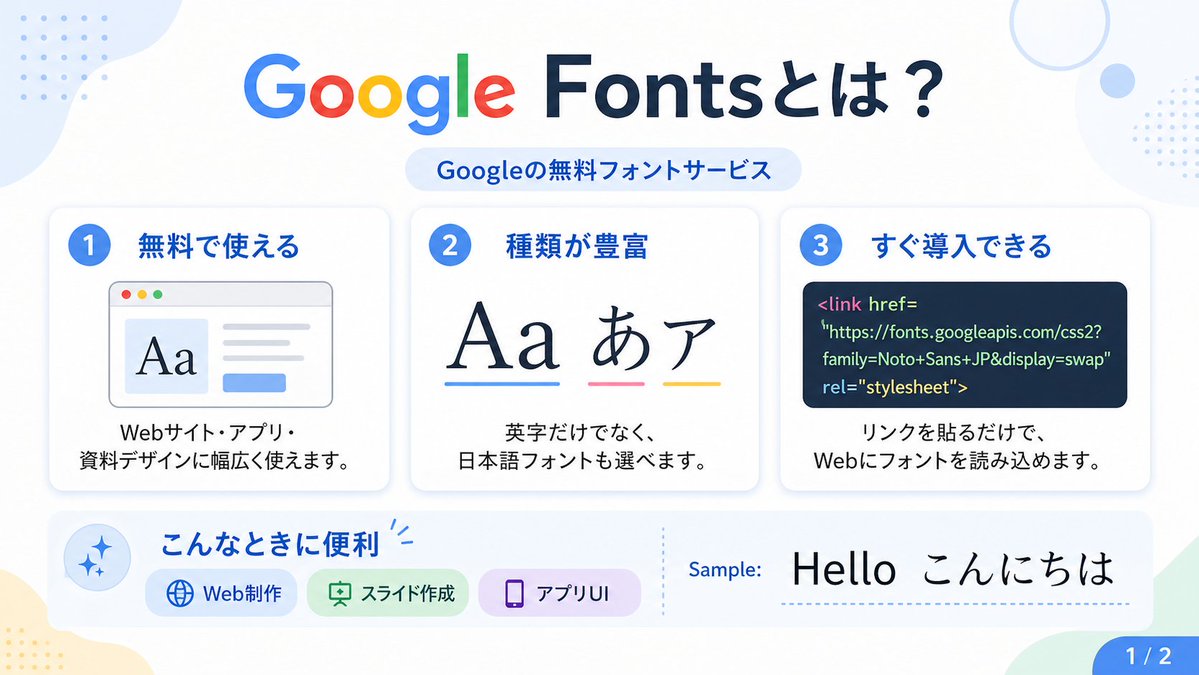
Infographie japonaise Google Fonts
Une infographie épurée, de style japonais, expliquant les polices Google, idéale pour les publications sur les réseaux sociaux, les diapositives ou les contenus pédagogiques.
Il s'agit d'un exemple de visuel pour la catégorie { GPT Image 2 Graphique et affiche . Utilisez le visuel ci-dessous pour générer des éléments visuels similaires et vérifiez les conditions d'utilisation (attribution Awesome GPT Image 2 Prompts et droits d'utilisation commerciale) avant toute réutilisation.
Free 1K preview
Generate one preview image instantly, no sign-up required.
Prompt
invite prête à être copiée
{
  "type": "Japanese infographic poster",
  "topic": "Google Fonts introduction",
  "style": {
    "look": "clean flat modern presentation slide",
    "palette": "white background with soft pastel blue, green, yellow, and lavender accents",
    "aspect_ratio": "16:9",
    "lighting": "bright even digital graphic lighting",
    "finish": "crisp vector-like infographic with subtle shadows and rounded cards"
  },
  "text": {
    "headline": "{argument name=\"headline text\" default=\"Google Fontsとは?\"}",
    "subheadline": "Googleの無料フォントサービス",
    "sample_label": "Sample:",
    "sample_text": "{argument name=\"sample text\" default=\"Hello こんにちは\"}",
    "page_indicator": "1 / 2"
  },
  "layout": {
    "sections": [
      {
        "title": "top header",
        "position": "top center",
        "count": 2,
        "labels": [
          "Google Fontsとは?",
          "Googleの無料フォントサービス"
        ]
      },
      {
        "title": "feature cards",
        "position": "middle row",
        "count": 3,
        "labels": [
          "1 無料で使える",
          "2 種類が豊富",
          "3 すぐ導入できる"
        ]
      },
      {
        "title": "use cases bar",
        "position": "bottom left to center",
        "count": 4,
        "labels": [
          "こんなときに便利",
          "Web Production",
          "スライド作成",
          "アプリUI"
        ]
      },
      {
        "title": "sample area",
        "position": "bottom right",
        "count": 2,
        "labels": [
          "Sample:",
          "Hello こんにちは"
        ]
      },
      {
        "title": "page marker",
        "position": "bottom right corner",
        "count": 1,
        "labels": [
          "1 / 2"
        ]
      }
    ],
    "background_decorations": {
      "count": 7,
      "items": [
        "pale blue organic blob in top left",
        "small blue dotted grid in top left",
        "thin pale blue ring in top right",
        "small pale blue circle near top right",
        "small blue dotted grid at upper right edge",
        "pale yellow organic blob in bottom left",
        "pale green angular shape in bottom right"
      ]
    }
  },
  "cards": [
    {
      "number": "1",
      "title": "無料で使える",
      "description": "Webサイト・アプリ・資料デザインに幅広く使えます。",
      "visual": "rounded white card with light shadow, blue number badge, browser window illustration showing large serif Aa on the left, gray text lines on the right, and a small blue button below"
    },
    {
      "number": "2",
      "title": "種類が豊富",
      "description": "英字だけでなく、日本語フォントも選べます。",
      "visual": "rounded white card with light shadow, blue number badge, large typography samples reading Aa あ ア, each with colored underline in blue, pink, and yellow"
    },
    {
      "number": "3",
      "title": "すぐ導入できる",
      "description": "リンクを貼るだけで、Webにフォントを読み込めます。",
      "visual": "rounded white card with light shadow, blue number badge, dark navy code panel containing HTML link tag for Google Fonts"
    }
  ],
  "lower_band": {
    "left_icon": "blue sparkle icon inside pale blue circle",
    "title": "こんなときに便利",
    "chips": {
      "count": 3,
      "items": [
        {
          "label": "Web Production",
          "color": "light blue",
          "icon": "globe"
        },
        {
          "label": "スライド作成",
          "color": "light green",
          "icon": "presentation board"
        },
        {
          "label": "アプリUI",
          "color": "light purple",
          "icon": "smartphone"
        }
      ]
    },
    "divider": "vertical dotted line",
    "sample_preview": "large black typography sample on white background"
  },
  "typography": {
    "headline_font": "{argument name=\"headline font\" default=\"Google Sans-like rounded sans serif\"}",
    "body_font": "{argument name=\"body font\" default=\"clean Japanese sans serif\"}",
    "notes": "The word Google in the headline uses the official multicolor Google logo style: blue G, red o, yellow o, blue g, green l, red e; the rest of the headline is dark navy."
  }
}
Variables d'invite
Espaces réservés aux arguments modifiables présents dans l'invite, avec leurs valeurs par défaut.
Best for
- - Graphique et affiche visual exploration
- - Image generation and reference-image edits
- - Reusable briefs that keep source attribution visible
Change these parts
- - Subject, product, character, or scene
- - Aspect ratio, camera, lighting, and background
- - Brand, text, color, and output constraints
Recommended model and settings
- - Model: gpt-image-2
- - Input mode: Texte vers image
- - Aspect ratio: source
- - Commercial status: review original source
How to use this prompt
- 1. Copy the prompt and preserve its structure for the first test.
- 2. Replace the subject, context, and publishing channel.
- 3. Change one camera, lighting, or style variable per iteration.
- 4. Inspect the output, source, text, and rights before reuse.
Limitations, source, and reuse cautions
- - Generated output is an editable draft, not factual, legal, or rights evidence.
- - Review the linked source, people, brands, logos, text, and third-party media before commercial use.
Plus de cas dans cette catégorie
Priorisé par catégorie, compatibilité du mode d'entrée, qualité et risque moindre.






Réutilisation et notes de source
Utilisez cette invite en toute sécurité après avoir prévisualisé le dossier.
- 1.Copiez l'invite ou ouvrez-la directement dans Dovoo avec le bouton de génération.
- 2.Ajustez les variables, le format d'image et les images de référence en fonction de votre cas d'utilisation.
- 3.Avant toute publication ou utilisation payante, vérifiez les droits d'auteur, les exigences d'attribution et les risques liés à la marque ou à l'image.