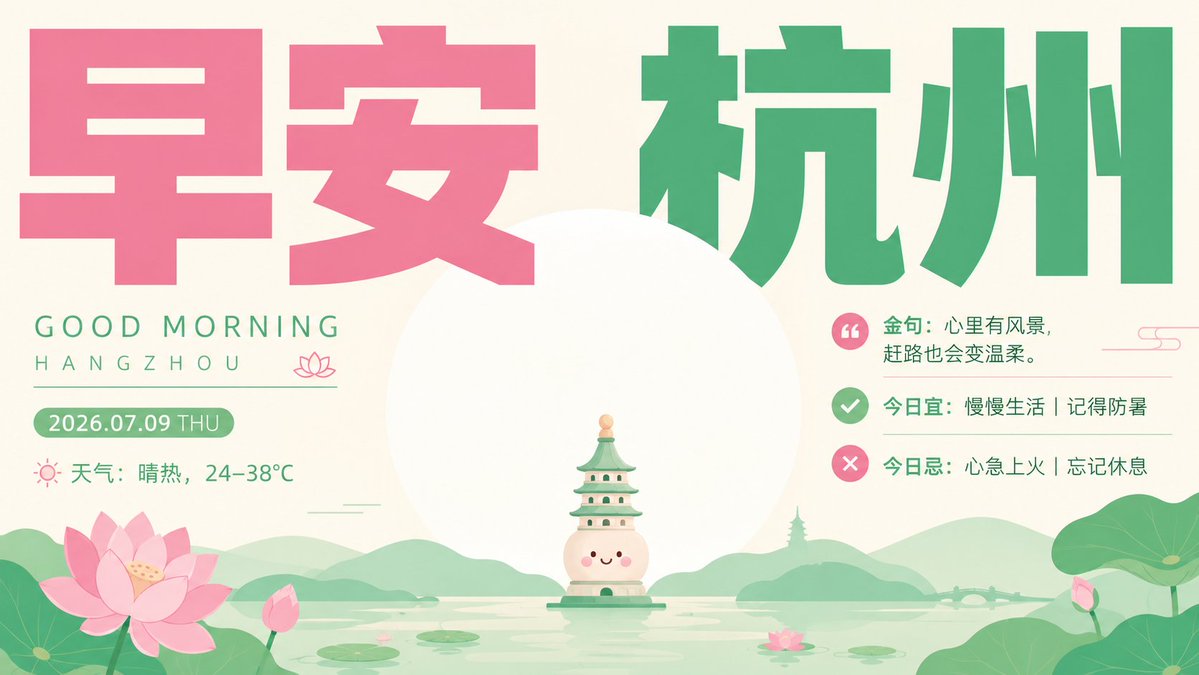
Healing Good Morning Hangzhou Poster
A pastel flat-design Chinese morning poster with oversized typography, weather notes, and a cute West Lake landmark scene for social media greetings.
Il s'agit d'un exemple de visuel pour la catégorie { GPT Image 2 Graphique et affiche . Utilisez le visuel ci-dessous pour générer des éléments visuels similaires et vérifiez les conditions d'utilisation (attribution Awesome GPT Image 2 Prompts et droits d'utilisation commerciale) avant toute réutilisation.
Besoin de l'ensemble complet des invites ? Utilisez le Graphique et affiche Consultez le centre thématique pour plus d'exemples connexes, ou ouvrez le GPT Image 2 catalogue rapide pour l'index complet des exemples, les structures réutilisables et l'attribution des sources.
Free 1K preview
Generate one preview image instantly, no sign-up required.
3373/4000
Prompt
invite prête à être copiée
Objective: Create a calm and healing flat-style good morning poster for {argument name="city name" default="Hangzhou"}, using oversized Chinese font titles and exquisite, cute landscape illustrations, balancing simplicity and order with soft emotions.

Canvas: 16:9 widescreen horizontal poster, warm ivory background, with a color scheme of lotus pink, jade green, mint green, cream color, and soft lake blue. Use simple and modern editing typography, with ample whitespace, and avoid realistic photography.

Layout: Place an oversized Chinese title at the top, content as {argument name="headline text" default="Good morning, Hangzhou"}; the first two characters on the left use bright lotus pink, and the last two characters on the right use deep jade green. The title should occupy the main part of the screen, using blocky geometric Chinese fonts, with clear and slightly soft edges. The center of the composition is a huge pale white sun or moon disc, with a miniature, cute landmark illustration of the West Lake rising in front of the disc.

Left Information Block: Below the pink title, add a small-spaced green English text: the first line “GOOD MORNING”, below “HANGZHOU”. Add a thin horizontal line with a small pink lotus icon on the right end. Below, add a rounded green date capsule with content {argument name="date text" default="2026.07.09 THU"}. Below the date, display a line of weather information, including a small pink sun icon and Chinese text “Weather: Hot and sunny, 24–38°C”.

Right Information Block: Below the green title, create 3 stacked daily notes, right-aligned to the central disc. The first line contains a pink circular quote icon and text “Quote: Having scenery in your heart makes the journey gentler.” The second line contains a green circular checkmark icon and text “Today is suitable for: Slow living | Remember to prevent heatstroke.” The third line contains a pink circular X icon and text “Today is not suitable for: Impatience and irritability | Don't forget to rest.” Use thin, light green separators between lines, and add a small decorative pink line pattern near the upper right corner.

Central Illustration: At the bottom center, draw a miniature, cute pagoda-shaped Hangzhou landmark character floating on the lake, with a smiling face, blush, cream-colored body, green multi-layered roof, small windows, and a small peach spire. Place it in front of the huge white disc to make it appear small and full of warmth.

Landscape Details: Display a flat, soft-toned West Lake at the bottom, including soft green rolling hills, a faint pagoda silhouette in the distance, a small bridge on the right horizon, calm horizontal water surface reflections, and water lilies. Include 2 groups of large lotus/lotus leaf clusters: a large cluster of pink lotuses and leaves in the lower left corner, and a large cluster of green leaves and a small pink bud in the lower right corner. Water lilies are scattered on the lake surface, and a small pink lotus is dotted on the lake surface in the lower middle right.

Visual Style: Flat vector illustration, Chinese healing aesthetic poster, simple and orderly, cute but not childish, soft gradients, rounded shapes, airy spacing, minimalist shadows, high readability, large font sizes paired with small illustrations. Avoid clutter, avoid realism, avoid unnecessary Logos or watermarks.
Variables d'invite
Espaces réservés aux arguments modifiables présents dans l'invite, avec leurs valeurs par défaut.
Variable
city name
Défaut
Hangzhou
Variable
headline text
Défaut
Good morning, Hangzhou
Variable
date text
Défaut
2026.07.09 THU
Best for
- - Graphique et affiche visual exploration
- - Image generation and reference-image edits
- - Reusable briefs that keep source attribution visible
Change these parts
- - Subject, product, character, or scene
- - Aspect ratio, camera, lighting, and background
- - Brand, text, color, and output constraints
Recommended model and settings
- - Model: gpt-image-2
- - Input mode: Texte vers image
- - Aspect ratio: source
- - Commercial status: review original source
How to use this prompt
- 1. Copy the prompt and preserve its structure for the first test.
- 2. Replace the subject, context, and publishing channel.
- 3. Change one camera, lighting, or style variable per iteration.
- 4. Inspect the output, source, text, and rights before reuse.
Limitations, source, and reuse cautions
- - Generated output is an editable draft, not factual, legal, or rights evidence.
- - Review the linked source, people, brands, logos, text, and third-party media before commercial use.
Importé de Awesome GPT Image 2 Prompts . L'attribution est requise. Le statut d'utilisation commerciale est allowed ; veuillez vérifier les droits d'auteur avant toute utilisation payante.
Plus de cas dans cette catégorie
Priorisé par catégorie, compatibilité du mode d'entrée, qualité et risque moindre.

Grumpy Rhino Storybook Illustration
Texte vers image

Pink Hijab Mirror Selfie Portrait
Texte vers image

Manga Desert Radio Telescope Road Trip
Texte vers image

Spring Editorial Fashion Collage
Texte vers image

Y2K Style Photo Booth Collage
Texte vers image

Martial Arts Legend Character Bible Sheet
Texte vers image
Réutilisation et notes de source
Utilisez cette invite en toute sécurité après avoir prévisualisé le dossier.
- 1.Copiez l'invite ou ouvrez-la directement dans Dovoo avec le bouton de génération.
- 2.Ajustez les variables, le format d'image et les images de référence en fonction de votre cas d'utilisation.
- 3.Avant toute publication ou utilisation payante, vérifiez les droits d'auteur, les exigences d'attribution et les risques liés à la marque ou à l'image.