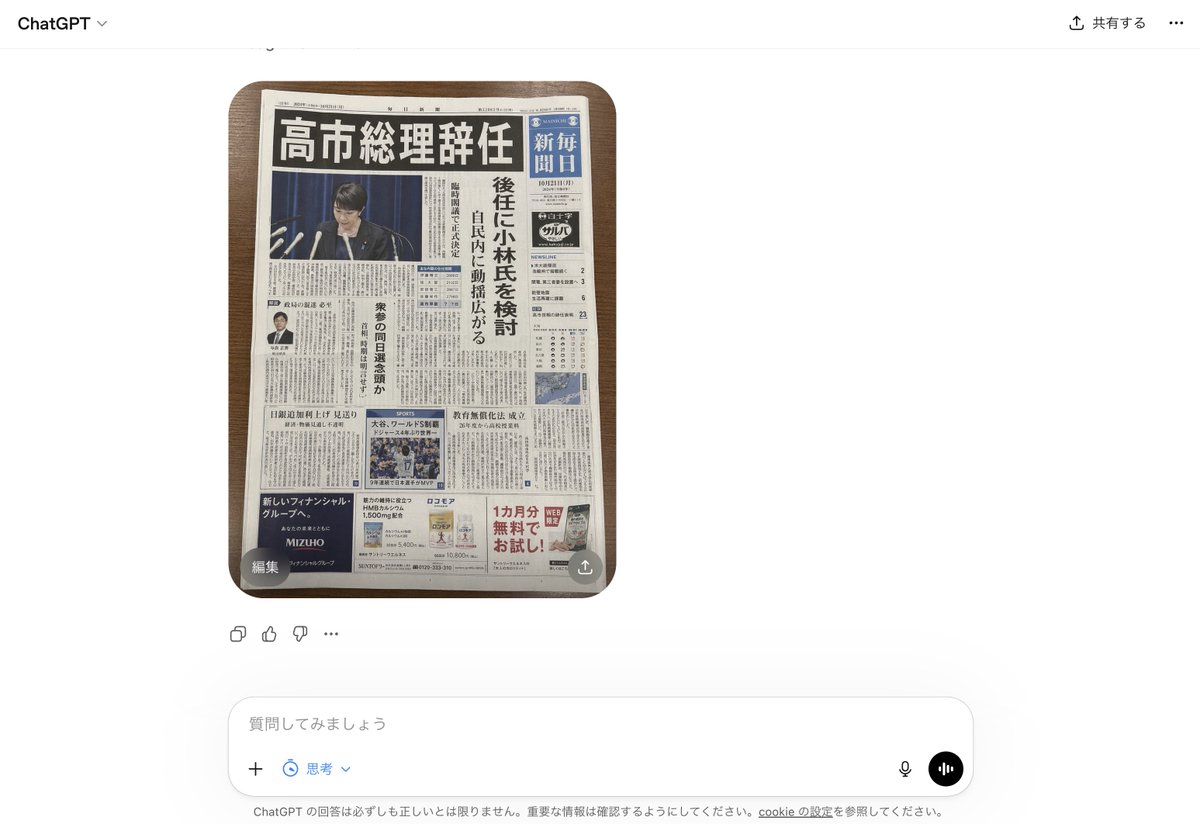
Faux journal japonais dans l'interface utilisateur de ChatGPT
Cela génère une capture d'écran photoréaliste de l'interface ChatGPT affichant une fausse une de journal japonais convaincante, utile pour les maquettes de fausses nouvelles générées par l'IA.
Il s'agit d'un exemple de visuel pour la catégorie { GPT Image 2 Produit et commercial . Utilisez le visuel ci-dessous pour générer des éléments visuels similaires et vérifiez les conditions d'utilisation (attribution Awesome GPT Image 2 Prompts et droits d'utilisation commerciale) avant toute réutilisation.
Besoin de l'ensemble complet des invites ? Utilisez le Produit et commercial Consultez le centre thématique pour plus d'exemples connexes, ou ouvrez le GPT Image 2 catalogue rapide pour l'index complet des exemples, les structures réutilisables et l'attribution des sources.
Free 1K preview
Generate one preview image instantly, no sign-up required.
2020/4000
Prompt
invite prête à être copiée
A realistic smartphone screenshot of the ChatGPT web interface in Japanese, shown on a clean white background. Centered in the chat is a single generated image: a top-down photo of 1 Japanese newspaper placed neatly on a medium-dark wooden tabletop with rounded table corners visible. The newspaper dominates the image and looks highly believable, like a fake but convincing breaking-news front page. The masthead area is dense and traditional, with a huge bold black Japanese headline across the top reading 「高市総理辞任」. Beneath it is a large main photo of 1 politician at a press conference podium with multiple microphones, Show every face clearly with natural, detailed facial features, in front of a dark blue curtain. Along the right side is 1 vertical blue newspaper nameplate area with white Japanese text resembling a major national daily. A tall vertical subheadline column in Japanese runs beside the main image, suggesting discussion of a successor candidate. The front page includes exactly 4 visible advertisement blocks near the bottom and lower side areas, 1 small portrait photo of a suited man in a left-side article, 1 sports photo block in the lower middle, 1 weather or data box on the right, and many tightly packed columns of Japanese body text throughout. The newspaper should feel authentic, serious, and editorial, with realistic print texture, slight page curl, subtle shadows, and credible Japanese typography. Around the image, include the visible ChatGPT UI chrome: top-left “ChatGPT”, top-right Japanese sharing controls, a small circular overlay button labeled 「編集」 at the lower-left corner of the image, a small share-style overlay icon at the lower-right corner of the image, reaction/action icons beneath the image, and a bottom input bar with Japanese placeholder text 「質問してみましょう」 plus microphone and voice buttons. Overall style: photorealistic screenshot, modern web app interface, fake-news newspaper front page, crisp legible layout, natural lighting, minimal perspective distortion.
Best for
- - Produit et commercial visual exploration
- - Image generation and reference-image edits
- - Reusable briefs that keep source attribution visible
Change these parts
- - Subject, product, character, or scene
- - Aspect ratio, camera, lighting, and background
- - Brand, text, color, and output constraints
Recommended model and settings
- - Model: gpt-image-2
- - Input mode: Texte vers image
- - Aspect ratio: source
- - Commercial status: review original source
How to use this prompt
- 1. Copy the prompt and preserve its structure for the first test.
- 2. Replace the subject, context, and publishing channel.
- 3. Change one camera, lighting, or style variable per iteration.
- 4. Inspect the output, source, text, and rights before reuse.
Limitations, source, and reuse cautions
- - Generated output is an editable draft, not factual, legal, or rights evidence.
- - Review the linked source, people, brands, logos, text, and third-party media before commercial use.
Importé de Awesome GPT Image 2 Prompts . L'attribution est requise. Le statut d'utilisation commerciale est allowed ; veuillez vérifier les droits d'auteur avant toute utilisation payante.
Plus de cas dans cette catégorie
Priorisé par catégorie, compatibilité du mode d'entrée, qualité et risque moindre.






Réutilisation et notes de source
Utilisez cette invite en toute sécurité après avoir prévisualisé le dossier.
- 1.Copiez l'invite ou ouvrez-la directement dans Dovoo avec le bouton de génération.
- 2.Ajustez les variables, le format d'image et les images de référence en fonction de votre cas d'utilisation.
- 3.Avant toute publication ou utilisation payante, vérifiez les droits d'auteur, les exigences d'attribution et les risques liés à la marque ou à l'image.