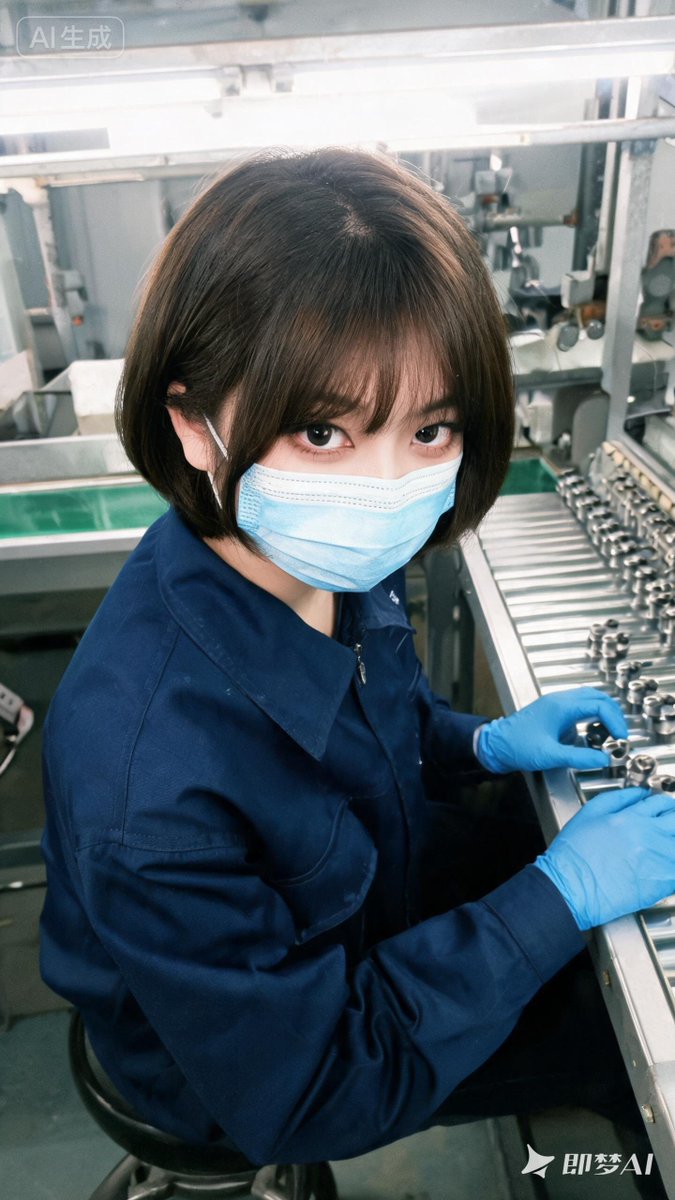
Realistic Factory Technician Portrait
Generates a candid vertical photorealistic portrait of a masked young factory technician working at an industrial assembly line.
Il s'agit d'un exemple de visuel pour la catégorie { GPT Image 2 Portrait et personnage . Utilisez le visuel ci-dessous pour générer des éléments visuels similaires et vérifiez les conditions d'utilisation (attribution Awesome GPT Image 2 Prompts et droits d'utilisation commerciale) avant toute réutilisation.
Besoin de l'ensemble complet des invites ? Utilisez le Portrait et personnage Consultez le centre thématique pour plus d'exemples connexes, ou ouvrez le GPT Image 2 catalogue rapide pour l'index complet des exemples, les structures réutilisables et l'attribution des sources.
Free 1K preview
Generate one preview image instantly, no sign-up required.
1520/4000
Prompt
invite prête à être copiée
Create a highly realistic vertical smartphone photo of {argument name="character description" default="a young East Asian woman factory technician with a short dark-brown bob haircut and wispy bangs"} seated at an industrial assembly workstation, viewed from a slightly high wide-angle perspective as she turns her head up to look directly into the camera with large expressive eyes. She wears exactly 3 visible protective/work items: a navy-blue zip-front work uniform jacket, a light-blue disposable surgical face mask, and bright blue nitrile gloves on both hands. Her hands are positioned at the right side of the frame, handling small shiny cylindrical metal components on a stainless-steel roller conveyor or inspection rail. The setting is a clean modern factory line with metal frames, rails, machinery, bolts, rollers, green flooring, fluorescent overhead lights, and cool gray industrial surfaces; keep the background detailed but slightly softened by depth of field. Use soft bright overhead lighting, realistic skin and fabric texture, mild lens distortion from a close phone camera, cool teal-blue color grading, and a candid documentary feel. Include exactly 2 small visible watermark-style text marks: a rounded translucent label in the top-left reading {argument name="top left label" default="AI generated"}, and a white logo/text mark in the bottom-right reading {argument name="bottom right logo text" default="DreamAI"}. No extra people, no extra text, no cartoon styling, no glamour studio lighting.Variables d'invite
Espaces réservés aux arguments modifiables présents dans l'invite, avec leurs valeurs par défaut.
Variable
character description
Défaut
a young East Asian woman factory technician with a short dark-brown bob haircut and wispy bangs
Variable
top left label
Défaut
AI generated
Variable
bottom right logo text
Défaut
DreamAI
Best for
- - Portrait et personnage visual exploration
- - Image generation and reference-image edits
- - Reusable briefs that keep source attribution visible
Change these parts
- - Subject, product, character, or scene
- - Aspect ratio, camera, lighting, and background
- - Brand, text, color, and output constraints
Recommended model and settings
- - Model: gpt-image-2
- - Input mode: Texte vers image
- - Aspect ratio: source
- - Commercial status: review original source
How to use this prompt
- 1. Copy the prompt and preserve its structure for the first test.
- 2. Replace the subject, context, and publishing channel.
- 3. Change one camera, lighting, or style variable per iteration.
- 4. Inspect the output, source, text, and rights before reuse.
Limitations, source, and reuse cautions
- - Generated output is an editable draft, not factual, legal, or rights evidence.
- - Review the linked source, people, brands, logos, text, and third-party media before commercial use.
Importé de Awesome GPT Image 2 Prompts . L'attribution est requise. Le statut d'utilisation commerciale est allowed ; veuillez vérifier les droits d'auteur avant toute utilisation payante.
Plus de cas dans cette catégorie
Priorisé par catégorie, compatibilité du mode d'entrée, qualité et risque moindre.






Réutilisation et notes de source
Utilisez cette invite en toute sécurité après avoir prévisualisé le dossier.
- 1.Copiez l'invite ou ouvrez-la directement dans Dovoo avec le bouton de génération.
- 2.Ajustez les variables, le format d'image et les images de référence en fonction de votre cas d'utilisation.
- 3.Avant toute publication ou utilisation payante, vérifiez les droits d'auteur, les exigences d'attribution et les risques liés à la marque ou à l'image.