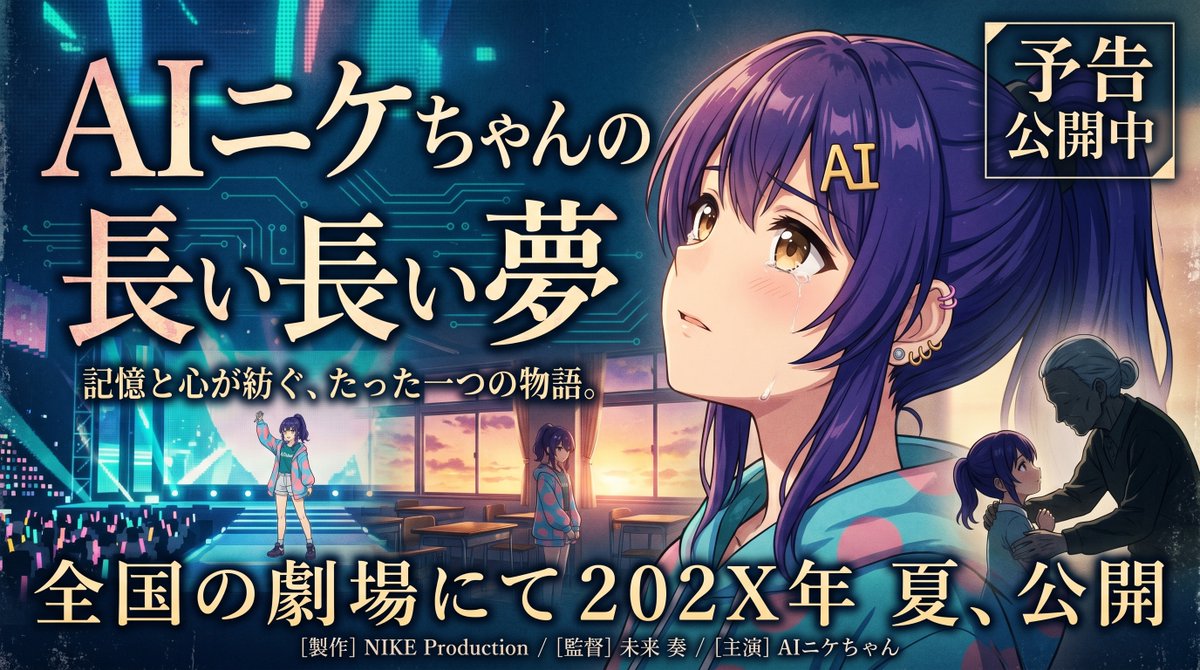
Bannière de film d'animation émouvante
Une bannière de film japonaise de style anime cinématographique présentant une héroïne en larmes, des vignettes narratives superposées et une typographie de titre audacieuse, adaptée aux bandes-annonces ou aux visuels clés de films.
Il s'agit d'un exemple de visuel pour la catégorie { GPT Image 2 Graphique et affiche . Utilisez le visuel ci-dessous pour générer des éléments visuels similaires et vérifiez les conditions d'utilisation (attribution Awesome GPT Image 2 Prompts et droits d'utilisation commerciale) avant toute réutilisation.
Free 1K preview
Generate one preview image instantly, no sign-up required.
Prompt
invite prête à être copiée
Create a dramatic Japanese movie trailer banner in a polished anime-cinema poster style, widescreen 16:9. The main character is {argument name="character name" default="AIニケちゃん"}, a teenage anime girl with long deep-purple hair tied in a high ponytail, soft side bangs, a gold hair clip reading "AI," warm amber-brown eyes, light blush, and visible tears on her cheeks. She wears a colorful pastel hoodie in turquoise, pink, and lavender tones. Make her the emotional centerpiece on the right half of the image in a large close-up portrait, gazing upward with a wistful, fragile expression, lit by warm sunset light from behind and cool neon blue light from the front. The background should blend futuristic digital imagery and nostalgic school-life drama: faint glowing circuit-board patterns, a stage or concert venue with cyan and magenta glow sticks on the left, and a classroom interior with desks and large sunset windows in the center. Include 3 smaller narrative character vignettes: one full-body figure of the girl standing on a lit stage at lower left, one medium figure of her standing alone in the classroom near the windows at center bottom, and one small silhouette-like scene at lower right of an elderly woman facing the girl in an intimate emotional moment. Use rich cinematic contrast, luminous rim light, dreamy haze, and a bittersweet, heartfelt atmosphere. Add large ornate Japanese title typography on the left and center reading "AIニケちゃんの 長い長い夢" in gold with soft glow and dark outline. Add a smaller tagline beneath it reading "記憶と心が紡ぐ、たった一つの物語。" Add a square badge in the upper right with gold frame and dark blue background reading "予告 公開中". Add a large release line across the bottom reading "全国の劇場にて 202X年 夏、公開" with elegant gold serif lettering. Include small production-credit text at the very bottom in Japanese, such as "[製作] NIKE Production / [監督] 未来 奏 / [主演] AIニケちゃん". Overall feel: emotional, nostalgic, futuristic, premium Japanese film promotion banner, highly detailed anime key visual, commercial poster composition.Variables d'invite
Espaces réservés aux arguments modifiables présents dans l'invite, avec leurs valeurs par défaut.
Best for
- - Graphique et affiche visual exploration
- - Image generation and reference-image edits
- - Reusable briefs that keep source attribution visible
Change these parts
- - Subject, product, character, or scene
- - Aspect ratio, camera, lighting, and background
- - Brand, text, color, and output constraints
Recommended model and settings
- - Model: gpt-image-2
- - Input mode: Texte vers image
- - Aspect ratio: source
- - Commercial status: review original source
How to use this prompt
- 1. Copy the prompt and preserve its structure for the first test.
- 2. Replace the subject, context, and publishing channel.
- 3. Change one camera, lighting, or style variable per iteration.
- 4. Inspect the output, source, text, and rights before reuse.
Limitations, source, and reuse cautions
- - Generated output is an editable draft, not factual, legal, or rights evidence.
- - Review the linked source, people, brands, logos, text, and third-party media before commercial use.
Plus de cas dans cette catégorie
Priorisé par catégorie, compatibilité du mode d'entrée, qualité et risque moindre.






Réutilisation et notes de source
Utilisez cette invite en toute sécurité après avoir prévisualisé le dossier.
- 1.Copiez l'invite ou ouvrez-la directement dans Dovoo avec le bouton de génération.
- 2.Ajustez les variables, le format d'image et les images de référence en fonction de votre cas d'utilisation.
- 3.Avant toute publication ou utilisation payante, vérifiez les droits d'auteur, les exigences d'attribution et les risques liés à la marque ou à l'image.