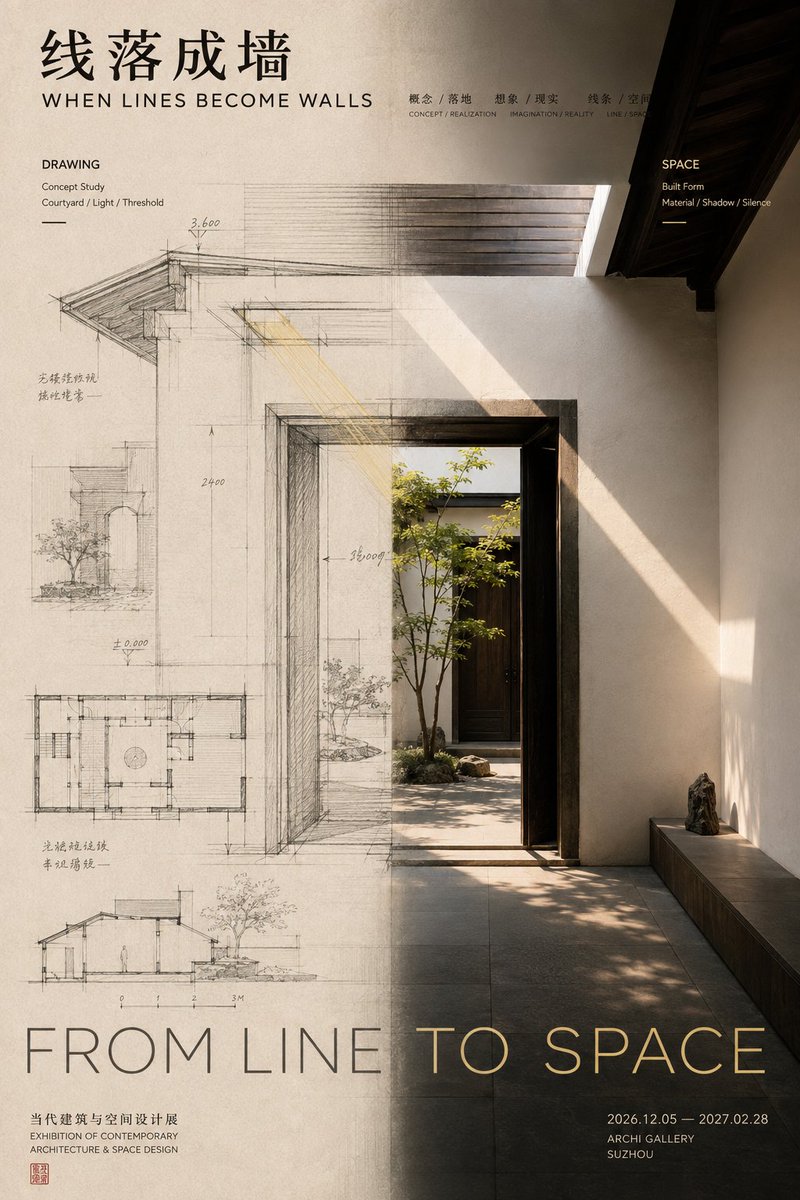
Conceptual Editorial Poster Design Framework
A complex instructional prompt for creating split-screen editorial posters that demonstrate a transition or transformation between two states.
Il s'agit d'un exemple de visuel pour la catégorie { GPT Image 2 Graphique et affiche . Utilisez le visuel ci-dessous pour générer des éléments visuels similaires et vérifiez les conditions d'utilisation (attribution Awesome GPT Image 2 Prompts et droits d'utilisation commerciale) avant toute réutilisation.
Free 1K preview
Generate one preview image instantly, no sign-up required.
Free text preview doesn’t preserve reference-image consistency.
Prompt
invite prête à être copiée
[Theme / Work Title]: {argument name="subject" default="____"}
[Left Status]: {argument name="left state" default="____"}
[Right Status]: {argument name="right state" default="____"}
[Relationship Type]: Before & After / Concept & Finished Product / Source & Spread / Entity & Transformation / Other
[Axis Change]: ____ → ____ → ____
[Chinese Title]: ____
[English Title]: ____
[Main Color Tone]: ____
[Secondary Color Tone]: ____
[Aspect Ratio]: 9:16

Generate an editorial design poster with exhibition visual quality, using a left-right composition.

Don't simply divide the screen into two columns; let the left and right visual areas express different states of the same theme, with the "middle boundary" being the actual point of change.

Use unequal proportional layouts (40:60, 45:55, 55:45) for the left and right areas based on the theme's weight, avoiding a mechanical 50:50 split. Establish a starting point or initial state on the left, and showcase the transformed result on the right.

The most crucial part is the axis transformation. Avoid rigid vertical lines; instead, choose a core element that runs through both areas and continuously changes as it crosses the axis (e.g., petals turning into stitches, a sketch becoming a real wall).

The layout should participate in this relationship, but all text must belong to the work itself. Control the colors to 2-4 main tones. The final reading order should guide the audience from the two states to the connection/change, and ultimately understand the cause and effect.
Variables d'invite
Espaces réservés aux arguments modifiables présents dans l'invite, avec leurs valeurs par défaut.
Best for
- - Graphique et affiche visual exploration
- - Image generation and reference-image edits
- - Reusable briefs that keep source attribution visible
Change these parts
- - Subject, product, character, or scene
- - Aspect ratio, camera, lighting, and background
- - Brand, text, color, and output constraints
Recommended model and settings
- - Model: gpt-image-2
- - Input mode: Image vers image
- - Aspect ratio: source
- - Commercial status: review original source
How to use this prompt
- 1. Copy the prompt and preserve its structure for the first test.
- 2. Replace the subject, context, and publishing channel.
- 3. Change one camera, lighting, or style variable per iteration.
- 4. Inspect the output, source, text, and rights before reuse.
Limitations, source, and reuse cautions
- - Generated output is an editable draft, not factual, legal, or rights evidence.
- - Review the linked source, people, brands, logos, text, and third-party media before commercial use.
Plus de cas dans cette catégorie
Priorisé par catégorie, compatibilité du mode d'entrée, qualité et risque moindre.






Réutilisation et notes de source
Utilisez cette invite en toute sécurité après avoir prévisualisé le dossier.
- 1.Copiez l'invite ou ouvrez-la directement dans Dovoo avec le bouton de génération.
- 2.Ajustez les variables, le format d'image et les images de référence en fonction de votre cas d'utilisation.
- 3.Avant toute publication ou utilisation payante, vérifiez les droits d'auteur, les exigences d'attribution et les risques liés à la marque ou à l'image.